htmx 4 Tutorial for Beginners With Flask (Step by Step)
htmx is a JavaScript library that lets your server send back small pieces of HTML and swap them into the page. You add attributes like hx-get and hx-post to your HTML, and htmx does the requests for you. No hand-written JavaScript, no JSON API, no build step.
This htmx tutorial builds a reading list in Flask on htmx 4, the new major version. You get live search, adding and editing links in place, a delete with a confirm dialog, error messages and CSRF protection, a guard against forged requests from other sites. Every command and output below comes from a run on macOS with Python 3.14.7, Flask 3.1.3 and htmx 4.0.1. The finished app then passed a scripted test in Google Chrome that clicks through every feature.
The steps also show the htmx 4 changes that break code written for htmx 2, with the real output when they go wrong.
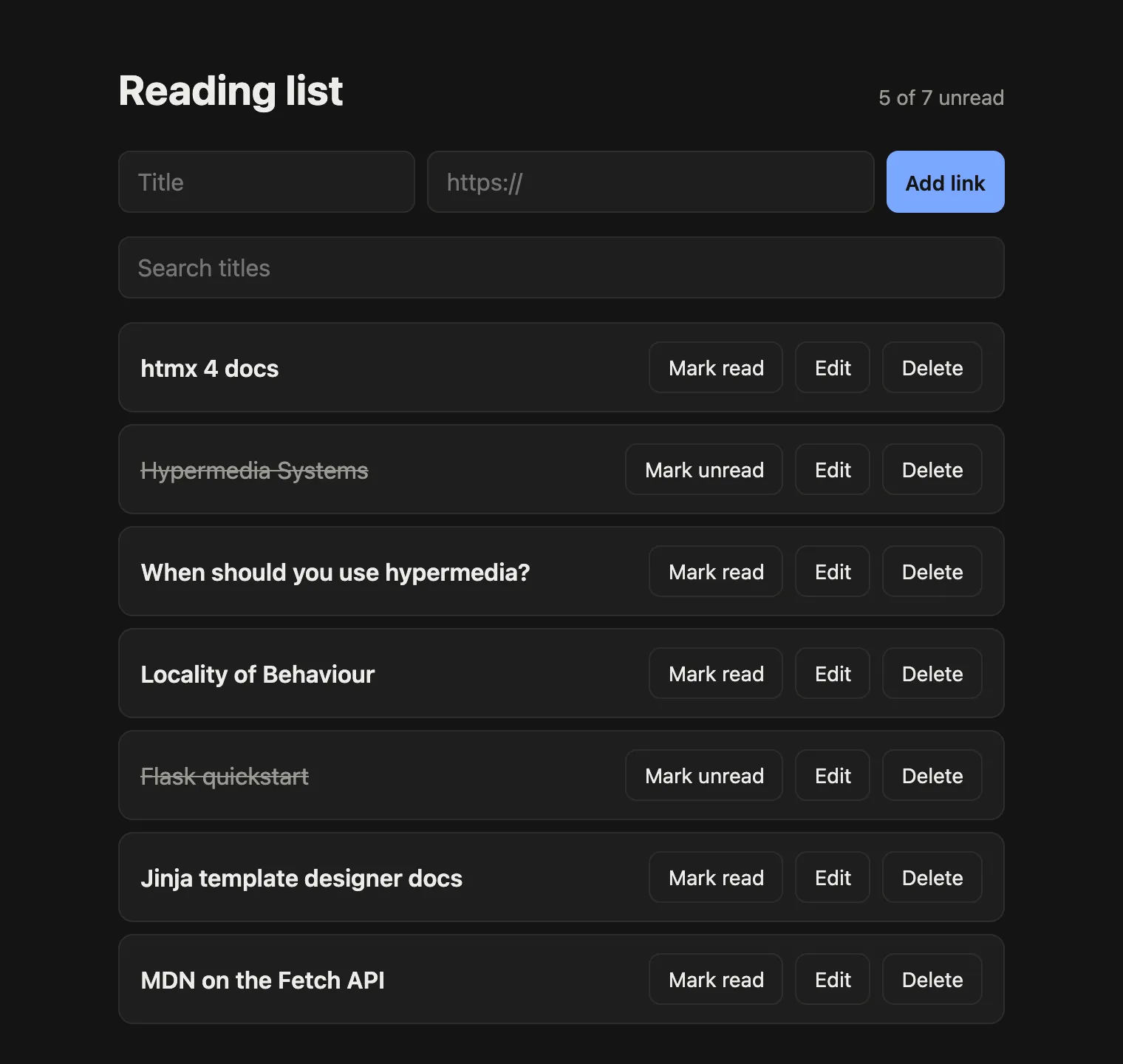
The finished app. The links are demo data.
Why do I reach for htmx?
I’ve used Django for more than seven years, and I’m still not a big fan of building apps around JavaScript. Tradion, my AI platform for financial research, has a React and Vite frontend, and I regret not using htmx there.
Most of my htmx has been django-htmx, the package that wires htmx into Django. On an internal dashboard it handled table filters and search, pagination, forms and modals, and stats that refresh on their own. My django-htmx tutorial walks through that setup. I’d use it almost everywhere I build.
Outside Django, I’ve used htmx in a FastAPI app I built. It handled search and filters, forms, rows you edit and delete in place, and parts of the page that refresh on their own.
The one htmx trace in my public code is RAGnetic, the FastAPI project from my post on the open source AI project I never launched. On June 19, 2025, I added the htmx 1.9.2 script tag to its chat page. I wrote zero hx- attributes, built the chat on a WebSocket in plain JavaScript, and removed the script tag the next day. Loading a library is not the same as using it.
I’ve tried htmx 4 already, and this tutorial uses it from the first line. The backend is Flask because htmx doesn’t care what your server runs, and Flask keeps the Python small enough that the htmx parts stand out.
What is htmx?
htmx is a small JavaScript library. You add hx- attributes to your HTML. When the user clicks, types or submits, htmx sends a request to your server. The server answers with HTML, not JSON, and htmx swaps that HTML into the page. The rest of the page never reloads.
That HTML is called a fragment, a piece of a page like one list item or one form. Your server already knows how to render HTML, so you write templates instead of an API plus a frontend that reads it.
The whole library is one file. Here’s the size of the minified htmx 4.0.1 file, plain and gzipped.
$ wc -c < htmx.min.js
37448
$ gzip -c htmx.min.js | wc -c
13415
What’s new in htmx 4?
htmx 4.0.0 came out on August 28, 2026, and 4.0.1 followed on November 1. The release announcement says that from a user’s viewpoint, htmx 4 is “almost identical to htmx 2.” The What’s New in htmx 4 page lists every change. These are the ones a beginner, or anyone reading an older tutorial, will run into.
- fetch() replaces XMLHttpRequest. Every request now goes through the browser’s Fetch API.
- Inheritance is explicit. In htmx 2, an attribute like
hx-targeton a parent applied to everything inside it. In htmx 4 you opt in with:inherited. Step 7 shows what happens when you forget. - Error responses swap. htmx 4 swaps every response except 204 and 304. htmx 2 didn’t swap 4xx and 5xx responses. Steps 6 and 10 depend on this.
- No history cache. The Back button no longer restores pages from
localStorage. htmx fetches the page again, and Step 4 covers what your server has to send. <hx-partial>updates several parts of the page from one response. Steps 5, 8 and 9 use it.hx-statussets different behavior per status code, likehx-status:422.- New swap styles, including
delete, which Step 9 needs. - Morph swaps.
innerMorphandouterMorphmerge the new HTML into the old with idiomorph, a library that changes the existing elements in place instead of replacing them, so state like a focused input survives. The What’s New page calls morph swaps “better for preserving state in complex UIs.” This tutorial doesn’t use them. - A 60-second default timeout. htmx 2 had none.
- Renamed events.
htmx:afterSwapis nowhtmx:after:swap, for example.
What do you need before you start?
- Python 3.9 or newer. Flask 3.1 needs at least 3.9. This run used Python 3.14.7.
- A browser. The test ran in Google Chrome.
- Basic Python and HTML. You don’t need to know JavaScript, and you don’t need Node.
- Node, only for the optional upgrade checker near the end, which runs through
npx.
$ python3 --version
Python 3.14.7
The 11 steps at a glance
Steps 1 to 4 get a page on screen with live search. Steps 5 to 9 add, edit, mark and delete links. Steps 10 and 11 handle errors and security.
- Create a project and install Flask.
- Load htmx 4 from a CDN.
- Render the reading list with Jinja.
- Add live search with hx-get.
- Add links with hx-post and hx-partial.
- Show validation errors with a 422.
- Edit a link in place with hx-put.
- Mark links read with hx-patch.
- Delete links with hx-delete and hx-confirm.
- Handle the error pages htmx 4 swaps in.
- Protect every request with a CSRF token.
Step 1. Create a project and install Flask
Make a project folder with a templates folder and a static folder inside it.
$ mkdir -p reading-list/templates reading-list/static
$ cd reading-list
Then create a virtual environment and install Flask. A virtual environment is a private copy of Python for one project, so its packages don’t mix with anything else on your machine.
$ python3 -m venv .venv
$ source .venv/bin/activate
$ pip install flask
...
Successfully installed blinker-1.9.0 click-8.5.0 flask-3.1.3 itsdangerous-2.2.0 jinja2-3.1.6 markupsafe-3.0.4 werkzeug-3.1.9
...
On Windows, the venv docs give .venv\Scripts\activate.bat for Command Prompt and .venv\Scripts\Activate.ps1 for PowerShell in place of the source line. I only ran these steps on macOS. Check the versions.
$ flask --version
Python 3.14.7
Flask 3.1.3
Werkzeug 3.1.9
By the end of the tutorial, the project looks like this.
reading-list/
├── app.py
├── static/
│   └── style.css
└── templates/
    ├── index.html
    ├── _count_text.html
    ├── _count.html
    ├── _links.html
    ├── _link.html
    ├── _form.html
    ├── _added.html
    └── _edit.html
The files that start with an underscore are fragments. That’s only a naming habit, so you can tell at a glance which templates are whole pages and which are pieces htmx swaps in.
Step 2. Load htmx 4 from a CDN
htmx is one <script> tag. This one loads it from jsDelivr, a CDN (content delivery network), which serves public files like this one from servers around the world. Create templates/index.html and start it with this head.
<!doctype html>
<html lang="en">
<head>
  <meta charset="utf-8">
  <meta name="viewport" content="width=device-width, initial-scale=1">
  <title>Reading list</title>
  <link rel="stylesheet" href="{{ url_for('static', filename='style.css') }}">
  <script src="https://cdn.jsdelivr.net/npm/htmx.org@4.0.1"
          integrity="sha384-Qp9rdC8H7EqOoX+nR0P3RPG2Noji+qdwJlGpfzwQJsfOpp3sGwIdSP9xO3+UlEhn"
          crossorigin="anonymous"></script>
</head>
Two parts of that tag matter. The URL pins the exact version, htmx.org@4.0.1. The integrity attribute is a Subresource Integrity hash, which tells the browser to refuse the file if a single byte differs from what you expect. That hash is the one the htmx 4 docs publish for 4.0.1.
Don’t drop the version from the URL. The team kept 2.x as the latest release on npm on purpose, and the announcement says 4.0 stays on the next tag “until some point in early 2027.” CDNs serve latest when you leave the version out. Here’s what the links served on November 4, 2026.
$ curl -sL https://cdn.jsdelivr.net/npm/htmx.org | grep -o -m1 -E 'version[:=]"[^"]+"'
version:"2.0.11"
$ curl -sL https://unpkg.com/htmx.org | grep -o -m1 -E 'version[:=]"[^"]+"'
version:"2.0.11"
$ curl -sL https://cdn.jsdelivr.net/npm/htmx.org@4.0.1 | grep -o -m1 -E 'version[:=]"[^"]+"'
version="4.0.1"
Copy an unpinned link from an old answer and you’ll spend an afternoon debugging htmx 4 code on htmx 2.
If you’d rather install from npm, the package is htmx.org, and the docs give npm install htmx.org@4.0.1. Plain htmx on npm is a different package.
$ npm view htmx name version description
name = 'htmx'
version = '0.0.2'
description = 'Use Javascript in place of PHP'
$ npm view htmx.org dist-tags
{ next: '4.0.1', latest: '2.0.11' }
Once the page runs in Step 3, open your browser’s developer console and type htmx.version. In the test run it returned 4.0.1.
Step 3. Render the reading list with Jinja
Flask renders HTML with Jinja, its template language, which fills {{ }} placeholders and runs {% %} loops and ifs. Start app.py. A Python list stands in for a database, so the data resets every time the server restarts. That keeps this tutorial about htmx instead of SQL.
from flask import Flask, abort, render_template, request

app = Flask(__name__)
app.jinja_env.trim_blocks = True
app.jinja_env.lstrip_blocks = True

links = [
    {"id": 1, "title": "Hypermedia Systems", "url": "https://hypermedia.systems/", "read": True},
    {"id": 2, "title": "When should you use hypermedia?", "url": "https://htmx.org/essays/when-to-use-hypermedia/", "read": False},
    {"id": 3, "title": "Locality of Behaviour", "url": "https://htmx.org/essays/locality-of-behaviour/", "read": False},
    {"id": 4, "title": "Flask quickstart", "url": "https://flask.palletsprojects.com/en/stable/quickstart/", "read": True},
    {"id": 5, "title": "Jinja template designer docs", "url": "https://jinja.palletsprojects.com/en/stable/templates/", "read": False},
    {"id": 6, "title": "MDN on the Fetch API", "url": "https://developer.mozilla.org/en-US/docs/Web/API/Fetch_API", "read": False},
]
next_id = 7
trim_blocks and lstrip_blocks stop Jinja from leaving blank lines where its {% %} tags were. Your fragments come out clean, which you’ll see when you curl them in Step 4.
Next, a context processor. It makes unread and total available in every template, so the counter is always right.
@app.context_processor
def counts():
    return {"unread": sum(not link["read"] for link in links), "total": len(links)}
Then the page route. The two lines that check HX-Request matter in Step 4. For now, the route renders the whole page.
@app.get("/")
def index():
    q = request.args.get("q", "").strip()
    shown = [link for link in links if q.lower() in link["title"].lower()]
    if request.headers.get("HX-Request"):
        return render_template("_links.html", links=shown)
    return render_template("index.html", links=shown, q=q, form={}, errors={})
Finish templates/index.html below the head.
<body>
  <main>
    <header>
      <h1>Reading list</h1>
      <p id="count">{% include "_count_text.html" %}</p>
    </header>

    {% include "_form.html" %}

    <input type="search" name="q" value="{{ q }}" placeholder="Search titles"
           hx-get="/" hx-trigger="input changed delay:300ms, search"
           hx-target="#links" hx-push-url="true">

    <ul id="links">
      {% include "_links.html" %}
    </ul>
  </main>
</body>
</html>
The page pulls in smaller templates with {% include %}. Create them now. _count_text.html is the counter text.
{{ unread }} of {{ total }} unread_links.html loops over the links and shows a message when there are none.
{% for link in links %}
  {% include "_link.html" %}
{% else %}
  <li class="empty">Nothing here yet.</li>
{% endfor %}
_link.html is one row. Its buttons carry htmx attributes that Steps 7, 8 and 9 explain. Don’t click them yet, because the routes behind them don’t exist until those steps.
<li class="{{ 'read' if link.read }}" hx-target:inherited="this" hx-swap:inherited="outerHTML">
  <a href="{{ link.url }}">{{ link.title }}</a>
  <button hx-patch="/links/{{ link.id }}/read">{{ 'Mark unread' if link.read else 'Mark read' }}</button>
  <button hx-get="/links/{{ link.id }}/edit">Edit</button>
  <button hx-delete="/links/{{ link.id }}" hx-swap="delete" hx-confirm="Delete {{ link.title }}?">Delete</button>
</li>
Create an empty templates/_form.html for now. Step 5 fills it in.
Last, the stylesheet. It’s plain CSS with nothing htmx-specific in it, and it follows your system’s light or dark mode. Paste it into static/style.css and move on.
:root {
  color-scheme: light dark;
  --bg: #f6f6f4;
  --card: #ffffff;
  --ink: #1d1d1b;
  --muted: #6b6b66;
  --line: #e2e2dd;
  --accent: #2f6fde;
  --error: #c2362b;
}
@media (prefers-color-scheme: dark) {
  :root {
    --bg: #141414;
    --card: #1e1e1e;
    --ink: #ececea;
    --muted: #9a9a94;
    --line: #2e2e2c;
    --accent: #7aa7ff;
    --error: #ff8a7a;
  }
}
* { box-sizing: border-box; }
body {
  margin: 0;
  background: var(--bg);
  color: var(--ink);
  font: 16px/1.5 system-ui, -apple-system, "Segoe UI", sans-serif;
}
main { max-width: 640px; margin: 0 auto; padding: 40px 20px; }
header { display: flex; align-items: baseline; justify-content: space-between; gap: 12px; }
h1 { margin: 0 0 20px; font-size: 28px; }
#count { margin: 0; color: var(--muted); font-size: 14px; }
form.add, input[type=search] { margin-bottom: 16px; }
form.add { display: flex; flex-wrap: wrap; gap: 8px; }
form.add input[name=title] { flex: 1 1 160px; }
form.add input[name=url] { flex: 2 1 220px; }
input {
  font: inherit;
  color: var(--ink);
  background: var(--card);
  border: 1px solid var(--line);
  border-radius: 8px;
  padding: 8px 12px;
}
input[type=search] { width: 100%; }
button {
  font: inherit;
  font-size: 14px;
  color: var(--ink);
  background: transparent;
  border: 1px solid var(--line);
  border-radius: 8px;
  padding: 6px 12px;
  cursor: pointer;
}
form.add > button { background: var(--accent); border-color: var(--accent); color: var(--bg); font-weight: 600; }
.error { flex-basis: 100%; margin: 0; color: var(--error); font-size: 14px; }
ul { list-style: none; margin: 0; padding: 0; }
li {
  display: flex;
  flex-wrap: wrap;
  align-items: center;
  gap: 8px;
  background: var(--card);
  border: 1px solid var(--line);
  border-radius: 10px;
  padding: 12px 14px;
  margin-bottom: 8px;
}
li a { flex: 1 1 200px; color: var(--ink); text-decoration: none; font-weight: 600; }
li a:hover { color: var(--accent); }
li.read a { color: var(--muted); font-weight: 400; text-decoration: line-through; }
li.empty { color: var(--muted); justify-content: center; }
li.empty:not(:only-child) { display: none; }
li.gone { color: var(--muted); justify-content: center; }
li.editing form { display: flex; flex-wrap: wrap; gap: 8px; width: 100%; }
li.editing input { min-width: 0; }
li.editing input[name=title] { flex: 1 1 120px; }
li.editing input[name=url] { flex: 2 1 160px; }
Run the app.
$ flask --app app run --debug
 * Serving Flask app 'app'
 * Debug mode: on
WARNING: This is a development server. Do not use it in a production deployment. Use a production WSGI server instead.
 * Running on http://127.0.0.1:5000
Press CTRL+C to quit
 * Restarting with stat
 * Debugger is active!
...
Open http://127.0.0.1:5000 and you’ll see six links and a counter that reads “4 of 6 unread”. The --debug flag restarts the server whenever you save a Python file, so leave it running.
Why does localhost:5000 return 403 on a Mac?
If you’re on a Mac, use 127.0.0.1, not localhost. macOS runs its AirPlay Receiver on port 5000. Flask listens on 127.0.0.1, but localhost also means the IPv6 address ::1, and AirPlay answers there with an empty 403.
$ curl -si http://localhost:5000/ | head -3
HTTP/1.1 403 Forbidden
Content-Length: 0
Server: AirTunes/960.13.1
That Server header is AirPlay. Nothing says web development like a speaker protocol answering your HTTP request. Open 127.0.0.1:5000, or start Flask with --port 5001 and the clash goes away.
$ curl -si http://localhost:5001/ | head -2
HTTP/1.1 200 OK
Server: Werkzeug/3.1.9 Python/3.14.7
You can also turn off AirPlay Receiver in System Settings.
Step 4. Add live search with hx-get
The search box in index.html is the first interactive part.
    <input type="search" name="q" value="{{ q }}" placeholder="Search titles"
           hx-get="/" hx-trigger="input changed delay:300ms, search"
           hx-target="#links" hx-push-url="true">
Here’s what each attribute does.
hx-get="/"sends a GET request to the page route, with the box’s value asq.hx-trigger="input changed delay:300ms, search"sends it when the value changes and the user has stopped typing for 300 milliseconds. That wait is called a debounce, and it saves you one request per keystroke. Thesearchevent is what a search box fires when you press Enter or click its clear button, per MDN.hx-target="#links"puts the response inside the list, not inside the search box.hx-push-url="true"updates the address bar to/?q=..., so you can bookmark or share a search.
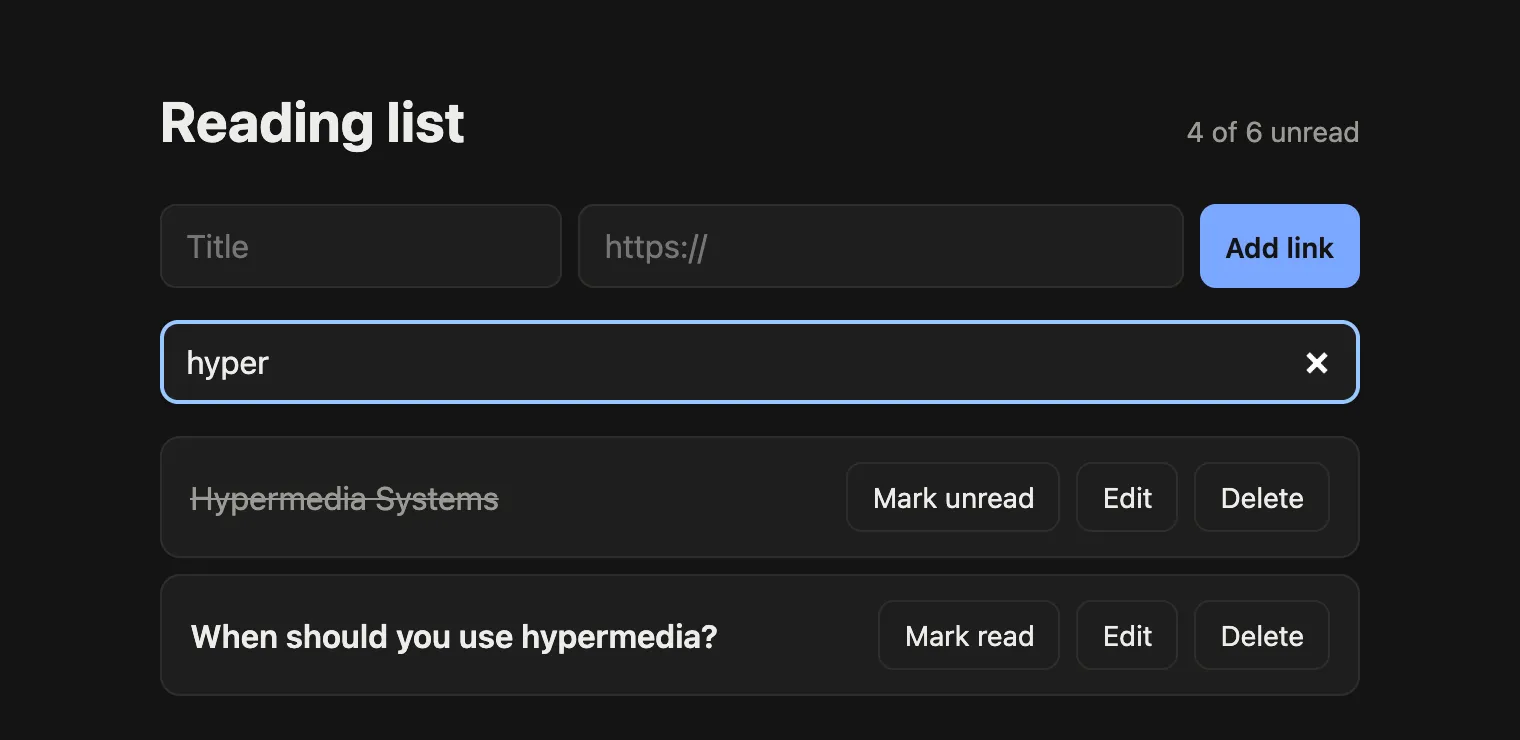
The test typed “hyper”, and htmx swapped in the two matching links.
Want a loading spinner? While a request runs, htmx adds the htmx-request class to the element that sent it. The hx-indicator reference shows how to point that class at another element, like hx-indicator="#spinner", and style it to appear. The tested app doesn’t use one.
Now the server side. The same route answers two kinds of request. When htmx asks, the request carries an HX-Request header, and the route returns only the matching rows from _links.html. A normal visit gets the full page.
    shown = [link for link in links if q.lower() in link["title"].lower()]
    if request.headers.get("HX-Request"):
        return render_template("_links.html", links=shown)
    return render_template("index.html", links=shown, q=q, form={}, errors={})
Curl shows both. With the header you get a fragment, a single <li> and nothing else.
$ curl -s "http://127.0.0.1:5000/?q=flask" -H "HX-Request: true"
<li class="read" hx-target:inherited="this" hx-swap:inherited="outerHTML">
  <a href="https://flask.palletsprojects.com/en/stable/quickstart/">Flask quickstart</a>
  <button hx-patch="/links/4/read">Mark unread</button>
  <button hx-get="/links/4/edit">Edit</button>
  <button hx-delete="/links/4" hx-swap="delete" hx-confirm="Delete Flask quickstart?">Delete</button>
</li>
Without it you get a whole HTML document.
$ curl -s "http://127.0.0.1:5000/?q=flask" | head -12
<!doctype html>
<html lang="en">
<head>
  <meta charset="utf-8">
  <meta name="viewport" content="width=device-width, initial-scale=1">
  <title>Reading list</title>
  <link rel="stylesheet" href="/static/style.css">
  <script src="https://cdn.jsdelivr.net/npm/htmx.org@4.0.1"
          integrity="sha384-Qp9rdC8H7EqOoX+nR0P3RPG2Noji+qdwJlGpfzwQJsfOpp3sGwIdSP9xO3+UlEhn"
          crossorigin="anonymous"></script>
</head>
<body>
These are the request headers htmx 4 sent when the test typed “hyper” into the box, in lowercase as the browser recorded them.
GET /?q=hyper
hx-request: true
hx-request-type: partial
hx-target: ul#links
hx-source: input
hx-current-url: http://127.0.0.1:5000/
accept: text/html
hx-request-type: partial is new in htmx 4. So is the tagName#id format of hx-target, here ul#links. hx-source names the element that sent the request, and the search box has no id, so it’s just input.
Why does the Back button need the full page?
Version 4 dropped the old history cache. The docs say that when you navigate back, htmx fetches the page again and swaps it into <body>. Here’s the request the test recorded when it pressed Back after a search.
GET /
hx-request-type: full
There’s no HX-Request header on it, only hx-request-type: full. The route sees no HX-Request, so it returns the full page, which is what <body> needs. In the test, the heading and the form came back with the full list.
Step 5. Add links with hx-post and hx-partial
Fill in templates/_form.html.
<form class="add" hx-post="/links" hx-swap="outerHTML">
  <input name="title" placeholder="Title" value="{{ form.title }}">
  <input name="url" placeholder="https://" value="{{ form.url }}">
  <button>Add link</button>
  {% for message in errors.values() %}
    <p class="error">{{ message }}</p>
  {% endfor %}
</form>
hx-post="/links" sends the form’s fields as a POST. hx-swap="outerHTML" replaces the whole form with whatever comes back, so the server decides what the form looks like next. After a good add it sends a fresh, empty form. After a bad one it sends the form with errors, which is Step 6.
Add a check function and the route to app.py. The edit route in Step 7 shares check.
def check(form):
    title = form.get("title", "").strip()
    url = form.get("url", "").strip()
    errors = {}
    if not title:
        errors["title"] = "Give it a title."
    if not url.startswith(("http://", "https://")):
        errors["url"] = "Links start with http:// or https://"
return title, url, errors@app.post("/links")
def add_link():
global next_id
title, url, errors = check(request.form)
if errors:
return render_template("_form.html", form=request.form, errors=errors), 422
link = {"id": next_id, "title": title, "url": url, "read": False}
next_id += 1
links.insert(0, link)
return render_template("_added.html", link=link, form={}, errors={})A good add returns templates/_added.html, which has three parts.
{% include "_form.html" %}
<hx-partial hx-target="#links" hx-swap="afterbegin">
{% include "_link.html" %}
</hx-partial>
{% include "_count.html" %}And templates/_count.html wraps the counter in a partial, so any response can update it.
<hx-partial hx-target="#count">{% include "_count_text.html" %}</hx-partial>This is where <hx-partial> earns its place. The main content of the response is the new empty form, which replaces the old one. htmx pulls each <hx-partial> out and swaps it into its own target. The first puts the new row at the top of #links with afterbegin. The second replaces the text in #count.
One request, three updates. In htmx 2 you’d reach for hx-swap-oob, short for out-of-band swap, which still exists. The new docs describe <hx-partial> as the alternative “for when you need explicit control over targeting and swap strategy.”
In the test, adding “htmx 4 docs” put it at the top of the list, moved the counter from “4 of 6 unread” to “5 of 7 unread”, and brought back an empty form.
Step 6. Show validation errors with a 422
The add route returns _form.html with status 422 when check finds a problem. 422 Unprocessable Content is the HTTP status for a request the server understood but can’t accept because of the data in it. Werkzeug still prints its older name, Unprocessable Entity.
Here’s the raw response for an empty title and a URL without https://.
$ curl -si -X POST http://127.0.0.1:5000/links -d "title=" -d "url=four.htmx.org" -H "HX-Request: true"
HTTP/1.1 422 UNPROCESSABLE ENTITY
Server: Werkzeug/3.1.9 Python/3.14.7
...
Content-Type: text/html; charset=utf-8
Content-Length: 313
Connection: close
<form class="add" hx-post="/links" hx-swap="outerHTML">
<input name="title" placeholder="Title" value="">
<input name="url" placeholder="https://" value="four.htmx.org">
<button>Add link</button>
<p class="error">Give it a title.</p>
<p class="error">Links start with http:// or https://</p>
</form>htmx 2 didn’t swap 4xx responses, so this pattern needed extra setup there. htmx 4 swaps them like any other response, so the form with its errors replaces the old form. The URL you typed stays in the box, because the route passes request.form back to the template.
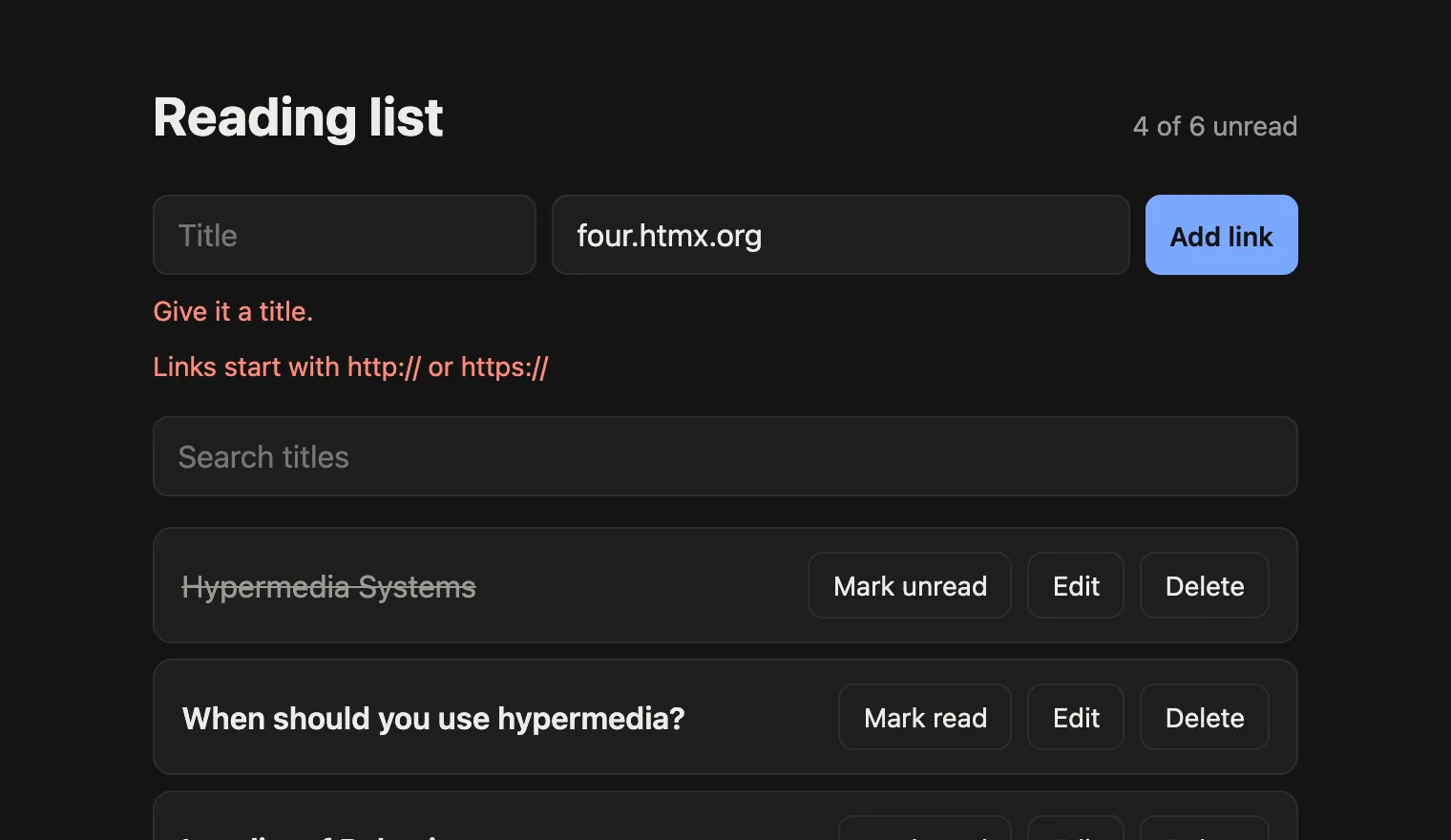
The add form after a bad submit. Both messages came from the server.
If you want htmx 2’s behavior back for a whole app, the docs give htmx.config.noSwap = [204, 304, '4xx', '5xx'] as the revert.
Step 7. Edit a link in place with hx-put
Look at the <li> in _link.html again.
<li class="{{ 'read' if link.read }}" hx-target:inherited="this" hx-swap:inherited="outerHTML">hx-target="this" points at the element that carries the attribute, the <li>. hx-swap="outerHTML" replaces that whole element. The :inherited suffix is the htmx 4 part. It passes both attributes down to every button in the row, so whatever a button gets back replaces the entire row.
Add the edit routes to app.py. get_link finds a link or stops with a 404.
def get_link(link_id):
for link in links:
if link["id"] == link_id:
return link
abort(404)@app.get("/links/<int:link_id>")
def show_link(link_id):
return render_template("_link.html", link=get_link(link_id))
@app.get("/links/<int:link_id>/edit")
def edit_link(link_id):
return render_template("_edit.html", link=get_link(link_id), errors={})
@app.put("/links/<int:link_id>")
def update_link(link_id):
link = get_link(link_id)
title, url, errors = check(request.form)
if errors:
draft = {"id": link_id, "title": title, "url": url}
return render_template("_edit.html", link=draft, errors=errors), 422
link.update(title=title, url=url)
return render_template("_link.html", link=link)Then create templates/_edit.html, the row in edit mode.
<li class="editing" hx-target:inherited="this" hx-swap:inherited="outerHTML">
<form hx-put="/links/{{ link.id }}">
<input name="title" value="{{ link.title }}">
<input name="url" value="{{ link.url }}">
<button>Save</button>
<button type="button" hx-get="/links/{{ link.id }}">Cancel</button>
{% for message in errors.values() %}
<p class="error">{{ message }}</p>
{% endfor %}
</form>
</li>Click Edit and the GET returns _edit.html, which replaces the row with a form. Save sends a PUT with the form fields. A good save returns the normal row. A bad one returns the edit form with a 422, the same way Step 6 does. Cancel asks for the normal row again, and its type="button" stops it from submitting the form.
In the test, a bad URL showed “Links start with http:// or https://” inside the row. A good save then renamed “MDN on the Fetch API” to “MDN on fetch()”.
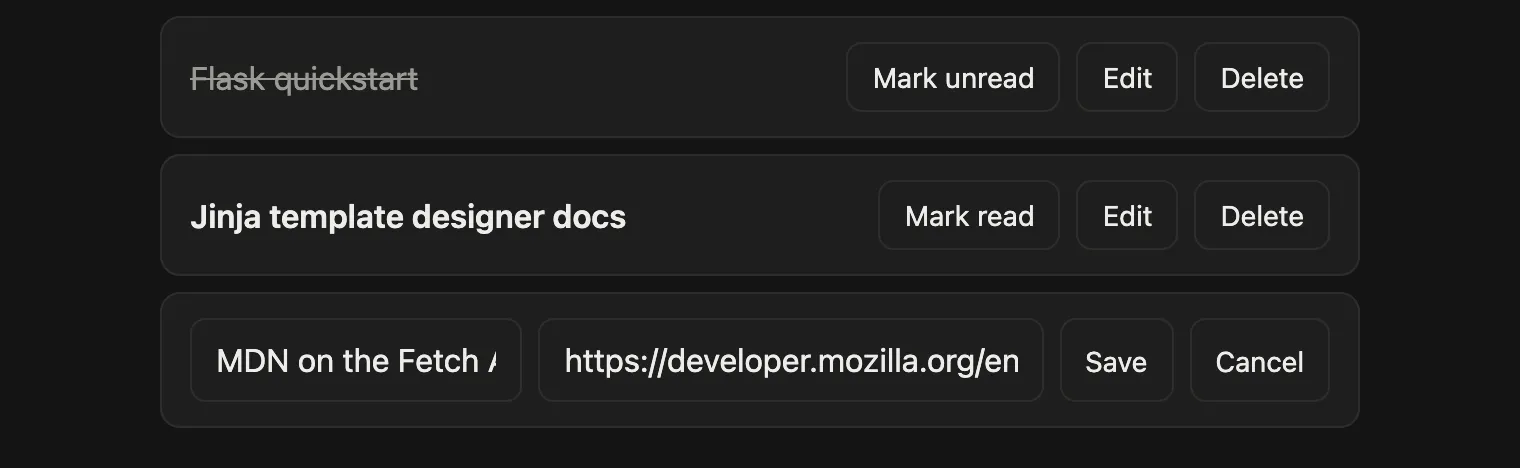
The last row in edit mode. The rows above it didn’t move.
What happens if you forget :inherited?
This is the change most likely to bite you if you learned version 2. Without the suffix, the buttons don’t get hx-target and hx-swap from the <li>. Each button targets itself, and the default swap puts the response inside it. With :inherited removed, the test clicked Mark read, and the button ended up holding the whole new row.
<button hx-patch="/links/3/read" data-htmx-powered="true"><li class="read">
<a href="https://htmx.org/essays/locality-of-behaviour/">Locality of Behaviour</a>
<button hx-patch="/links/3/read" data-htmx-powered="true">Mark unread</button>
...A whole row inside a button. Nobody designs it that way on purpose.
If a big older app breaks everywhere at once, htmx.config.implicitInheritance = true brings back the old inheritance while you migrate.
Step 8. Mark links read with hx-patch
The Mark read button sends hx-patch="/links/{{ link.id }}/read". PATCH is the HTTP method for changing part of a record. Add the route.
@app.patch("/links/<int:link_id>/read")
def toggle_read(link_id):
link = get_link(link_id)
link["read"] = not link["read"]
return render_template("_link.html", link=link) + render_template("_count.html")It flips the flag and returns two templates joined together. The row is the main content, and it replaces the old row through the inherited target and swap. The _count.html partial updates the counter. In the test, marking a link read moved the counter from “5 of 7 unread” to “4 of 7 unread”, and the button changed to “Mark unread”.
Step 9. Delete links with hx-delete and hx-confirm
The Delete button has three htmx attributes.
<button hx-delete="/links/{{ link.id }}" hx-swap="delete" hx-confirm="Delete {{ link.title }}?">Delete</button>hx-confirm shows the browser’s own confirm dialog before anything is sent. In the test it read “Delete Jinja template designer docs?”. Dismissing it sent nothing and kept the row. Accepting it sent the DELETE.
The route removes the link and returns only the counter. Here’s its raw response from curl, on a freshly started server with all six links.
@app.delete("/links/<int:link_id>")
def delete_link(link_id):
links.remove(get_link(link_id))
return render_template("_count.html")$ curl -s -X DELETE http://127.0.0.1:5000/links/5 -H "HX-Request: true"
<hx-partial hx-target="#count">3 of 5 unread</hx-partial>That’s the whole response, one partial and no main content. So the button sets hx-swap="delete". The delete swap style removes the target, here the row, and ignores the response body. It overrides the outerHTML the button would otherwise inherit from the <li>. In the test, the row disappeared and the counter went from “4 of 7 unread” to “3 of 6 unread”.
Why does the deleted row stay on the page?
Because the main swap never ran. With hx-swap="delete" removed from the button, the test deleted a link. The server deleted it and the counter updated, but the row stayed on the page until a reload.
{
"mode": "delete",
"statuses": [
"DELETE /links/3 200"
],
"row_still_there": 1,
"count": "3 of 5 unread",
"after_reload_row": 0
}The counter said five links. The page still showed six.
The reason is in the htmx source. After it pulls the partials out of a response, htmx skips the main swap if nothing is left. The comment in htmx.js 4.0.1 says so.
// skip main swap if fragment is empty after partial/oob removal
// swapEmpty modifier can override; default: skip if hasPartialsSo an outerHTML swap with an empty body does nothing. The delete style doesn’t need a body, so it always runs.
Step 10. Handle the error pages htmx 4 swaps in
htmx 4 swaps error responses, and that includes the default error pages your framework sends. Here’s how you’d hit one. Open the list in two tabs, delete a link in one, then click Edit on the same link in the other. The server answers 404, and without a handler, Flask’s own Not Found page replaces the row.
{
"mode": "404",
"statuses": [
"GET /links/3/edit 404"
],
"h1_inside_list": [
"Not Found"
],
"list_text": "Hypermedia Systems\nMark unread\nEdit\nDelete\nWhen should you use hypermedia?\nMark read\nEdit\nDelete\nNot Found\n\nThe requested URL was not found on the server. If you entered the URL manually please check your spelling and try again.\n\nFlask quickstart\nMark unread\nEdit\nDelete\nJinja template designer docs\nMark read\nEdit\nDelete\nMDN on the Fetch API\nMark read\nEdit\nDelete"
}Your reading list now has an item called Not Found.
The fix is a 404 handler that answers htmx requests with a fragment that fits the spot.
@app.errorhandler(404)
def not_found(error):
if request.headers.get("HX-Request"):
return '<li class="gone">That link is gone. Reload the page.</li>', 404
return errorNormal visits still get Flask’s usual 404 page, because return error hands the original error back. In the test, the same two-tab click now showed “That link is gone. Reload the page.” in place of the row.
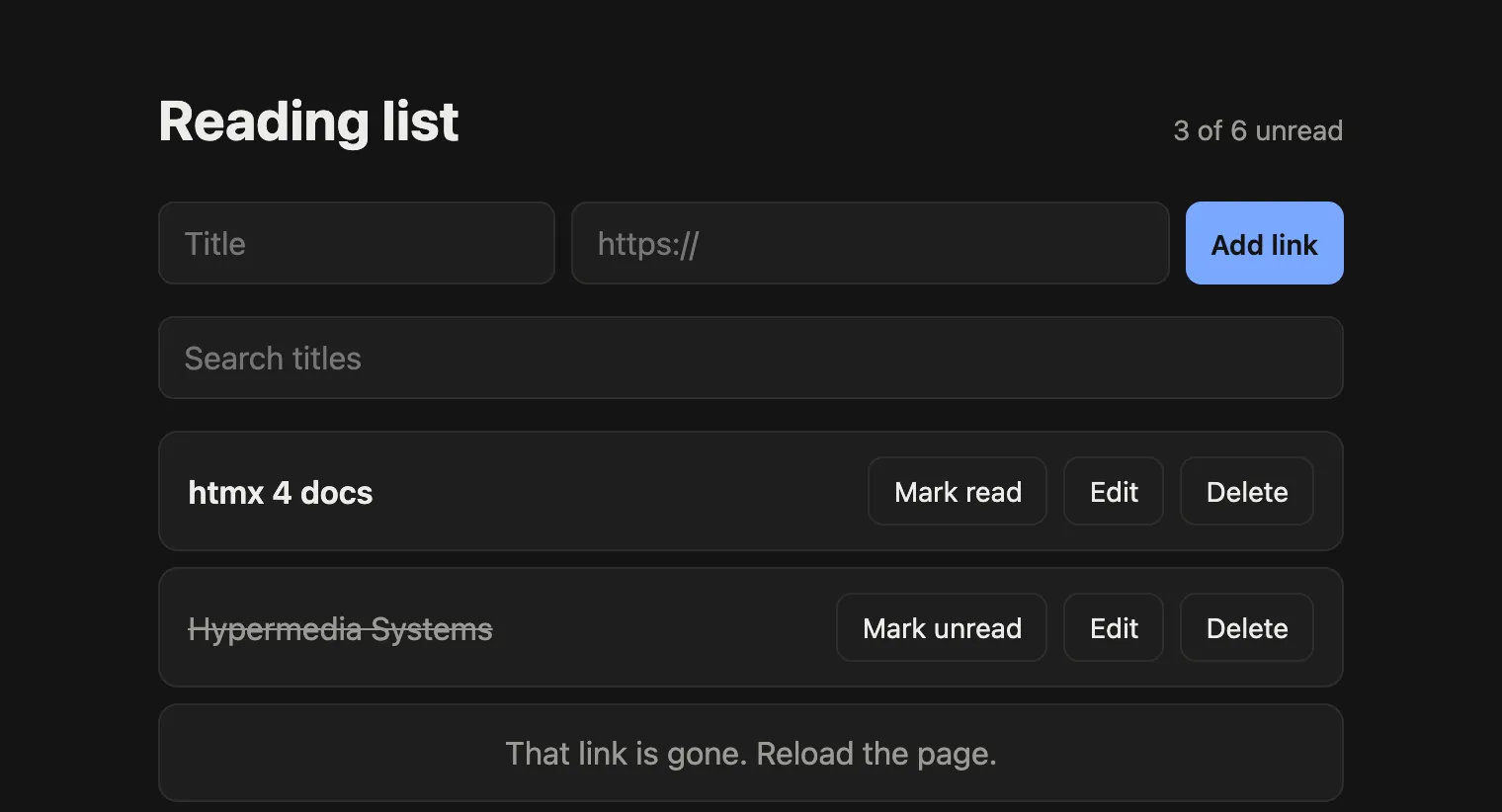
The 404 fragment in the row’s place. The counter still says 3 of 6, because the delete happened in the other tab.
The hx-status docs show another way. You set the behavior per status code on the element. Their example hx-status:5xx="swap:none" on a button ignores server errors. That one comes from the docs and isn’t part of the tested app.
Step 11. Protect every request with a CSRF token
CSRF, short for cross-site request forgery, is when another site tricks a logged-in user’s browser into sending a request to your app. The browser attaches your cookies, so the request looks real. The defense is a secret token that your own pages know and other sites don’t.
Flask doesn’t include this, and its security docs say why. “Why does Flask not do that for you? The ideal place for this to happen is the form validation framework, which does not exist in Flask.” The usual answer is Flask-WTF. Install it.
$ pip install flask-wtf
...
Successfully installed flask-wtf-1.3.0 wtforms-3.3.2
...Add four lines near the top of app.py.
import secrets
from flask import Flask, abort, render_template, request
from flask_wtf.csrf import CSRFProtect
app = Flask(__name__)
app.config["SECRET_KEY"] = secrets.token_hex()
csrf = CSRFProtect(app)CSRFProtect rejects every POST, PUT, PATCH and DELETE that arrives without a valid token. The token is signed with SECRET_KEY. Here a random key is made at startup, which is fine for a tutorial and wrong for production, as you’ll see in a moment.
Now htmx has to send the token. The Flask-WTF docs say JavaScript requests should send it in the X-CSRFToken header. htmx’s hx-headers attribute adds headers to requests, so put it on <body> in index.html.
<body hx-headers:inherited='{"X-CSRFToken": "{{ csrf_token() }}"}'>csrf_token() is a template function that Flask-WTF adds. :inherited passes the header down to every htmx element on the page. A request without the token gets stopped.
$ curl -si -X POST http://127.0.0.1:5000/links -d "title=htmx" -d "url=https://htmx.org" | head -1
HTTP/1.1 400 BAD REQUESTWith CSRF on, the full browser test ran again, and every step gave the same results as before.
Why is the CSRF token missing with htmx 4?
Because hx-headers doesn’t inherit by default anymore. The hx-headers reference says “By default, hx-headers does not inherit to child elements.” With hx-headers on <body> and no :inherited, the header never reaches the form. Flask-WTF answers 400, and htmx 4 swaps its error page in where the form was.
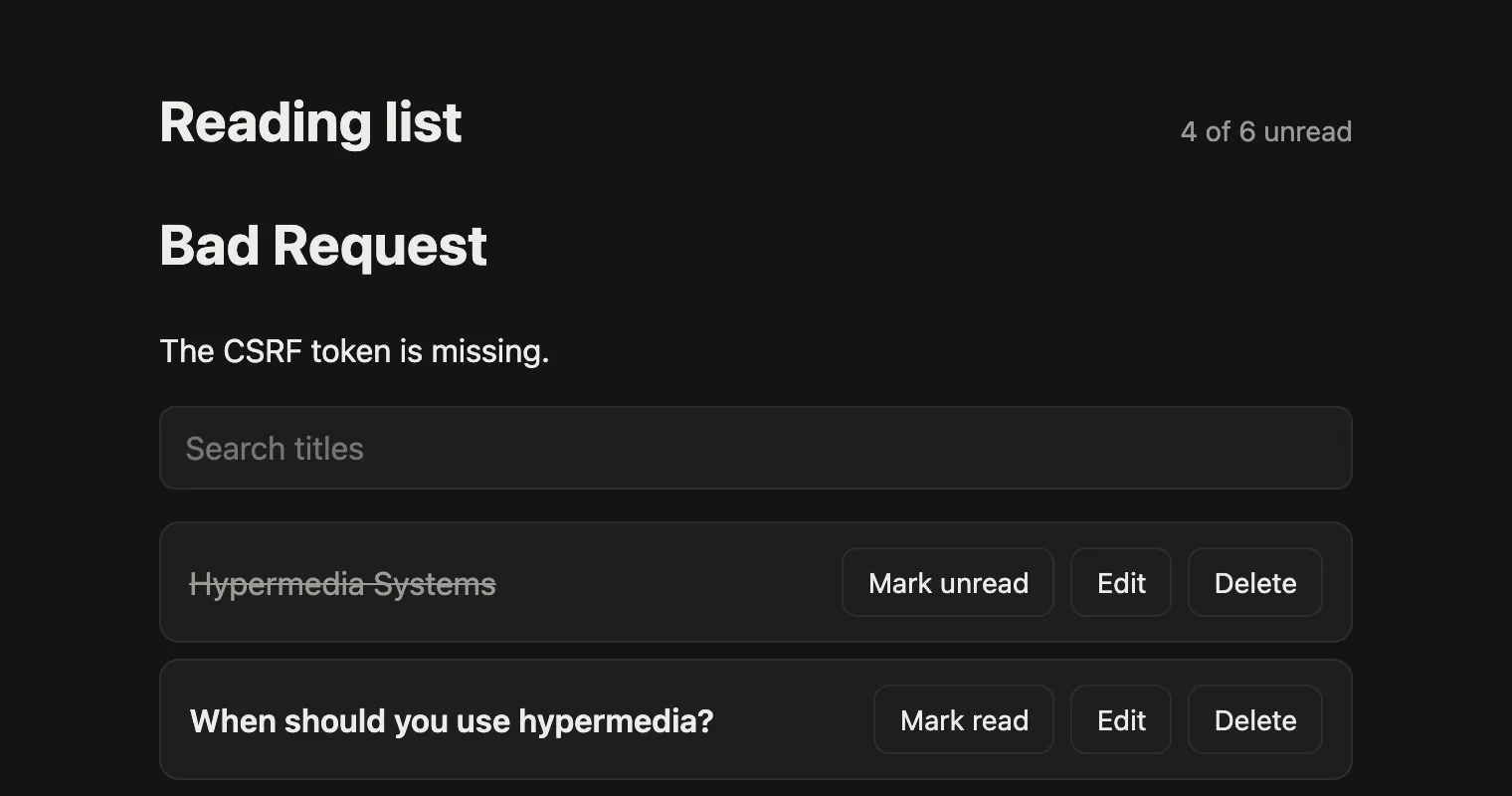
Without :inherited, Flask-WTF’s 400 page takes the add form’s place.
If you’re upgrading an older app, check this line first. InfoQ’s write-up of the release calls out the same CSRF trap.
Why do requests fail after the server restarts?
The random SECRET_KEY changes every time the server starts, and --debug restarts it each time you save app.py. A page you loaded before the restart holds a token signed with the old key. In the test, the first add after a restart came back 400 with “The CSRF session token is missing.” After a page reload, the same add worked.
While you develop, reload the page after a restart. In production, load a fixed key from an environment variable, so every restart and every server process uses the same one. My Docker tutorial shows how to pass environment variables into a container.
What about HTML that users type in?
htmx swaps in whatever HTML your server sends, so anything a user typed has to be escaped on the way out. The htmx docs put the rule as “do not trust input from the user.” Flask handles most of it for you. Its security docs say “Flask configures Jinja to automatically escape all values unless explicitly told otherwise.”
Here’s a title that’s a script tag, then a URL that runs JavaScript. Both went to the app from Step 10, which has no CSRF check, so curl needs no token.
$ curl -s -X POST http://127.0.0.1:5003/links --data-urlencode "title=<script>alert(1)</script>" -d "url=https://example.com" -H "HX-Request: true" | grep script
<a href="https://example.com"><script>alert(1)</script></a>
<button hx-delete="/links/7" hx-swap="delete" hx-confirm="Delete <script>alert(1)</script>?">Delete</button>
$ curl -s -X POST http://127.0.0.1:5003/links -d "title=Click me" --data-urlencode "url=javascript:alert(1)" -H "HX-Request: true" | grep error
<p class="error">Links start with http:// or https://</p>Jinja turned the tags into plain text, in the link and in the hx-confirm message. A javascript: URL in an href is the one case the Flask docs say escaping can’t stop, and they suggest a Content Security Policy header for it. Here the check function from Step 5 already refuses it, because links must start with http:// or https://.
What does the finished app.py look like?
Here’s the whole file, so you can check yours against it.
import secrets
from flask import Flask, abort, render_template, request
from flask_wtf.csrf import CSRFProtect
app = Flask(__name__)
app.config["SECRET_KEY"] = secrets.token_hex()
csrf = CSRFProtect(app)
app.jinja_env.trim_blocks = True
app.jinja_env.lstrip_blocks = True
links = [
{"id": 1, "title": "Hypermedia Systems", "url": "https://hypermedia.systems/", "read": True},
{"id": 2, "title": "When should you use hypermedia?", "url": "https://htmx.org/essays/when-to-use-hypermedia/", "read": False},
{"id": 3, "title": "Locality of Behaviour", "url": "https://htmx.org/essays/locality-of-behaviour/", "read": False},
{"id": 4, "title": "Flask quickstart", "url": "https://flask.palletsprojects.com/en/stable/quickstart/", "read": True},
{"id": 5, "title": "Jinja template designer docs", "url": "https://jinja.palletsprojects.com/en/stable/templates/", "read": False},
{"id": 6, "title": "MDN on the Fetch API", "url": "https://developer.mozilla.org/en-US/docs/Web/API/Fetch_API", "read": False},
]
next_id = 7
@app.context_processor
def counts():
return {"unread": sum(not link["read"] for link in links), "total": len(links)}
def get_link(link_id):
for link in links:
if link["id"] == link_id:
return link
abort(404)
@app.errorhandler(404)
def not_found(error):
if request.headers.get("HX-Request"):
return '<li class="gone">That link is gone. Reload the page.</li>', 404
return error
def check(form):
title = form.get("title", "").strip()
url = form.get("url", "").strip()
errors = {}
if not title:
errors["title"] = "Give it a title."
if not url.startswith(("http://", "https://")):
errors["url"] = "Links start with http:// or https://"
return title, url, errors
@app.get("/")
def index():
q = request.args.get("q", "").strip()
shown = [link for link in links if q.lower() in link["title"].lower()]
if request.headers.get("HX-Request"):
return render_template("_links.html", links=shown)
return render_template("index.html", links=shown, q=q, form={}, errors={})
@app.post("/links")
def add_link():
    global next_id
    title, url, errors = check(request.form)
    if errors:
        return render_template("_form.html", form=request.form, errors=errors), 422
    link = {"id": next_id, "title": title, "url": url, "read": False}
    next_id += 1
    links.insert(0, link)
    return render_template("_added.html", link=link, form={}, errors={})
@app.get("/links/<int:link_id>")
def show_link(link_id):
    return render_template("_link.html", link=get_link(link_id))


@app.get("/links/<int:link_id>/edit")
def edit_link(link_id):
    return render_template("_edit.html", link=get_link(link_id), errors={})


@app.put("/links/<int:link_id>")
def update_link(link_id):
    link = get_link(link_id)
    title, url, errors = check(request.form)
    if errors:
        draft = {"id": link_id, "title": title, "url": url}
        return render_template("_edit.html", link=draft, errors=errors), 422
    link.update(title=title, url=url)
    return render_template("_link.html", link=link)
@app.patch("/links/<int:link_id>/read")
def toggle_read(link_id):
    link = get_link(link_id)
    link["read"] = not link["read"]
    return render_template("_link.html", link=link) + render_template("_count.html")
@app.delete("/links/<int:link_id>")
def delete_link(link_id):
    links.remove(get_link(link_id))
return render_template("_count.html")What does each route send back?
Seven routes run the whole app. Every one returns HTML, never JSON.
| Route | Sent by | Returns on success | Returns on an error |
|---|---|---|---|
GET / |
Page load, the search box, the Back button | index.html, or only _links.html when HX-Request is set |
Nothing to fail |
POST /links |
The add form | A fresh form, plus the new row and the counter as partials | 422 and the form with its messages |
GET /links/<id>/edit |
Edit | _edit.html |
404 and the “That link is gone” row |
GET /links/<id> |
Cancel | _link.html |
404 and the same row |
PUT /links/<id> |
Save | _link.html |
422 and the edit form with its messages, or 404 |
PATCH /links/<id>/read |
Mark read and Mark unread | _link.html plus the counter partial |
404 |
DELETE /links/<id> |
Delete | Only the counter partial | 404 |
With CSRF on, the four write routes also answer 400 when the token is missing. The Flask-WTF config docs list POST, PUT, PATCH and DELETE as the methods it protects by default.
What did the browser test check?
The test drives Google Chrome with Playwright 1.64.1. It clicks through every step and records what the page shows after each one. Here are its results on the finished app, cut down to the single values.
{
  "htmx_version": "4.0.1",
...
  "start_count": "4 of 6 unread",
...
  "search_url": "/?q=hyper",
  "back_url": "/",
...
  "add_count": "5 of 7 unread",
...
  "read_count": "4 of 7 unread",
...
  "edit_error": "Links start with http:// or https://",
...
  "confirm_text": "Delete Jinja template designer docs?",
...
  "delete_count": "3 of 6 unread",
  "gone_text": "That link is gone. Reload the page.",
...
  "reload_count": "2 of 5 unread",
  "console": [
    "console error: Failed to load resource: the server responded with a status of 404 (NOT FOUND)",
    "console error: Failed to load resource: the server responded with a status of 422 (UNPROCESSABLE ENTITY)",
    "console error: Failed to load resource: the server responded with a status of 422 (UNPROCESSABLE ENTITY)",
    "console error: Failed to load resource: the server responded with a status of 404 (NOT FOUND)"
...
}
Follow the counter. Adding a link took it from 4 of 6 to 5 of 7, and marking one read took it to 4 of 7. The delete brought it to 3 of 6, and the reload showed 2 of 5 after the other tab’s delete. The four console errors are expected. The 422s are the bad add and the bad edit, the last 404 is the edit on the deleted link, and the first 404 is the browser asking for /favicon.ico, which the app doesn’t have.
How do you upgrade from htmx 2 to htmx 4?
htmx 4 ships an upgrade checker. Point it at your templates folder and it flags code that needs changes. The finished Flask templates came back clean.
$ npx htmx.org@4.0.1 upgrade-check -- ./templates
File extensions: .html, .php, .js, .ts, .jinja, .jinja2, .j2, .erb, .hbs
Use --ext to add more (e.g. --ext .vue --ext .svelte)

Scanning 8 file(s)...


Found 0 issue(s) in 0 of 8 file(s).
Then the same check on the templates from my django-htmx tutorial, which was written for htmx 2.
$ npx htmx.org@4.0.1 upgrade-check -- ./templates
File extensions: .html, .php, .js, .ts, .jinja, .jinja2, .j2, .erb, .hbs
Use --ext to add more (e.g. --ext .vue --ext .svelte)

Scanning 2 file(s)...


Found 1 issue(s) in 1 of 2 file(s).
./templates/tickets/base.html:12: [inheritance] hx-headers needs :inherited suffix to reach descendants (no request attribute in this file; if this is a base template, the requests are in other files) (this looks like a CSRF token; without :inherited the header does not reach child elements and the server rejects the request)
It flagged the hx-headers line that tutorial’s htmx 4 note tells you to change to hx-headers:inherited. At least we agree.
These are the renames you’re most likely to hit, from the What’s New page.
| htmx 2 | htmx 4 |
|---|---|
hx-disable |
hx-ignore |
hx-disabled-elt |
hx-disable |
hx-inherit and hx-disinherit |
Removed, since inheritance is explicit |
htmx:beforeRequest |
htmx:before:request |
htmx:afterSwap |
htmx:after:swap |
htmx:responseError |
htmx:response:error |
htmx:sendError |
htmx:error |
timeout config, default 0 |
defaultTimeout, default 60000 |
The docs say to rename hx-disable to hx-ignore first, because hx-disable means something different in htmx 4. If you listen for error events, the What’s New page says most of them are now one event, htmx:error, while failed HTTP responses keep their own, htmx:response:error.
Which htmx attributes did this tutorial use?
| Attribute | What it does | Step |
|---|---|---|
hx-get |
Sends a GET request | 4, 7 |
hx-trigger |
Picks the events that send the request | 4 |
hx-target |
Where the response goes | 4, 7 |
hx-swap |
How the response goes in | 5, 7, 9 |
hx-push-url |
Updates the address bar | 4 |
hx-post |
Sends a POST request | 5 |
hx-put |
Sends a PUT request | 7 |
hx-patch |
Sends a PATCH request | 8 |
hx-delete |
Sends a DELETE request | 9 |
hx-confirm |
Asks before sending | 9 |
hx-headers |
Adds headers, here the CSRF token | 11 |
<hx-partial> |
Updates another target from the same response | 5, 8, 9 |
What are the common htmx 4 gotchas?
Every row here happened in this tutorial’s tests.
| Symptom | Cause | Fix |
|---|---|---|
localhost:5000 returns 403 on a Mac |
AirPlay Receiver uses port 5000 | Open 127.0.0.1:5000 or use --port 5001 |
htmx.version returns 2.0.11 |
An unpinned CDN link | Pin htmx.org@4.0.1 |
| A whole row shows up inside a button | Missing :inherited |
hx-target:inherited and hx-swap:inherited on the parent |
| A deleted row stays on the page | The response holds only partials, so the main swap is skipped | hx-swap="delete" |
| Flask’s Not Found page lands in your list | htmx 4 swaps 4xx and 5xx | A 404 handler that returns a fragment, or hx-status |
| 400 and “The CSRF token is missing.” | hx-headers without :inherited |
hx-headers:inherited on <body> |
| 400 and “The CSRF session token is missing.” | The server restarted with a new random key | Reload the page, and use a fixed SECRET_KEY |
When should you not use htmx?
htmx’s own essay on when to use hypermedia, by Carson Gross, lists where it fits and where it doesn’t. Good fits include UIs that are mostly text and images, and CRUD apps, the create, read, update and delete screens most business software is made of. This reading list is exactly that.
The essay’s poor fits are these. They come from the essay, not from my experience.
- UIs with many dynamic dependencies, like a spreadsheet where a user can type a formula into any cell.
- Apps that need full functionality offline.
- UIs that update extremely often. The essay says a network request between a mouse move and a UI update “will not work well.”
- Teams that want copy and paste components built for React, such as ShadCN.
- Teams that aren’t on board.
The essay also points out that an editable row, like the one in Step 7, works well with hypermedia because each edit stays inside one area.
What else do beginners ask about htmx?
Is htmx 4 ready to use?
It’s a full release. 4.0.0 shipped on August 28, 2026, and 4.0.1 on November 1. On November 4, 2026, npm’s latest tag still pointed at 2.0.11 and next at 4.0.1. The announcement says 4.0 stays on next until early 2027, so sites loading htmx from unversioned CDN links don’t get upgraded by surprise.
Do I need Node or a build step for htmx?
No. htmx is one <script> tag. You only need Node for the optional upgrade checker.
What does hx-boost do?
The htmx docs say hx-boost will “convert anchor tags and forms into fetch()-based requests.” Normal links and forms then go through htmx instead of loading a whole new page. This tutorial doesn’t use it, because every button and form here already has its own hx- attribute.
Do I need Alpine.js with htmx?
Not for this app. Every change in the reading list goes through the server, so nothing needed state that lives only in the browser. The docs say “Alpine is a very popular library among htmx developers,” and htmx 4 lists a core extension, hx-alpine-compat, to “Run htmx alongside Alpine.js without conflicts.”
Is there a Flask extension for htmx?
There is, but you don’t need one. Step 4 reads the HX-Request header with one line. flask-htmx, at version 0.4.0 on PyPI, describes itself as “A Flask extension to work with HTMX.” It wasn’t part of this test.
Is htmx better than React?
Not everywhere. The poor fits in the section above, like spreadsheet-style UIs and apps that must work offline, are where a JavaScript framework earns its build step. For CRUD screens like this reading list, you skip the JSON API and the build. My own Tradion frontend is React and Vite, and I regret not using htmx there.
Can htmx do live updates from the server?
Yes, through extensions. The htmx docs list hx-sse for Server-Sent Events, which let “one HTTP response stream multiple events to the browser over a single connection,” and hx-ws for WebSockets. Neither is part of this tutorial.
Does htmx work with Django or FastAPI?
Yes. htmx only needs a server that answers with HTML, and I’ve used it with both. My django-htmx tutorial builds live search and a Load more button in Django. If you’re still choosing a framework, my Django vs. Flask comparison can help you pick.
What should you remember about htmx 4?
- Pin the version in the script tag,
htmx.org@4.0.1. Unversioned CDN links still serve 2.x. - Inheritance is explicit. Put
:inheritedonhx-target,hx-swapandhx-headerswhen children should use them. - Check the
HX-Requestheader on the server. Send a fragment to htmx and the full page to everything else, including the Back button. - htmx 4 swaps 4xx and 5xx responses. Return a fragment that fits the spot, like the 422 form or the 404 row.
- One response can update several places with
<hx-partial>. If the response holds only partials, the main swap is skipped, so delete rows withhx-swap="delete". - Keep CSRF on with
hx-headers:inheritedon<body>and a fixedSECRET_KEY. - Jinja escapes what users type, but a
javascript:URL still needs a check on the server.
Which htmx 4 change will bite your app first, the explicit inheritance or the error pages that now swap in?