Comprehensive Tutorial on Django ORM, Migrations and makemigrations
The ORM in Django lets you work with your database in Python instead of SQL. You describe each table as a Python class called a model, and Django writes the SQL for you. When a model changes, django makemigrations writes a migration file, a small Python script that records the change. Then python manage.py migrate runs that file against your database.
That’s the whole loop behind Django migrations. Change a model, make a migration, migrate. Most of the pain comes from skipping a step, or from your database and your migration files disagreeing about what has run.
This tutorial builds a small coffee and tea store on SQLite, one migration at a time. Then it breaks things on purpose. You’ll backfill a new required field, roll a migration back, untangle two developers whose migrations drifted apart, and speed up a slow page with Django 6.1’s new fetch modes. Every command and every line of output below came from a real run on Python 3.13.8 and Django 6.1.2.
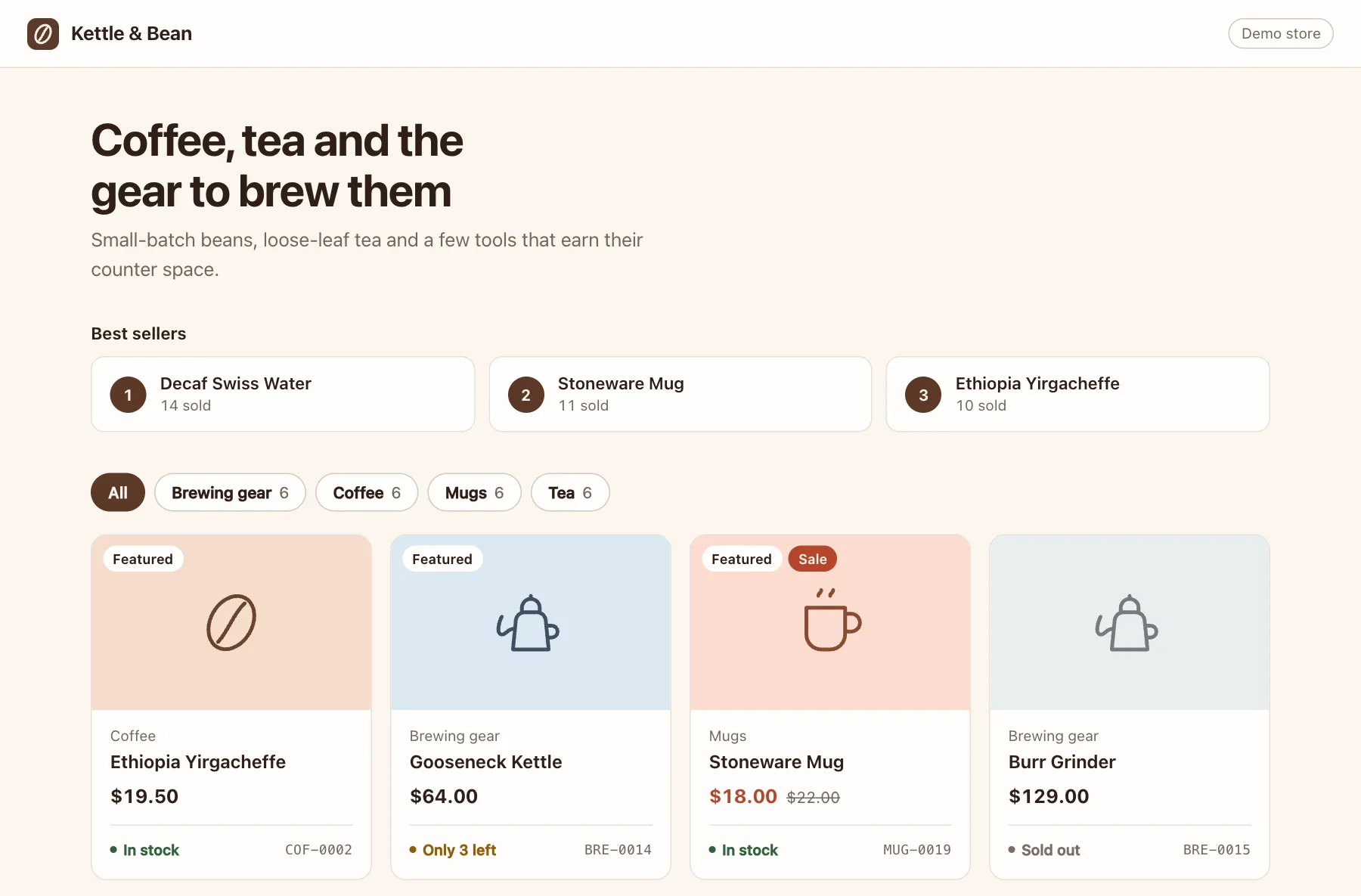
The finished demo store. Every product, price and order is made-up demo data.
How I learned Django migrations the hard way
I’m an applied AI and backend developer who has used Django since 2018, and migrations were a big part of learning it. I made all three classic beginner mistakes. I mixed up makemigrations and migrate. When something broke, I deleted the migration files or the whole db.sqlite3 file and started over. And the ORM felt like magic, because I couldn’t see the SQL it ran.
Deleting db.sqlite3 really does make the error go away, along with every row you had.
Once you get the gist, the ORM makes migrations simple. The harder lessons came later.
I had to backfill a new required field on a table that already had rows. I switched branches and my database broke. I pulled a teammate’s code, forgot to migrate and got errors about a column that didn’t exist. This tutorial covers all of it, in roughly the order you’ll run into it.
What is the ORM in Django?
ORM stands for object-relational mapper. It maps Python classes to database tables. A model class becomes a table, each field becomes a column, and each object you save becomes a row.
You ask for data in Python, like Product.objects.filter(price__lt=12), and Django turns that into SQL for whichever database you use. The built-in ORM is one of the big reasons I pick Django, and my Django vs. Flask comparison covers what Flask uses instead.
Start with an empty folder. Make a virtual environment, install Django, then create a project and an app. A virtual environment is an isolated copy of Python for one project, so its packages don’t clash with other projects. On Windows, activate it with .venv\Scripts\activate instead, or follow along inside WSL.
mkdir store && cd store
python -m venv .venv
source .venv/bin/activate
python -m pip install django
django-admin startproject config .
python manage.py startapp shop
Open config/settings.py and add the app at the end of INSTALLED_APPS.
    'django.contrib.staticfiles',
    'shop',
]
Now the first two models. A category has a name and a slug, the short URL-friendly name like brewing-gear. A product belongs to one category. Put this in shop/models.py.
from django.db import models


class Category(models.Model):
    name = models.CharField(max_length=60)
    slug = models.SlugField(unique=True)

    class Meta:
        ordering = ["name"]
        verbose_name_plural = "categories"

    def __str__(self):
        return self.name


class Product(models.Model):
    category = models.ForeignKey(
        Category, on_delete=models.PROTECT, related_name="products"
    )
    name = models.CharField(max_length=120)
    price = models.DecimalField(max_digits=8, decimal_places=2)
    created = models.DateTimeField(auto_now_add=True)

    class Meta:
        ordering = ["name"]

    def __str__(self):
        return self.name
A few choices here matter later. ForeignKey links each product to one category. on_delete=models.PROTECT stops you from deleting a category that still has products. related_name="products" lets you write coffee.products to reach a category’s products. Money goes in a DecimalField, never a FloatField, because floats can’t store a value like 0.1 exactly.
What does Django makemigrations actually do?
Django makemigrations compares your models with the migration files you already have, then writes a new file that describes the difference. That’s all it does. It never changes your database.
python manage.py makemigrations shopMigrations for 'shop':
shop/migrations/0001_initial.py
+ Create model Category
+ Create model ProductOpen that file. It’s plain Python, and every model change is an operation in a list.
# Generated by Django 6.1.2 on 2026-10-11 10:09

import django.db.models.deletion
from django.db import migrations, models


class Migration(migrations.Migration):

    initial = True

    dependencies = [
    ]

    operations = [
        migrations.CreateModel(
            name='Category',
            fields=[
                ('id', models.BigAutoField(auto_created=True, primary_key=True, serialize=False, verbose_name='ID')),
                ('name', models.CharField(max_length=60)),
                ('slug', models.SlugField(unique=True)),
            ],
            options={
                'verbose_name_plural': 'categories',
                'ordering': ['name'],
            },
        ),
        migrations.CreateModel(
            name='Product',
            fields=[
                ('id', models.BigAutoField(auto_created=True, primary_key=True, serialize=False, verbose_name='ID')),
                ('name', models.CharField(max_length=120)),
                ('price', models.DecimalField(decimal_places=2, max_digits=8)),
                ('created', models.DateTimeField(auto_now_add=True)),
                ('category', models.ForeignKey(on_delete=django.db.models.deletion.PROTECT, related_name='products', to='shop.category')),
            ],
            options={
                'ordering': ['name'],
            },
        ),
    ]
Want the SQL behind it? sqlmigrate prints it without running anything.
python manage.py sqlmigrate shop 0001BEGIN;
--
-- Create model Category
--
CREATE TABLE "shop_category" ("id" integer NOT NULL PRIMARY KEY AUTOINCREMENT, "name" varchar(60) NOT NULL, "slug" varchar(50) NOT NULL UNIQUE);
--
-- Create model Product
--
CREATE TABLE "shop_product" ("id" integer NOT NULL PRIMARY KEY AUTOINCREMENT, "name" varchar(120) NOT NULL, "price" decimal NOT NULL, "created" datetime NOT NULL, "category_id" bigint NOT NULL REFERENCES "shop_category" ("id") DEFERRABLE INITIALLY DEFERRED);
CREATE INDEX "shop_product_category_id_14d7eea8" ON "shop_product" ("category_id");
COMMIT;The ForeignKey became a category_id column with an index, and the SlugField became varchar(50) with a UNIQUE rule. The ORM isn’t magic. It’s a very patient SQL writer.
Here’s the mix-up I made early on. You’ve made the migration, so you try to use the model.
python manage.py shell -c "print(Category.objects.count())"django.db.utils.OperationalError: no such table: shop_categoryThe table doesn’t exist, because nothing has run the migration yet. Writing the file and changing the database are two separate jobs.
What’s the difference between makemigrations and migrate?
makemigrations turns model changes into migration files. migrate applies those files to your database and records each one it ran. One writes the plan, the other carries it out.
| Command | What it does | Run it when |
|---|---|---|
| makemigrations | Reads your models and writes migration files, never changes the database | You change a model |
| migrate | Runs migration files against your database and records each one in the django_migrations table | After makemigrations, after every pull, after switching branches |
| showmigrations | Lists the migration files and marks the ones that ran, changes nothing | You’re not sure what has run |
| sqlmigrate | Prints the SQL for one migration, changes nothing | You want to check the SQL first |
Check the state before you migrate. [ ] means the file exists but hasn’t run.
python manage.py showmigrations shopshop
[ ] 0001_initialNow run it. The first migrate also creates tables for Django’s built-in apps, like auth and the admin, so I’ve cut the middle of the list.
python manage.py migrateOperations to perform:
Apply all migrations: admin, auth, contenttypes, sessions, shop
Running migrations:
Applying contenttypes.0001_initial... OK
Applying auth.0001_initial... OK
...
Applying sessions.0001_initial... OK
Applying shop.0001_initial... OKpython manage.py showmigrations shopshop
[X] 0001_initialDjango keeps that record in a table called django_migrations, with one row for every migration that ran. You can look at it with dbshell, which opens your database’s own command line. For SQLite, that needs the sqlite3 program installed.
python manage.py dbshellSELECT id, app, name FROM django_migrations WHERE app = 'shop';19|shop|0001_initialRemember this table. Your migration files live in git, but this record lives only in your database. Almost every sync problem later in this post comes from the two disagreeing.
Querying the store with the Django ORM
You query through Product.objects. That’s a manager, the gateway to the table, and every model gets one for free. Calls on it like filter(), get() and update() turn into SQL when Django runs them.
A store needs orders. Add two more models at the bottom of shop/models.py. An order has an email and a status. Each order item points at one product, with a quantity and the price paid. TextChoices gives a field a fixed list of allowed values.
class Order(models.Model):
    class Status(models.TextChoices):
        PENDING = "pending", "Pending"
        PAID = "paid", "Paid"
        SHIPPED = "shipped", "Shipped"

    email = models.EmailField()
    status = models.CharField(max_length=10, choices=Status, default=Status.PENDING)
    created = models.DateTimeField(auto_now_add=True)

    class Meta:
        ordering = ["-created"]

    def __str__(self):
        return f"Order {self.pk}"


class OrderItem(models.Model):
    order = models.ForeignKey(Order, on_delete=models.CASCADE, related_name="items")
    product = models.ForeignKey(
        Product, on_delete=models.PROTECT, related_name="order_items"
    )
    quantity = models.PositiveIntegerField(default=1)
    unit_price = models.DecimalField(max_digits=8, decimal_places=2)

    def __str__(self):
        return f"{self.quantity} x {self.product}"
python manage.py makemigrations shop
python manage.py migrateMigrations for 'shop':
shop/migrations/0002_order_orderitem.py
+ Create model Order
+ Create model OrderItem
Operations to perform:
Apply all migrations: admin, auth, contenttypes, sessions, shop
Running migrations:
Applying shop.0002_order_orderitem... OKNow some fake data. A management command is a script you run through manage.py. Create empty __init__.py files in shop/management/ and shop/management/commands/, which turn those folders into Python packages, as my modules and packages guide explains. Then save this as shop/management/commands/seed_store.py. It builds 24 products in four categories plus 40 random orders, and the seeded random generator gives you the same data every time.
import random
from decimal import Decimal
from django.core.management.base import BaseCommand
from shop.models import Category, Order, OrderItem, Product
CATALOG = {
"Coffee": [
("House Espresso Blend", "16.00"),
("Ethiopia Yirgacheffe", "19.50"),
("Colombia Huila", "17.00"),
("Decaf Swiss Water", "16.50"),
("Cold Brew Coarse Grind", "15.00"),
("Guatemala Antigua", "18.00"),
],
"Tea": [
("Sencha Green Tea", "12.00"),
("Earl Grey Supreme", "11.50"),
("Chamomile Blossom", "10.00"),
("Masala Chai", "12.50"),
("Jasmine Pearls", "21.00"),
("Hojicha Roasted Tea", "13.00"),
],
"Brewing gear": [
("Pour-Over Dripper", "28.00"),
("Gooseneck Kettle", "64.00"),
("Burr Grinder", "129.00"),
("French Press", "39.00"),
("Paper Filters (100)", "7.50"),
("Digital Scale", "34.00"),
],
"Mugs": [
("Stoneware Mug", "22.00"),
("Double-Wall Glass", "18.00"),
("Travel Tumbler", "29.00"),
("Espresso Cups (Set of 2)", "24.00"),
("Enamel Camp Mug", "16.00"),
("Latte Bowl", "20.00"),
],
}
class Command(BaseCommand):
help = "Create a demo catalog and 40 fake orders."
def handle(self, *args, **options):
OrderItem.objects.all().delete()
Order.objects.all().delete()
Product.objects.all().delete()
Category.objects.all().delete()
products = []
for name, items in CATALOG.items():
slug = name.lower().replace(" ", "-")
category = Category.objects.create(name=name, slug=slug)
for product_name, price in items:
products.append(
Product.objects.create(
category=category, name=product_name, price=Decimal(price)
)
)
rng = random.Random(7)
statuses = ["pending", "paid", "shipped"]
for i in range(40):
order = Order.objects.create(
email=f"customer{i + 1}@example.com", status=rng.choice(statuses)
)
for product in rng.sample(products, rng.randint(1, 3)):
OrderItem.objects.create(
order=order,
product=product,
quantity=rng.randint(1, 3),
unit_price=product.price,
)
self.stdout.write(f"Created {len(products)} products and 40 orders.")python manage.py seed_storeCreated 24 products and 40 orders.Open the shell with python manage.py shell. The Django shell imports all your models for you, plus helpers like models and connection, so you can type queries right away. Here’s a session against the store.
>>> coffee = Category.objects.get(slug="coffee")
>>> coffee
<Category: Coffee>
>>> coffee.products.count()
6
>>> cheap = Product.objects.filter(price__lt=12)
>>> cheap
<QuerySet [<Product: Chamomile Blossom>, <Product: Earl Grey Supreme>, <Product: Paper Filters (100)>]>
>>> print(cheap.query)
SELECT "shop_product"."id", "shop_product"."category_id", "shop_product"."name", "shop_product"."price", "shop_product"."created" FROM "shop_product" WHERE "shop_product"."price" < 12 ORDER BY "shop_product"."name" ASC
>>> Product.objects.filter(category__slug="tea", price__gte=12).values_list("name", "price")
<QuerySet [('Hojicha Roasted Tea', Decimal('13.00')), ('Jasmine Pearls', Decimal('21.00')), ('Masala Chai', Decimal('12.50')), ('Sencha Green Tea', Decimal('12.00'))]>
>>> kenya = Product.objects.create(category=coffee, name="Kenya AA", price="21.00")
>>> kenya.pk
25
>>> Product.objects.filter(models.Q(category__slug="mugs") | models.Q(price__gte=100)).count()
7
>>> Product.objects.filter(category__slug="tea").update(price=models.F("price") + 1)
6
>>> line_total = models.F("items__quantity") * models.F("items__unit_price")
>>> Order.objects.annotate(total=models.Sum(line_total)).order_by("-total").values("id", "total")[:3]
<QuerySet [{'id': 32, 'total': Decimal('376.5')}, {'id': 20, 'total': Decimal('367.5')}, {'id': 12, 'total': Decimal('321')}]>
>>> Category.objects.annotate(n=models.Count("products")).values_list("name", "n")
<QuerySet [('Brewing gear', 6), ('Coffee', 7), ('Mugs', 6), ('Tea', 6)]>Here’s what each line did.
get()returns exactly one object. It raises an error if it finds none or more than one.coffee.productsis therelated_nameat work.count()runs a SQLCOUNT, so it never loads the rows.price__lt=12is a lookup. The double underscore adds a condition, andltmeans less than.- A queryset is lazy. Django builds the query when you write
filter(), but it only runs it when you need the results. print(cheap.query)shows the SQL. If the ORM feels like magic, print the query.category__slug="tea"follows the foreign key into the category table, a join you didn’t have to write.values_list()returns plain tuples instead of model objects.create()saves a new row and gives it back with its new primary key.Qobjects combine conditions, and|means OR.F("price")points at the column itself.update(price=models.F("price") + 1)raises every tea by a dollar inside the database, in one query, without loading a single row.annotate()adds a computed value to each row. Here it’s each order’s total, quantity times unit price, summed over its items, all in SQL.
The Django docs page on making queries covers every lookup and expression.
How do you backfill a new required field?
Backfilling means filling in a value for rows that already exist. You need it whenever you add a required field to a table that already has data. The safe way is three migrations. Add the field as nullable, fill it in with a data migration, then make it required.
I’ve had to do it in real work for a new required field, and the store is about to need one too. Every product needs a SKU (stock keeping unit), a unique product code like COF-0003.
The tempting move is one new line in Product.
sku = models.CharField(max_length=20, unique=True)A required column needs a value in every row that already exists, and makemigrations can’t see your data, so it asks.
python manage.py makemigrations shopIt is impossible to add a non-nullable field 'sku' to product without specifying a default. This is because the database needs something to populate existing rows.
Please select a fix:
1) Provide a one-off default now (will be set on all existing rows with a null value for this column)
2) Quit and manually define a default value in models.py.
Select an option: 1
Please enter the default value as valid Python.
The datetime and django.utils.timezone modules are available, so it is possible to provide e.g. timezone.now as a value.
Type 'exit' to exit this prompt
>>> ''
Migrations for 'shop':
shop/migrations/0003_product_sku.py
+ Add field sku to productAn empty string looks harmless. Then migrate tries to give every product the same empty SKU, and the unique rule says no.
python manage.py migrate shopOperations to perform:
Apply all migrations: shop
Running migrations:
Applying shop.0003_product_sku...Traceback (most recent call last):
...
django.db.utils.IntegrityError: UNIQUE constraint failed: new__shop_product.skuDjango offered that one-off default with a straight face, with unique=True sitting on the same line.
The new__shop_product name is a SQLite detail. SQLite has very little built-in support for changing tables, so Django creates a new table, copies the data across, drops the old one and renames the new one, as the migrations docs explain. SQLite also runs the whole migration in a transaction, so the failure left nothing half done, and showmigrations still lists 0003_product_sku as not applied. Delete that file and do it properly.
rm shop/migrations/0003_product_sku.pyHere are those three migrations. It’s the same pattern the Django docs use for migrations that add unique fields.
Step 1. Add the field as nullable
null=True lets the column start empty, so the existing rows are fine.
sku = models.CharField(max_length=20, null=True)python manage.py makemigrations shopMigrations for 'shop':
shop/migrations/0003_product_sku.py
+ Add field sku to productStep 2. Fill in the existing rows
--empty writes a migration with no operations, for you to fill in.
python manage.py makemigrations shop --empty --name backfill_product_skuMigrations for 'shop':
shop/migrations/0004_backfill_product_sku.pyOpen shop/migrations/0004_backfill_product_sku.py and give it one function that runs forward and one that runs backward.
# Generated by Django 6.1.2 on 2026-10-11 10:09
from django.db import migrations
def fill_sku(apps, schema_editor):
Product = apps.get_model("shop", "Product")
products = Product.objects.filter(sku__isnull=True).select_related("category")
for product in products:
product.sku = f"{product.category.slug[:3].upper()}-{product.pk:04d}"
product.save(update_fields=["sku"])
def clear_sku(apps, schema_editor):
Product = apps.get_model("shop", "Product")
Product.objects.update(sku=None)
class Migration(migrations.Migration):
dependencies = [
('shop', '0003_product_sku'),
]
operations = [
migrations.RunPython(fill_sku, clear_sku),
]Two details matter here. First, apps.get_model() hands you the model as it looked at this point in the migration history, not the current class in models.py. The docs on historical models say that if you import models directly, your migrations “may work initially but will fail in the future”. Second, clear_sku makes the migration reversible. Without it, Django can’t undo this step, as the rollback section shows.
The select_related("category") isn’t decoration either. Without it, reading product.category runs one extra query per product. That problem gets its own section near the end.
Step 3. Make the field required and unique
Change the model line to its final version.
sku = models.CharField(max_length=20, unique=True)Run makemigrations again. It asks the same kind of question, with a new option this time. Pick 2, because the migration you just wrote handles the existing rows.
python manage.py makemigrations shopIt is impossible to change a nullable field 'sku' on product to non-nullable without providing a default. This is because the database needs something to populate existing rows.
Please select a fix:
1) Provide a one-off default now (will be set on all existing rows with a null value for this column)
2) Ignore for now. Existing rows that contain NULL values will have to be handled manually, for example with a RunPython or RunSQL operation.
3) Quit and manually define a default value in models.py.
Select an option: 2
Migrations for 'shop':
shop/migrations/0005_alter_product_sku.py
~ Alter field sku on productCheck the plan, then run all three.
python manage.py migrate shop --plan
python manage.py migrate shopPlanned operations:
shop.0003_product_sku
Add field sku to product
shop.0004_backfill_product_sku
Raw Python operation
shop.0005_alter_product_sku
Alter field sku on product
Operations to perform:
Apply all migrations: shop
Running migrations:
Applying shop.0003_product_sku... OK
Applying shop.0004_backfill_product_sku... OK
Applying shop.0005_alter_product_sku... OKThen check the result in the shell.
>>> Product.objects.values_list("name", "sku")[:4]
<QuerySet [('Burr Grinder', 'BRE-0015'), ('Chamomile Blossom', 'TEA-0009'), ('Cold Brew Coarse Grind', 'COF-0005'), ('Colombia Huila', 'COF-0003')]>
>>> Product.objects.filter(sku__isnull=True).count()
0Every product has a SKU, and none are empty. A required field changes your other code too, though. The seed command still creates products without a SKU, so the second product collides with the first one’s empty string.
python manage.py seed_storedjango.db.utils.IntegrityError: UNIQUE constraint failed: shop_product.skuAdd a SKU to the create() call in seed_store.py and run it again.
for product_name, price in items:
products.append(
Product.objects.create(
category=category,
name=product_name,
sku=f"{slug[:3].upper()}-{len(products) + 1:04d}",
price=Decimal(price),
)
)Created 24 products and 40 orders.Two more points from the docs matter on a big production table. They warn of a race condition if rows get created while a migration like this runs, so run it when nothing else is writing to the table. And for very large tables, the docs show a non-atomic migration with atomic = False that fills rows in batches of 1,000, each batch in its own transaction.
Check the result in the admin
The admin is Django’s built-in back office for your data. Register the models in shop/admin.py so they show up there.
from django.contrib import admin
from .models import Category, Order, Product
@admin.register(Category)
class CategoryAdmin(admin.ModelAdmin):
list_display = ["name", "slug"]
@admin.register(Product)
class ProductAdmin(admin.ModelAdmin):
list_display = ["name", "sku", "category", "price"]
list_select_related = ["category"]
@admin.register(Order)
class OrderAdmin(admin.ModelAdmin):
list_display = ["id", "email", "status", "created"]list_display picks the columns, and list_select_related loads each product’s category in the same query as the product list. The admin already does that for a foreign key in list_display, as the admin docs explain, so this line only makes it explicit.
Create a login for yourself, start the server and open http://127.0.0.1:8000/admin/shop/product/.
python manage.py createsuperuser
python manage.py runserver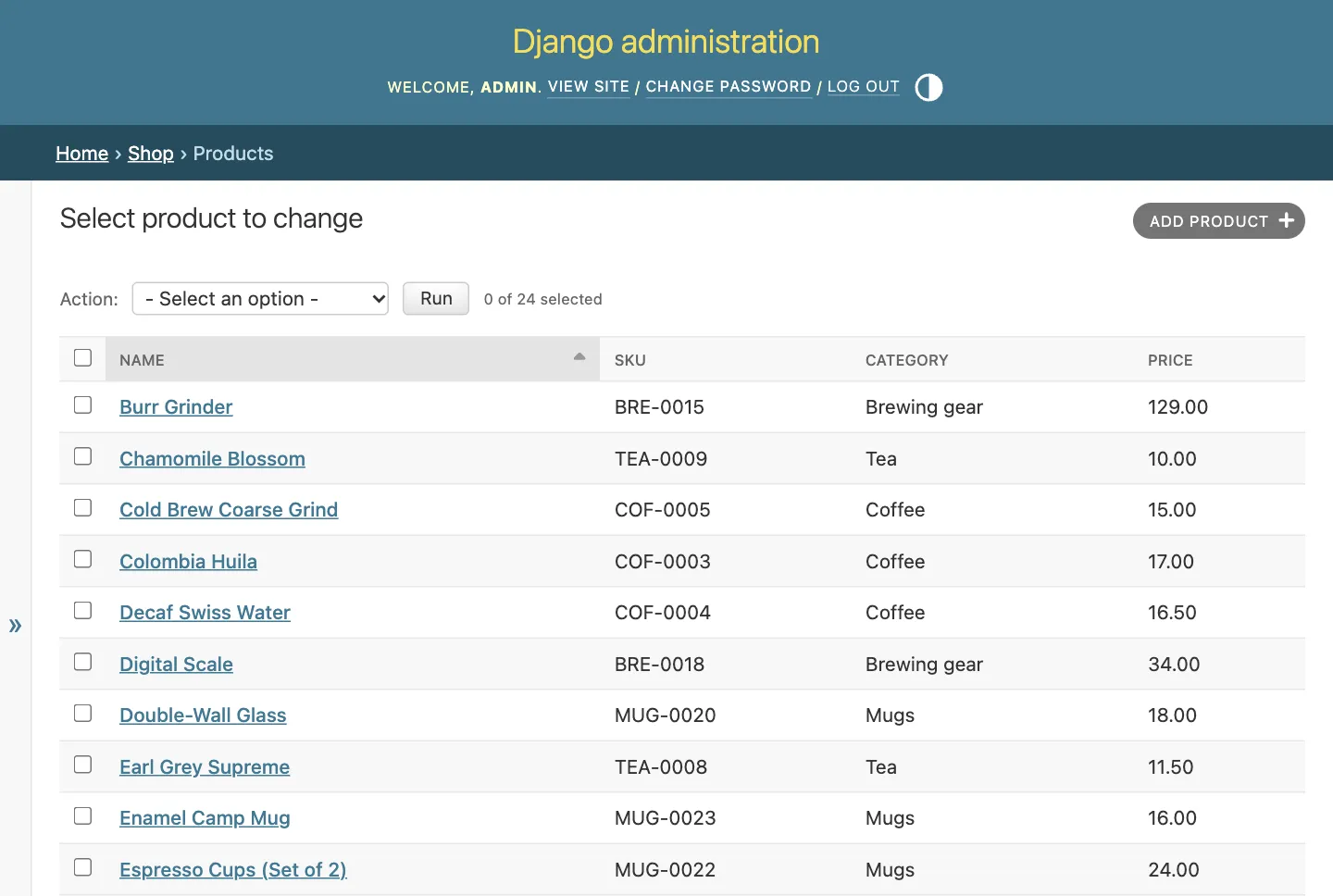
The Django admin after the backfill, with a SKU on every product. All demo data.
How do you roll back a Django migration?
To roll back, you migrate to an earlier migration. Django undoes everything after it, newest first. --plan shows what will happen before anything does.
python manage.py migrate shop 0002 --planPlanned operations:
shop.0005_alter_product_sku
Undo Alter field sku on product
shop.0004_backfill_product_sku
Raw Python operation
shop.0003_product_sku
Undo Add field sku to productpython manage.py migrate shop 0002Operations to perform:
Target specific migration: 0002_order_orderitem, from shop
Running migrations:
Rendering model states... DONE
Unapplying shop.0005_alter_product_sku... OK
Unapplying shop.0004_backfill_product_sku... OK
Unapplying shop.0003_product_sku... OKRolling back past 0003 drops the sku column and every SKU in it. Here the backfill rebuilds them on the way forward, because they come from the category and the primary key. Real data is rarely that forgiving. Migrate forward again with python manage.py migrate shop. To undo every migration in an app, use zero as the target, as in python manage.py migrate shop zero.
Now you can see why clear_sku exists. Here’s the same kind of rollback on a copy of the project where the RunPython line has no reverse function.
migrations.RunPython(fill_sku),python manage.py migrate shop 0003django.db.migrations.exceptions.IrreversibleError: Operation <RunPython <function fill_sku at 0x107cfb880>> in shop.0004_backfill_product_sku is not reversibleIf undoing a data migration needs no work, pass migrations.RunPython.noop as the second argument. It does nothing on the way back and keeps the migration reversible, as the RunPython docs describe.
Why do Django migrations go out of sync on a team?
Migration files travel through git. The record of what ran doesn’t, because it lives in each developer’s own database. Every time git changes the files under you, your database’s record can stop matching them.
To show this for real, I put the store in git, made a bare repository on my machine to play the shared remote, and cloned it a second time for a pretend teammate. A bare repository is one with no working files, the kind a Git server keeps. Both folders share one virtual environment, but each has its own db.sqlite3, just like two laptops would.
printf '.venv/\ndb.sqlite3\n__pycache__/\n' > .gitignore
git init -b main
git add -A
git commit -m "Store with SKUs"
git init --bare -b main ../origin.git
git remote add origin ../origin.git
git push -u origin main
git clone ../origin.git ../teammate
cd ../teammate
python manage.py migrate
python manage.py seed_storeYou pulled code and forgot to migrate
This one has happened to me. I pulled a teammate’s code and got errors about a column that didn’t exist, until I ran migrate.
Here’s the setup. In their folder, your teammate adds a stock count to Product and makes the migration.
stock = models.PositiveIntegerField(default=0)python manage.py makemigrations shopMigrations for 'shop':
shop/migrations/0006_product_stock.py
+ Add field stock to productThen they migrate, commit and push. Back in your folder, you pull and use the app without migrating.
git pull
python manage.py shell -c "print(Product.objects.first())"django.db.utils.OperationalError: no such column: shop_product.stockThe new code asks for a stock column your database doesn’t have yet. Django did warn you, in the startup text of runserver that nobody reads.
python manage.py runserverPerforming system checks...
System check identified no issues (0 silenced).
You have 1 unapplied migration(s). Your project may not work properly until you apply the migrations for app(s): shop.
Run 'python manage.py migrate' to apply them.Open the product list in the admin anyway, and Django’s yellow debug page says the same thing. You only see that page while DEBUG is on, which is the default for a new project.
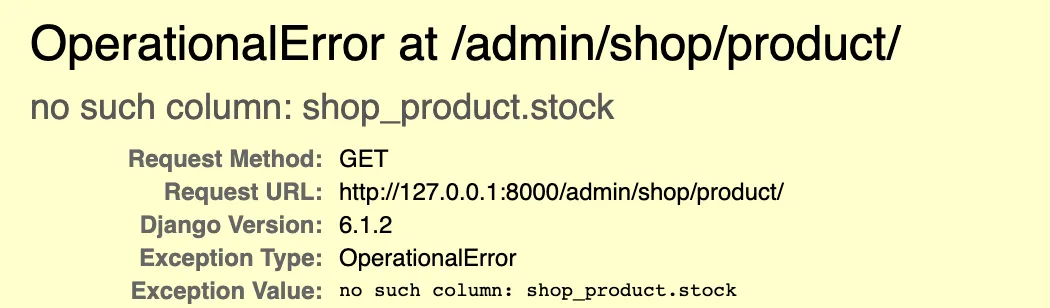
The top of Django’s debug page right after the pull. The rest of the page lists local file paths, so it’s cropped out.
showmigrations agrees.
python manage.py showmigrations shopshop
[X] 0001_initial
[X] 0002_order_orderitem
[X] 0003_product_sku
[X] 0004_backfill_product_sku
[X] 0005_alter_product_sku
[ ] 0006_product_stockmigrate --check gives the same answer as an exit code, which is handy in a deploy script. It prints nothing and exits with 1 when a migration hasn’t run.
python manage.py migrate --check; echo $?1The fix is one command. Make it a habit after every pull.
python manage.py migrateOperations to perform:
Apply all migrations: admin, auth, contenttypes, sessions, shop
Running migrations:
Applying shop.0006_product_stock... OKYou switched branches and the database broke
This one got me too. I switched branches and my database broke. It’s harder to spot than the first one, because Django’s own status command says everything is fine.
Two branches start from main. Your teammate adds a sale price on a new branch called sale, then commits and pushes it.
sale_price = models.DecimalField(
max_digits=8, decimal_places=2, null=True, blank=True
)git switch -c sale
python manage.py makemigrations shopMigrations for 'shop':
shop/migrations/0007_product_sale_price.py
+ Add field sale_price to productYou add a featured flag on a branch called featured, make the migration, apply it to your database, then commit and push.
is_featured = models.BooleanField(default=False)git switch -c featured
python manage.py makemigrations shop
python manage.py migrate
Migrations for 'shop':
shop/migrations/0007_product_is_featured.py
+ Add field is_featured to product
Operations to perform:
Apply all migrations: admin, auth, contenttypes, sessions, shop
Running migrations:
Applying shop.0007_product_is_featured... OKThen you switch to your teammate’s branch to review it, and this time you remember to migrate.
git fetch
git switch sale
python manage.py migrate
Operations to perform:
Apply all migrations: admin, auth, contenttypes, sessions, shop
Running migrations:
Applying shop.0007_product_sale_price... OKIn the shell, reading still works. Saving doesn’t.
>>> Product.objects.count()
24
>>> mugs = Category.objects.get(slug="mugs")
>>> Product.objects.create(category=mugs, name="Speckled Mug", sku="MUG-0100", price=24)
Traceback (most recent call last):
...
django.db.utils.IntegrityError: NOT NULL constraint failed: shop_product.is_featuredThe sale branch has never heard of is_featured, so its code leaves that column out of the INSERT. Your database still has the column from the other branch, and it’s NOT NULL with no default of its own. Django fills in default=False in Python when it saves, so the database column has nothing to fall back on.
Now ask Django what it thinks.
python manage.py showmigrations shopshop
[X] 0001_initial
[X] 0002_order_orderitem
[X] 0003_product_sku
[X] 0004_backfill_product_sku
[X] 0005_alter_product_sku
[X] 0006_product_stock
[X] 0007_product_sale_priceEvery box is ticked, which is technically true and no help at all. showmigrations only lists migration files on disk, and 0007_product_is_featured isn’t on this branch. The database knows better.
python manage.py dbshellSELECT name FROM django_migrations WHERE app = 'shop' ORDER BY id;0001_initial
0002_order_orderitem
0003_product_sku
0004_backfill_product_sku
0005_alter_product_sku
0006_product_stock
0007_product_is_featured
0007_product_sale_priceThere it is, applied in the database and invisible in the files. To clean up, unapply each branch’s migration while you’re on the branch that has its file.
python manage.py migrate shop 0006
git switch featured
python manage.py migrate shop 0006Operations to perform:
Target specific migration: 0006_product_stock, from shop
Running migrations:
Rendering model states... DONE
Unapplying shop.0007_product_sale_price... OK
Operations to perform:
Target specific migration: 0006_product_stock, from shop
Running migrations:
Rendering model states... DONE
Unapplying shop.0007_product_is_featured... OKDon’t reach for migrate --prune here. It deletes the records of migrations whose files are missing, but the column stays behind, and then nothing remembers why it’s there.
The habit that prevents all this is simple. Before you switch away from a branch, unapply its migrations. Here it is, starting back on featured with your migration applied.
python manage.py migrate
python manage.py migrate shop 0006
git switch sale
python manage.py migrateOperations to perform:
Apply all migrations: admin, auth, contenttypes, sessions, shop
Running migrations:
Applying shop.0007_product_is_featured... OK
Operations to perform:
Target specific migration: 0006_product_stock, from shop
Running migrations:
Rendering model states... DONE
Unapplying shop.0007_product_is_featured... OK
Operations to perform:
  Apply all migrations: admin, auth, contenttypes, sessions, shop
Running migrations:
Applying shop.0007_product_sale_price... OK>>> Product.objects.count()
24
>>> mugs = Category.objects.get(slug="mugs")
>>> Product.objects.create(category=mugs, name="Speckled Mug", sku="MUG-0100", price=24)
<Product: Speckled Mug>There are two other ways out. On a local database full of seed data, deleting db.sqlite3 and running migrate and seed_store again is a fine reset. That’s my 2018 move, and it only works because nothing in there is real. Another option is a separate database file for each branch.
Two migrations with the same number
Both branches pass review. Your teammate merges sale into main first. You unapply your migration out of habit, switch to main, pull and merge featured.
python manage.py migrate shop 0006
git switch main
git pull
git merge featured
Auto-merging shop/models.py
Merge made by the 'ort' strategy.
shop/migrations/0007_product_is_featured.py | 18 ++++++++++++++++++
shop/models.py | 1 +
2 files changed, 19 insertions(+)
create mode 100644 shop/migrations/0007_product_is_featured.pyGit is happy. The two branches changed different lines, so it merged them without a conflict. Django is not happy.
python manage.py migrateCommandError: Conflicting migrations detected; multiple leaf nodes in the migration graph: (0007_product_is_featured, 0007_product_sale_price in shop).
To fix them run 'python manage.py makemigrations --merge'Both migrations are numbered 0007, and both depend on 0006. A leaf node is a migration that nothing depends on yet. Django wants one per app, so it knows the order to run things in.
The docs on version control say Django “will offer to automatically linearize the two migrations” when it thinks that’s safe. What 6.1.2 offered me was a CommandError and a hint. So follow the hint.
python manage.py makemigrations --mergeMerging shop
Branch 0007_product_is_featured
+ Add field is_featured to product
Branch 0007_product_sale_price
+ Add field sale_price to product
Merging will only work if the operations printed above do not conflict
with each other (working on different fields or models)
Should these migration branches be merged? [y/N] y
Created new merge migration ~/store/shop/migrations/0008_merge_20261011_1010.pyThe merge migration has no operations. It only depends on both 0007 files, which joins the two lines back into one.
# Generated by Django 6.1.2 on 2026-10-11 10:10
from django.db import migrations
class Migration(migrations.Migration):
dependencies = [
('shop', '0007_product_is_featured'),
('shop', '0007_product_sale_price'),
]
operations = [
]python manage.py migrateOperations to perform:
Apply all migrations: admin, auth, contenttypes, sessions, shop
Running migrations:
Applying shop.0007_product_sale_price... OK
Applying shop.0007_product_is_featured... OK
Applying shop.0008_merge_20261011_1010... OK--merge only works when the two migrations touch different fields or models, as its own prompt says. If both branches changed the same field, you have to decide which change wins and edit the migrations by hand. Commit the merge migration and push it, so your teammates run the same file.
Catch missing migrations in CI with –check
CI means the automated checks that run on every push, like the GitHub Actions stage in my automated code review pipeline. makemigrations --check exits with 1 when your models have changes that no migration covers, and it never writes a file. On a clean project it exits with 0.
python manage.py makemigrations --check; echo $?No changes detected
0Here’s the same check after I added a field to Product and didn’t make a migration. It printed the file it would write, but no file was written.
Migrations for 'shop':
shop/migrations/0009_product_weight_grams.py
+ Add field weight_grams to product
1It also fails on the same-number clash from above, so one line in CI catches both.
CommandError: Conflicting migrations detected; multiple leaf nodes in the migration graph: (0007_product_is_featured, 0007_product_sale_price in shop).
To fix them run 'python manage.py makemigrations --merge'
1Fix the N+1 problem with Django 6.1 fetch modes
The N+1 problem is one extra database query for every row, whenever a loop touches a related object. select_related() fixes it if you list the fields up front. Django 6.1’s new FETCH_PEERS mode fixes most cases in two queries without that list. Both are measured on the store below.
First, give the new fields some values. Reset the data with python manage.py seed_store, then run this in the shell. update() changes every row a queryset matches, in one SQL statement.
>>> Product.objects.update(stock=24)
24
>>> Product.objects.filter(category__slug="brewing-gear").update(stock=3)
6
>>> Product.objects.filter(name__in=["Burr Grinder", "Jasmine Pearls"]).update(stock=0)
2
>>> featured = ["Ethiopia Yirgacheffe", "Gooseneck Kettle", "Stoneware Mug"]
>>> Product.objects.filter(name__in=featured).update(is_featured=True)
3
>>> mugs = Product.objects.filter(category__slug="mugs", price__gte=20)
>>> mugs.update(sale_price=models.F("price") - 4)
4
Now the page from the screenshot at the top. Here’s the view in shop/views.py.
from django.db import models
from django.shortcuts import render

from .models import Category, Product


def storefront(request):
    products = Product.objects.fetch_mode(models.FETCH_PEERS).order_by(
        "-is_featured", "name"
    )
    active = request.GET.get("category", "")
    if active:
        products = products.filter(category__slug=active)

    best_sellers = (
        Product.objects.annotate(sold=models.Sum("order_items__quantity"))
        .order_by("-sold", "name")[:3]
    )
    categories = Category.objects.annotate(count=models.Count("products"))

    return render(
        request,
        "shop/storefront.html",
        {
            "products": products,
            "best_sellers": best_sellers,
            "categories": categories,
            "active": active,
        },
    )
Wire it up in shop/urls.py, then add path('', include('shop.urls')) to config/urls.py, with include imported from django.urls.
from django.urls import path

from . import views

urlpatterns = [
    path("", views.storefront, name="storefront"),
]
The templates go in shop/templates/shop/. This is base.html.
{% load static %}
<!doctype html>
<html lang="en">
<head>
<meta charset="utf-8">
<meta name="viewport" content="width=device-width, initial-scale=1">
<title>Kettle & Bean</title>
<link rel="icon" href="{% static 'shop/favicon.svg' %}">
<link rel="stylesheet" href="{% static 'shop/app.css' %}">
</head>
<body>
<header class="topbar">
<a class="brand" href="{% url 'storefront' %}">
<img src="{% static 'shop/favicon.svg' %}" width="28" height="28" alt="">
Kettle & Bean
</a>
<span class="demo-tag">Demo store</span>
</header>
<main>
{% block content %}{% endblock %}
</main>
<footer class="site-foot">Demo data only. Built with Django and SQLite.</footer>
</body>
</html>And this is storefront.html. Notice the loop prints product.category.name for every product.
{% extends "shop/base.html" %}

{% block content %}
<section class="hero">
  <h1>Coffee, tea and the gear to brew them</h1>
  <p>Small-batch beans, loose-leaf tea and a few tools that earn their counter space.</p>
</section>

<section class="best" aria-labelledby="best-title">
  <h2 id="best-title">Best sellers</h2>
  <ol class="best-list">
    {% for product in best_sellers %}
    <li>
      <span class="rank">{{ forloop.counter }}</span>
      <span class="best-name">{{ product.name }}</span>
      <span class="best-sold">{{ product.sold }} sold</span>
    </li>
    {% endfor %}
  </ol>
</section>

<nav class="chips" aria-label="Categories">
  <a href="{% url 'storefront' %}" class="chip{% if not active %} is-active{% endif %}">All</a>
  {% for category in categories %}
  <a href="?category={{ category.slug }}" class="chip{% if active == category.slug %} is-active{% endif %}">
    {{ category.name }} <span class="chip-count">{{ category.count }}</span>
  </a>
  {% endfor %}
</nav>

<div class="grid">
  {% for product in products %}
  <article class="card">
    <div class="thumb thumb-{{ product.category.slug }}">
      <div class="badges">
        {% if product.is_featured %}<span class="badge">Featured</span>{% endif %}
        {% if product.sale_price %}<span class="badge badge-sale">Sale</span>{% endif %}
      </div>
    </div>
    <div class="card-body">
      <p class="card-cat">{{ product.category.name }}</p>
      <h3 class="card-title">{{ product.name }}</h3>
      <p class="price">
        {% if product.sale_price %}
        <span class="now">${{ product.sale_price }}</span> <s>${{ product.price }}</s>
        {% else %}
        <span class="now">${{ product.price }}</span>
        {% endif %}
      </p>
      <div class="card-foot">
        {% if product.stock == 0 %}
        <span class="stock stock-out">Sold out</span>
        {% elif product.stock < 5 %}
        <span class="stock stock-low">Only {{ product.stock }} left</span>
        {% else %}
        <span class="stock">In stock</span>
        {% endif %}
        <span class="sku">{{ product.sku }}</span>
      </div>
    </div>
  </article>
  {% empty %}
  <p class="empty">No products in this category yet.</p>
  {% endfor %}
</div>
{% endblock %}
The stylesheet and the four category icons are only decoration, so I’ve left them out. Without them the page works the same, just plainer.
Now the problem the view avoids. By default, Django loads a related object the first time you touch it, with one query per object. A loop over 24 products that prints each category runs one query for the products and then one more for each product. That’s the N+1 problem. Here are three versions of the same loop, with every query counted.
>>> from django.test.utils import CaptureQueriesContext
>>> def count_queries(products):
...     with CaptureQueriesContext(connection) as queries:
...         for product in products:
...             product.category.name
...     return len(queries)
...
>>> count_queries(Product.objects.all())
25
>>> count_queries(Product.objects.select_related("category"))
1
>>> count_queries(Product.objects.fetch_mode(models.FETCH_PEERS))
2
That’s 25 queries to print the same four category names, over and over.
Drawn with Python from the shell output above.
select_related() gets everything in one query with a SQL join. It works well for foreign keys, as long as you know up front what the template will touch. Name the fields when you call it, because Django 6.1 deprecates calling select_related() with no arguments.
FETCH_PEERS is new in Django 6.1. When you touch product.category on one product, Django loads the category for every product from the same queryset, in one extra query. The fetch modes docs compare it to an on-demand prefetch_related(). You don’t have to list the fields in advance, which is why the view uses it. To make it the default for a model, the docs use a custom manager.
FETCH_RAISE goes the other way. It blocks the extra query and raises an error instead, which helps in code where a surprise query would hurt.
>>> product = Product.objects.fetch_mode(models.FETCH_RAISE).first()
>>> product.category
Traceback (most recent call last):
...
django.core.exceptions.FieldFetchBlocked: Fetching of Product.category blocked.
A test can also pin the page’s query count, so a template change that brings N+1 back fails the build. This is shop/tests.py.
from io import StringIO

from django.core.management import call_command
from django.test import TestCase


class StorefrontTests(TestCase):
    @classmethod
    def setUpTestData(cls):
        call_command("seed_store", stdout=StringIO())

    def test_storefront_query_count(self):
        with self.assertNumQueries(4):
            response = self.client.get("/")
        self.assertContains(response, "Ethiopia Yirgacheffe")
python manage.py test shopCreating test database for alias 'default'...
.
----------------------------------------------------------------------
Ran 1 test in 0.028s
OK
Destroying test database for alias 'default'...
Found 1 test(s).
System check identified no issues (0 silenced).Four queries for the whole page. One loads the category chips with their counts, one the best sellers, one the products, and one is the FETCH_PEERS query for all of their categories.
Common Django makemigrations errors and fixes
Every error here showed up somewhere in this tutorial. Most are Python exceptions, and the last line of a traceback is the part to read first. My Python exception handling guide covers how exceptions work.
No changes detectedmeans the app isn’t inINSTALLED_APPS, or no model changed. CheckINSTALLED_APPSfirst.No installed app with label 'shop'.is the same cause, with the app named. Add the app toINSTALLED_APPS.no such tablemeans the migration was made but never run. Runmigrate.no such columnmeans your code has a migration your database hasn’t run. Runmigrate, then checkshowmigrations.It is impossible to add a non-nullable fieldmeans you added a required field to a table that has rows. Use the three-step backfill, or give the field a real default.UNIQUE constraint failedwhile migrating means a one-off default gave every row the same value. Delete that migration and use the three steps.NOT NULL constraint failedafter a branch switch means another branch’s migration is still applied. Unapply it on the branch that has its file.Conflicting migrations detectedmeans two migrations share a parent. Runmakemigrations --merge.IrreversibleErrormeans aRunPythonhas no reverse function. Add one, or useRunPython.noop.
One fix to avoid until you know exactly why you need it is migrate --fake. It marks migrations as applied without running their SQL, and the migrate docs warn that it “runs the risk of putting the migration state table into a state where manual recovery will be needed to make migrations run correctly.”
A Django migrations checklist
- Run makemigrations after every model change, then migrate. Two commands, two jobs.
- Read each new migration file before you commit it. Use
sqlmigratewhen you want the SQL. - Commit migration files together with the model change.
- Add a required field to a table with data in three steps. Nullable, backfill, then required.
- Use
apps.get_model()in data migrations, and give everyRunPythona reverse function. - Run
migrateafter every pull. - Unapply your branch’s migrations before you switch branches.
- Merge same-number migrations with
makemigrations --merge, then commit the merge file. - Run
makemigrations --checkin CI. - Use
select_related()orFETCH_PEERSwhen a loop touches related objects.
If you want live search on a store like this without writing JavaScript, my django-htmx tutorial builds one on Django 6.1. And if you’d rather add an AI assistant, the Django and Anthropic SDK guide saves every chat with the same models and migrations you just learned. For more things to build, my Python project ideas list includes Django apps.
What’s the worst migration mess you’ve had to untangle, and did you fix it properly or delete db.sqlite3 like 2018 me?