I Built a 3D Sky City to Monitor Claude Code Sessions
Skyborne is a free, open source tool I built to monitor Claude Code sessions as a live 3D sky city. Each session is a floating district, and each agent is a little robot called a Skybot. You can see who’s working, who’s stuck and who needs you, and you can approve or deny their permission requests right from the city. Click any session to walk through every step, tool and token, agent by agent.
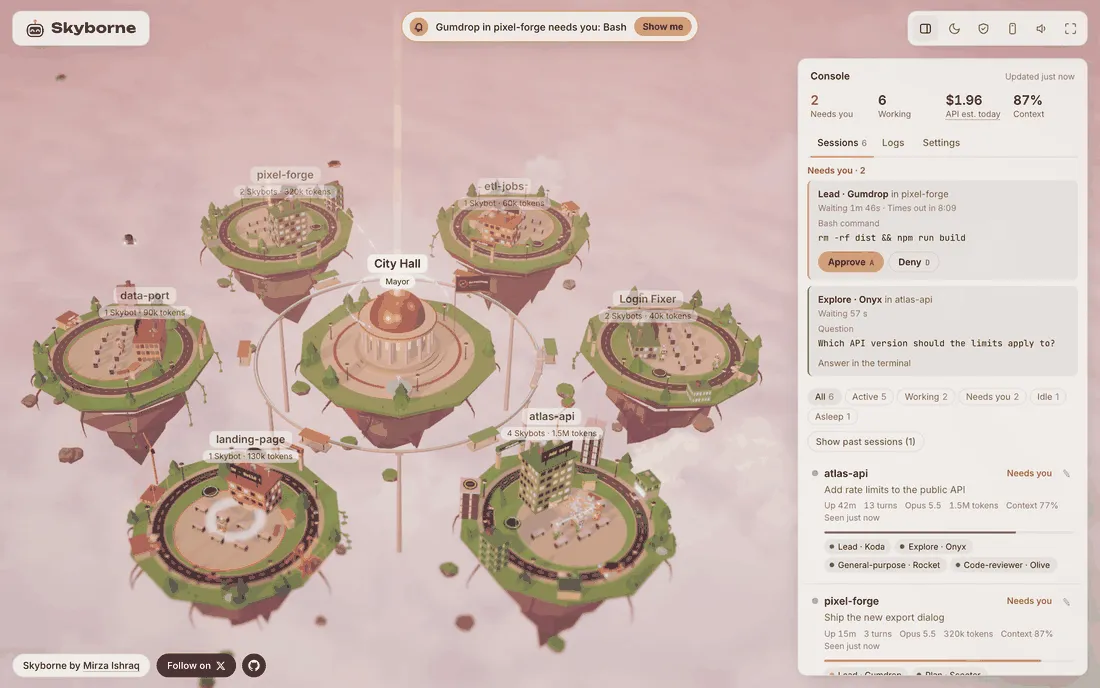
That’s demo data. Every district here is a sample, not one of my real projects, and the $1.96 is an API-price estimate, not a bill.
It runs only on your computer. No account, no cloud and no telemetry, so nothing gets sent back to anyone.
Why build it? Not because monitoring Claude Code is hard. It isn’t. Claude Code’s own notifications, agent view, Remote Control and OpenTelemetry export cover most of it.
I was inspired by Astro Bot. A city of little robots acting out my agents’ work looked like a fun weekend project. It could also trace what they were up to, step by step.
Try the demo at skyborne.dev with nothing to install, or read the code on GitHub.
It’s open source under the Apache 2.0 license, and it’s still early. It needs Python 3.11 or newer, and so far it’s tested end to end on macOS with the Claude Code CLI. The install steps are at the end.
Can’t you already monitor Claude Code sessions without it?
Mostly, yes. Claude Code can run several sessions at once, and each session can launch helpers. The docs call them subagents, and each subagent runs in its own context window with its own tools and permissions. Claude Code also ships good tools for keeping track of them.
- Notifications. When a session pauses for a permission prompt and you seem to be away, Claude Code fires one. That’s a desktop alert in Ghostty, Kitty and iTerm2, or a terminal bell elsewhere if you set
preferredNotifChannelto"terminal_bell". A ping says something is waiting, though not which session is asking. Your own Notification hook can close part of that gap, since every hook gets the session’s folder. - Agent view. Agent view, opened with
claude agents, lists background sessions grouped by state, with the ones that need you at the top. Interactive sessions in other terminals don’t show up there until you background them, and helpers aren’t listed as separate rows. - Remote Control. Remote Control connects a local session to claude.ai/code or the Claude app. It can push permission prompts to your phone so you answer them there. It needs a Pro, Max, Team or Enterprise plan, and while it’s connected, the session transcript is stored on Anthropic’s servers.
- Per-session numbers. Inside one session,
/usageshows cost and plan limits, and/contextshows what’s filling the context window. I walk through both in my Claude Code cost post. - OpenTelemetry. For team-wide numbers, Claude Code can export metrics, events and, in beta, traces through OpenTelemetry. That’s an open standard for sending telemetry to a backend you set up.
So Claude Code covers the alert, the background list, the phone, the per-session numbers and the team metrics. What it doesn’t give you is one live, local view of every session and helper that you can answer from. That gap is small, and it’s the one Skyborne fills.
What I wanted was a fun way to watch what my agents were really doing.
- Which ones are working, stuck or waiting on me.
- Every step they take, and how long each one takes.
- Which tools and helpers they reach for.
- Where the tokens go. Tokens are the units Claude’s usage and cost are counted in.
That’s agent tracing, a step-by-step record of what an AI agent did, and part of what the industry calls LLM observability. Skyborne does it with a city of little robots.
What is Skyborne?
Skyborne turns your Claude Code sessions into a city that floats above the clouds. Each session is a district around City Hall, named after its project folder or a name you give it. Its tower grows a floor as the session uses more tokens, and a quiet district dozes off after 3 minutes.
Every agent gets a Skybot. That means the session’s lead, the main agent you type to, plus one for every helper it launches. Helpers beam down when they start and beam back up after they finish. Each bot gets a name, like Gumdrop or Onyx, and helpers show their role, like Explore or Plan.
The bots act out what their agent is doing, so you can read the city at a glance.
- Eyes show status. Cyan while working, amber while waiting for you, red after an error, dim when asleep.
- Props show the job. A book while reading, a magnifying glass while searching, orbiting lights while thinking, a spinning gear while using a tool.
- An amber beam means it needs you. A bot waiting for your approval links to City Hall with an amber beam. It turns green when you approve and red when you deny.
The console beside the city is where you read the details and act. At the top, it counts the requests that need you and the bots that are working. It also shows Usage and Context.
Usage is how much of your 5-hour limit you’ve used on a Pro or Max plan. On other plans, it’s what today’s sessions would cost at API list prices. Context is how close the fullest session is to filling its context window, the amount of conversation Claude can hold at once.
Click a session and you get a timeline of every step, agent by agent, with how long each one took. You also get the conversation, the files changed, every approval and the tokens per agent.
Sessions stay for 30 days, and you can open any of your 60 most recent ones and walk through them step by step.
There’s also a portrait Reel mode for recording videos, and a Safe to film switch that hides your prompts, files and project names.
Why a 3D city and not a dashboard?
Mostly because it’s more fun. That’s the Astro Bot part. I wanted to see moods, coffee breaks and victory dances.
So Skybots get into the zone after a few minutes of work, get tired after 20 minutes and get grumpy after repeated errors. When a lead finishes answering you, it does a victory dance in a burst of confetti, and the idle bots around it clap along. In quiet moments they wave to each other, stretch, yawn and take coffee breaks.
It also reads faster than a table. An amber beam over a floating district doesn’t need scanning. You glance at the city and you know which agent needs you.
For a repo’s PRs, CI and deploys, though, I did build a plain Claude dashboard.
Pixel office versions of this idea already exist, and I cover the biggest one below. But I wanted 3D with approvals and tracing.
A 3D city does cost some GPU. On my development Mac, a full city of 60 districts ran at about 51 frames per second. The page lowers its resolution when frames run slow.
How does approving from the city work?
When Claude Code asks permission to run something, Skyborne shows a Needs you card in the city, and you approve or deny it there.
Behind the card is a hook. Claude Code can run small commands, called hooks, at set moments in a session. When it needs your permission, it fires one called PermissionRequest.
The hooks docs say it runs when Claude Code is about to ask you for permission to use a tool. A hook can answer allow or deny for you.
Skyborne’s hook holds that request open while the card waits. The card shows the exact command, file or address Claude wants, and how long it’s been waiting. You click Approve or Deny, or press A or D.
Approve allows that one call. There’s no “always allow” in the city, so use the terminal’s own options for that.
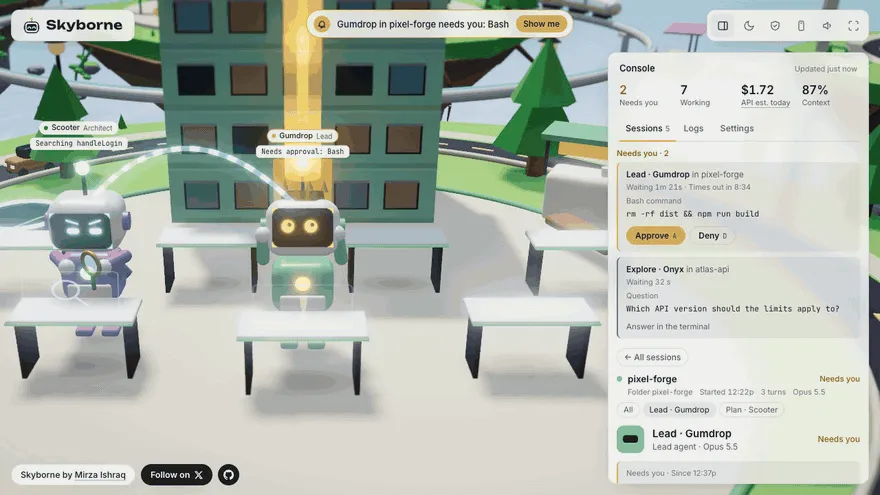
Demo data again. Gumdrop, Onyx and pixel-forge are sample names.
The terminal’s own prompt still works at the same time, and whichever you answer first wins. In my live tests, the card showed up at the same moment as the terminal’s prompt, and the command ran 0.12 seconds after the click.
If the city isn’t in front, optional desktop alerts name the bot, the session and the tool that’s asking. They’re off by default, and they never show the command itself.
There are three rules I wouldn’t bend.
- Skyborne never answers on its own. That’s the opposite of Claude Code’s auto mode, which decides for you. After about 10 minutes with no answer in the city, Skyborne stops holding the request and the card tells you to answer in the terminal. The terminal prompt was there the whole time.
- Questions and plans stay in the terminal. When Claude asks you a question or waits for your OK on a plan, the card says to answer there. Scripted runs with
claude -por the Agent SDK are never held, since nobody is at a terminal to answer. - Every answer is logged. Skyborne records what was asked, the answer, and where it was given.
One quirk could have left stale cards on screen. If you deny a request at the terminal prompt instead, no hook fires at all. Claude Code does have a PermissionDenied hook, but the docs say it only fires when auto mode denies a call. So the card would keep asking.
Claude Code just hangs up on the hook that’s waiting. It’s the quietest “no” in software.
So Skyborne listens for the hang-up. The server watches the held connection, and when it closes, the card clears.
How does Skyborne work under the hood?
In short, Claude Code reports what it’s doing to a small server on your computer, and the server feeds the city. When you click Approve or Deny, your answer travels back the same way.
How events reach Skyborne
Skyborne ships a Claude Code plugin, a bundle of add-ons that Claude Code loads as one unit. It registers 15 hook events. Fourteen of them hand their event to curl, a small command-line tool that sends web requests.
Those 14 hooks run in the background, so Claude Code never waits on them, and each curl call gives up after 2 seconds. The server replies before it stores anything, so each call finishes fast. If Skyborne isn’t running, those hooks fail quietly and Claude Code works as usual.
The permission hook is the one that waits, because waiting for your answer is its whole job. If nothing is listening, it exits cleanly and the terminal prompt works the way it always does.
The server is plain Python. It uses only what ships with Python, so there are no extra packages to install. It stores events in SQLite, a small database that lives in one file under ~/.skyborne. It pushes live changes to the page with Server-Sent Events, a one-way stream from the server to the open page.
Transcripts and the token double count
Hooks don’t report everything, so every 0.3 seconds the server also reads Claude Code’s transcripts, the log files it writes for each session. That’s where the tokens per agent come from. It’s also where the second quirk lives.
Claude Code writes one API message across two or three transcript lines and repeats the token usage on every line. Add up every line and you nearly double the count. In one test session, that came to 889,376 tokens against a real 426,143. Skyborne counts each message once.
Where Usage and Context come from
Usage and Context come from the optional status line, the info bar at the bottom of Claude Code. Its script receives session data as JSON. The 5-hour limit only shows up there for Pro and Max subscribers, so other plans get the API-price estimate instead.
Privacy, and one honest limit
Privacy was a ground rule, not an afterthought.
- It listens on
127.0.0.1, so only your computer can reach it. - Websites open in your browser can’t read it or send it anything, because it refuses requests from any other page.
- Approve, deny and rename need a token that’s new every launch.
- It makes no requests to the internet. The 3D engine and fonts come bundled, and the browser tests fail if any request leaves the machine.
- History, including your prompts, commands and tool output, stays in
~/.skyborne, in a folder only your account can open.
There’s one honest limit. Any program running on the same computer can connect to Skyborne and read the live stream, prompts and commands included. The stream also carries that launch token, so such a program could approve or deny a waiting request too.
So don’t run Skyborne on a computer you share with people you don’t trust.
How is Skyborne different from Claude Code’s agent view and Pixel Agents?
As of October 2026, the biggest difference is where you answer. Of the four tools below, Skyborne is the one built around answering a permission prompt from the view itself. You don’t attach to the session or switch to its terminal.
| Tool | What you see | Subagents (helpers) | Permission prompts | Where it runs |
|---|---|---|---|---|
| Claude Code agent view | A terminal list of background sessions, grouped by state | Not listed as separate rows | Attach to the session to answer | Built into Claude Code |
| Pixel Agents | A 2D pixel-art office | Their own characters | A speech bubble when one waits | VS Code or a local browser page |
| Agent Flow | A live node graph, for Claude Code and Codex | Part of the graph | Not a listed feature | VS Code or a local browser page |
| Skyborne | A 3D sky city | Their own Skybots | Approve or deny from a card | A local browser page |
Agent view is the official one, and it’s still a research preview. It comes with Claude Code, so there’s nothing to install.
Pixel Agents also shows agent teams, lets you lay out your own office, and lists Windows, Linux and macOS support. Agent Flow adds timeline and transcript panels, and it can replay a saved event log.
If you only run background sessions, agent view is already there. If you live in VS Code, Pixel Agents sits right next to your terminal. If you also run Codex, Agent Flow covers both. And if you mostly want to answer prompts from your phone, Remote Control does that, through Anthropic’s servers.
Skyborne covers the rest. That means answering permission prompts from one place, tracing every step and every token per agent, and keeping all of it on my own machine.
How did a token tracer turn into a sky city?
Skyborne didn’t start as a city. It started as a small token tracer and grew in steps. The city went by four other names before Skyborne, and two earlier projects led to it. Here’s the whole chain.
- Command Token Tracer (October 1). A small Python dashboard from my Claude token usage case study. It answered one narrow question. Would I save tokens if I ran some commands myself instead of letting Claude run them?
- darkm0 (October 1 to 2). “An agent tracer for Claude Code,” in its README’s words. It “records what every agent does, what it costs, and what it touches, and shows it as a 3D ‘codebase city.’” I built the recorder, the transcript importer and the server core. The 3D city never got built there.
- Agent Yard, then Cybertronic, then Orion. The city’s early names, before it had a repo of its own.
- Orion Skycity (October 2). The first commit landed that morning. By the afternoon, the bots had faces, moods and little life moments.
- Skyborne (October 2, evening). It’s a sky city, so the ones who live there are sky-born.
The bots were plain “Claude Bots” until October 5, when I asked what to call them. Skybot stuck.
How did I build Skyborne in four days without vibe coding?
I built Skyborne with the help of Claude Code, running Opus 5.5. Vibe coding is when you never read the code the AI writes, and I don’t work that way. So the process mattered as much as the code.
Before the real code, I wrote ground rules into the project’s CLAUDE.md, the instructions file Claude Code reads in every session. They included keeping everything local, plus these three.
- Never auto-approve anything. Log every decision.
- Never get in Claude Code’s way. If Skyborne is down, Claude Code behaves exactly as if it was never installed.
- Verify before building. Check the docs or real recorded payloads before using any field, and never guess a name.
Then I measured before building. A throwaway Python server recorded every event Claude Code sent. A small driver ran real claude sessions and noted when each permission prompt hit the screen. Everything they found went into a public findings file, from approval timings to the token double count.
The rules also said that when the docs and the observed behavior disagree, trust the behavior and write it down. That came up fast. The hooks docs listed an ID that ties each permission request to its tool call, and Claude Code 2.1.289 didn’t send it.
So Skyborne matches requests by session, agent, tool and input instead. The docs now say the request comes without that ID. At least the docs and the software agree now.
Review agents checked each plan and each diff, the same way I describe in my automated code review pipeline. The plan reviewer is plan-adversary, a subagent I tested with LLM evals, meaning repeatable tests that score an AI’s answers. The tests carry the rest.
- 214 Python tests for the server, the importer, the recorder and the reducer. The reducer is the code that turns a stream of events into the city’s current state.
- Replay tests built from real Claude Code payloads, the raw data it sends, with private details scrubbed out. Hook events can arrive out of order, so each one is replayed in shuffled order and has to give the same result every time.
- Live tests that drive real
claudesessions in a terminal. - CI, the automatic test run on every push and pull request, across macOS, Ubuntu and Windows and three Python versions, plus browser tests in Chromium.
The first commit was on Friday, October 2, in a private repo. Skyborne went public four days later, on Tuesday, October 6, with version 0.1.0 on PyPI, Python’s public package index. The public repo starts at that release commit. The first pull request from someone else, a --version flag, was merged the day after the release.
What did RAGnetic teach me that Skyborne got right?
Before Skyborne, I spent four months on an open source AI project with 347 commits and no users. I wrote down what I’d do differently. Skyborne is me actually doing it.
- One thing, not a platform. RAGnetic had five pillars. Skyborne monitors Claude Code, and only Claude Code. No Codex, no other runtimes.
- Show it in a week. RAGnetic never launched. Skyborne went public within days, rough edges and all.
- Fewer dependencies, one storage backend. RAGnetic was glue over about ten fast-moving libraries and needed a 2.4 GB Python environment. Skyborne needs only Python and one SQLite file.
- Try it in five minutes. I wrote that if a stranger can’t try something in five minutes, they won’t. Skyborne installs with three short commands, and skyborne.dev plays a recorded session right in the browser.
- Tests before the second feature. RAGnetic’s only benchmark couldn’t fail. Skyborne’s replay tests come from real payloads, and they fail when the result comes out wrong.
That five-minute promise is the easiest one to check, so here’s how.
How do you try Skyborne?
The fastest way is skyborne.dev. It plays a recorded session in the city, next to a few sample districts, with nothing to install.
To watch your own agents, you need Python 3.11 or newer, Claude Code, curl and a current browser. The browser needs WebGL, the 3D feature every current one has. If you don’t have Python, uv, below, fetches it.
So far it’s tested end to end on macOS with the Claude Code CLI, versions 2.1.288 and 2.1.289. Linux and Windows pass the automated tests but haven’t been tried with real sessions yet, and Firefox and Safari are unchecked.
Skyborne installs with uv, a fast installer for Python programs. If you don’t have uv yet, install it from its install page first, then open a new terminal.
uv tool install skyborne
skyborne install
skyborne
skyborne install adds Skyborne’s plugin to Claude Code, and its hooks merge with yours, so your own hooks keep running. It also asks whether to add its status line. Say yes if you want Usage and Context in the city.
If you already have a status line, Skyborne’s runs yours and shows its output, so you still see it. Uninstalling restores your original setting.
If the skyborne command isn’t found, run uv tool update-shell and open a new terminal.
The last command starts Skyborne, and the city opens at http://127.0.0.1:7317. The first time, it offers to import your sessions from the last 7 days, from the transcripts Claude Code already keeps. After that, start Claude Code in another terminal, and its session appears as a new district. Sessions that were already open before you installed don’t show up live, so start a new one.
If something looks off, skyborne doctor checks your setup and explains the problem. To remove Skyborne, run skyborne uninstall and then uv tool uninstall skyborne. Your history stays in ~/.skyborne until you delete that folder.
If you can help, the issues are open for Linux, Windows, and Firefox and Safari.
Skyborne is an independent project. It isn’t made, endorsed or supported by Anthropic.
Right now, Skybots read, search, think, take coffee breaks and dance when a lead finishes. What should the Skybots act out next?