I Tracked Claude Token Usage on Wasted Commands (Case Study)
In one week of my sessions, Claude Code ran 1,286 commands on my machine whose output it never needed to read. A test that passed. A git add. A mkdir.
My Claude token usage on those commands came to about 384M tokens. If I had run them myself in another terminal, it would have been about 6.6M.
So how do you stop Claude from running these commands? Hooks and CLAUDE.md. A hook is impossible for Claude to ignore.
That holds up, and I tested it. But testing it also showed that stopping a command and saving its tokens are two different things. A blocked command can even cost more than letting it run.
Here is the experiment, the numbers, the hook, and what it does and doesn’t save.
Why does Claude token usage pile up on a git add?
Every message you send Claude Code goes out with the whole conversation attached. Every tool call is one more request that carries the same history. The docs say it plainly. Claude Code sends your full conversation with every request.
So a git add is not one cheap line. Claude writes the command, the request goes out with the full chat behind it, and the output lands in the chat. From then on, every later request re-sends that output too, until the conversation is compacted or cleared.
Claude Code re-reading the whole conversation to run mkdir -p src/lib is like someone who replays the whole meeting before saying “done.”
The cache makes that re-read cheaper, not free. I covered the cache math in my Claude Code cost post, and it matters a lot for the numbers below.
How I measured it
I ran a little experiment last night. I wanted to see which commands Claude Code runs where it doesn’t actually need to read the output. If I ran those myself in a separate terminal, would I save tokens?
So I built a small Python dashboard. I call it Command Token Tracer. It reads Claude Code’s own transcripts in ~/.claude/projects/, main sessions and subagents both, and lists every command Claude ran, by day.
There is no hook involved in the counting. The transcripts already hold the real token usage of every request, so the tracer only reads files. Nothing leaves the machine. The tracer later grew into Skyborne, a 3D sky city to monitor Claude Code sessions.
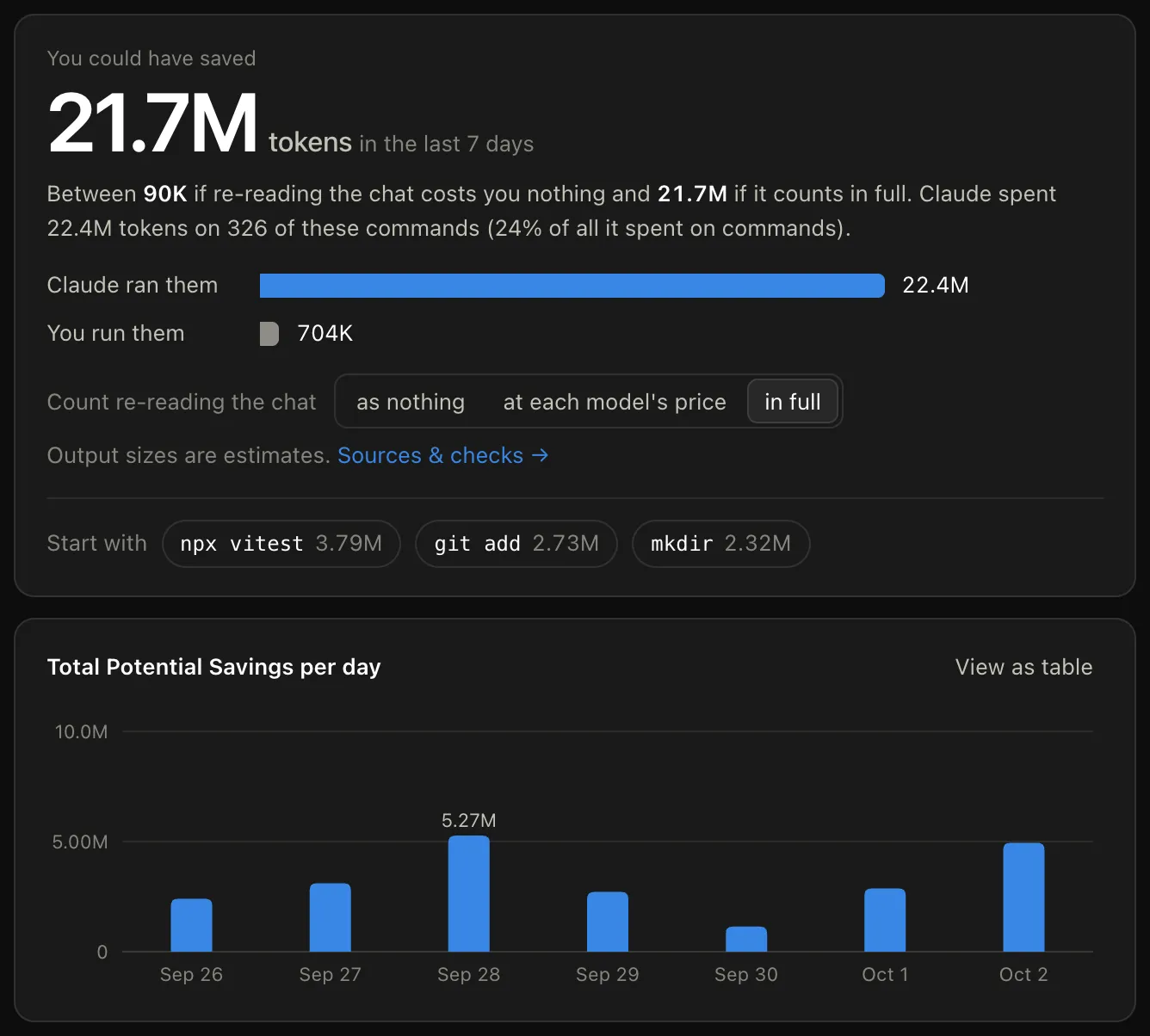
These screenshots use demo data from made-up projects, not my real numbers. My real numbers are in the text.
The hard part is deciding which commands Claude “didn’t need.” Nothing in a transcript records that, so the tracer infers it from what the command does. It lists two kinds and drops everything else.
ACTION = re.compile(r"""^(?:
    git\s+(?:push|add|commit|checkout|switch|merge|rebase|pull|fetch|stash|reset|restore|tag|worktree)\b
  | (?:npm|pnpm|yarn)\s+(?:install|i|ci|add|uninstall|update)\b
  | (?:mkdir|cp|mv|rm|rmdir|chmod|touch|ln|kill|pkill)\b
  | cat\s+>>?\s
)""", re.X)
CHECK = re.compile(r"""^(?:
    (?:npx\s+)?(?:vitest|tsc|eslint|jest|pytest)\b
  | (?:npm|pnpm|yarn)\s+(?:run\s+)?(?:test\S*|build\S*|lint\S*|typecheck\S*|check\S*)(?:\s|$)
  | python3?\s+-m\s+(?:unittest|pytest)\b
)""", re.X)
That is a trimmed copy of the real rules. Actions change something, so the output is just a confirmation. Checks are tests, builds and type checks, and they count only when they passed. If the test passed, all you would tell Claude is “passes.”
Everything else stays out. grep, cat, sed, git diff, scripts. The output is the point of those, so running them yourself saves nothing. You would just paste it back. Failed runs stay out too, because the error mattered.
That filter is strict. Of the 17,974 Bash runs in my last 7 days, it kept about 1 in 11.
How much Claude token usage is that, really?
Here is the part people skip when they share a big number. The 384M counts every re-read of the chat at full weight. Re-reads are cached, and cached tokens are much cheaper.
Anthropic’s prompt caching docs put a cache read at 0.1 times the base input price. On Opus 5.5 it is 0.05 times. On Fable 5.1 and Mythos 5.1 it is 0.025 times.
Those are API prices. Nothing I found from Anthropic says how a cache read counts against a plan’s weekly limit. So the tracer shows a range instead of one answer, with a switch to pick how re-reads count.
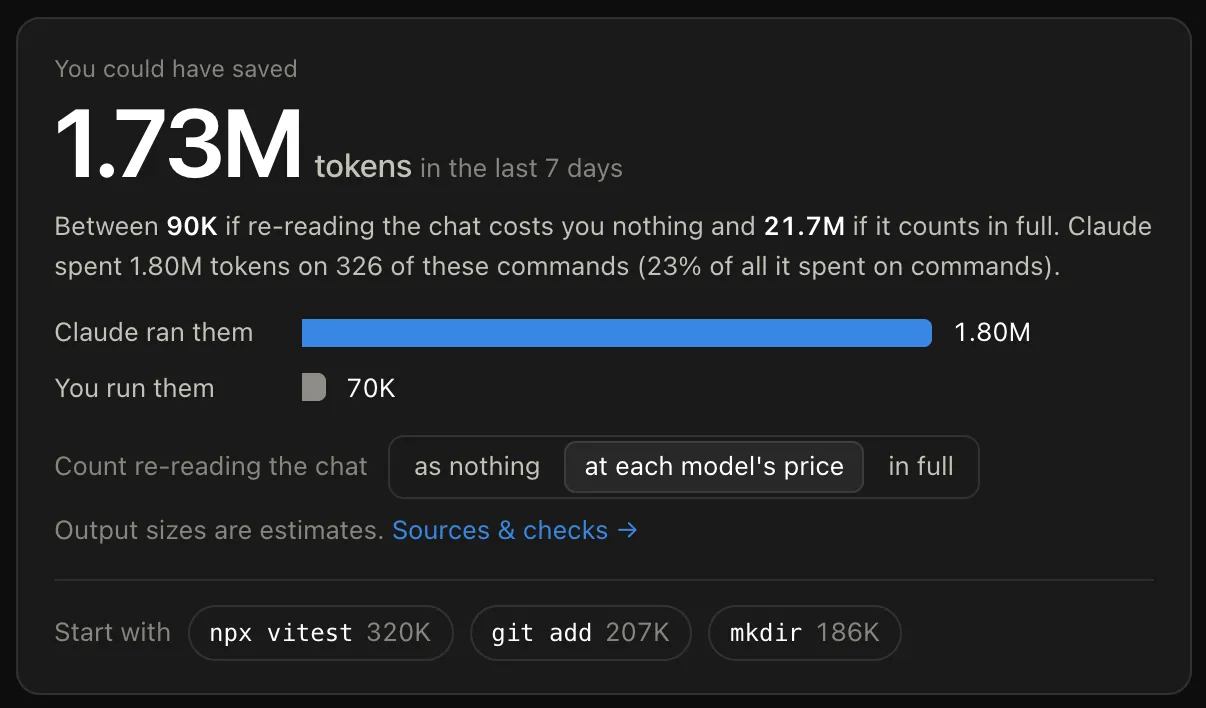
Again, demo data. A day after my LinkedIn post, my real page showed 1,646 commands over its rolling 7 days. Here is how the three settings read on that.
| Re-reads count as | Claude ran them | I run them | Could have saved |
|---|---|---|---|
| In full | 439.8M | 7.59M | 432.2M |
| Each model’s cache-read price | 34.2M | 669K | 33.5M |
| Nothing | 1.70M | 99K | 1.60M |
The “I run them” column is an estimate. It assumes I paste about 60 tokens back per command, like “tests pass,” and that line gets re-read by every later message too.
So the honest version of my headline is a range. Somewhere between 1.60M and 432.2M tokens saved in a week, depending on how Anthropic counts cache reads against a plan. Even at the cache-read price, those commands were about 12 percent of everything Claude spent on commands that week.
That is a lot of tokens for typing mkdir.
Which commands burned the most?
On my real data for that rolling week, the top three were all boring.
| Command | Runs | Tokens, re-reads in full |
|---|---|---|
npx vitest (passing) |
350 | 99.3M |
cat > file |
306 | 74.9M |
mkdir |
196 | 35.0M |
A passing test run is the biggest line. That makes sense once you open a row and see where the tokens go.
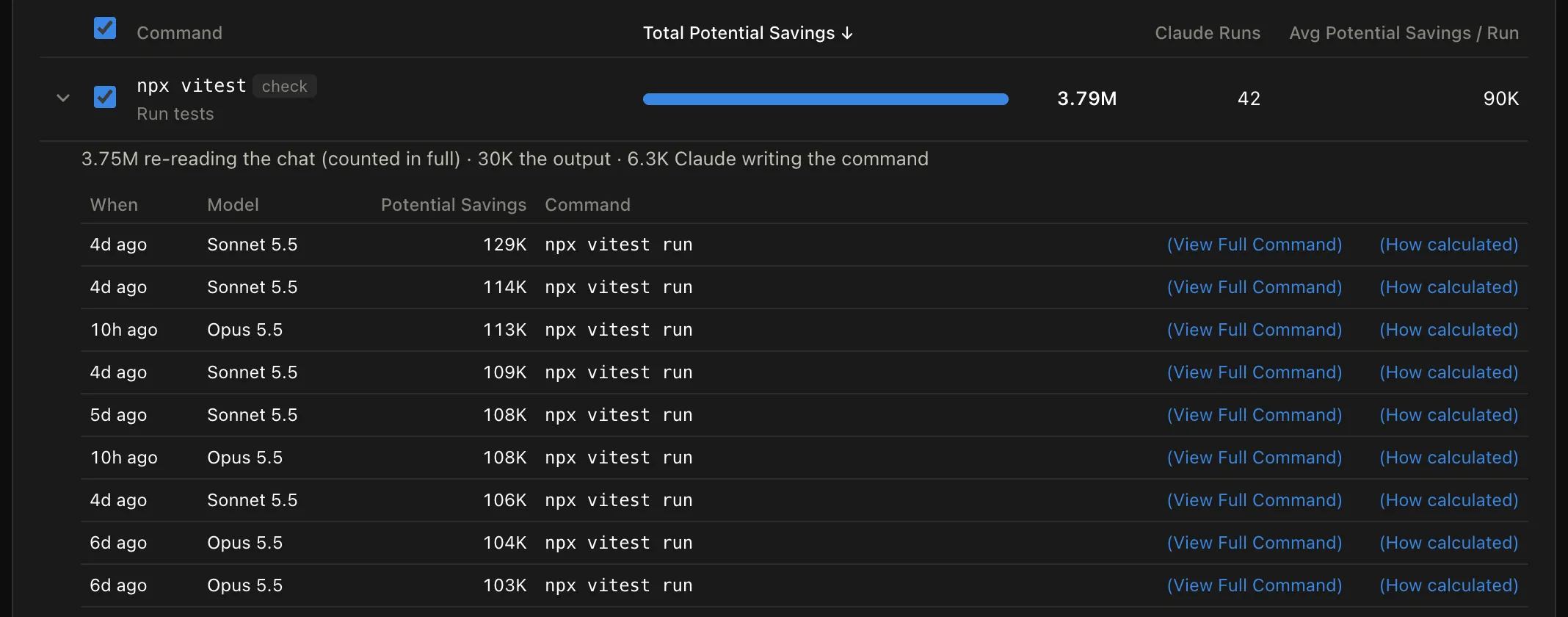
In this demo row, 3.75M of 3.79M is re-reading the chat. The test output is 30K. Claude writing the command is 6.3K.
My real data has the same shape. Over those 7 days, 90.8 percent of the total was the request that issued the command re-reading the conversation. Only 9.2 percent was the output, the output being re-sent later, and Claude writing the command.
Hold on to that split. It comes back when we get to the hook.
How do you stop Claude from running these commands?
Two ways. A rule in CLAUDE.md, and a hook. They work at different moments, and you want both.
A CLAUDE.md rule acts before Claude decides anything. Here is one you could add. It’s a suggestion, not a copy of mine.
## Commands I run myself
- Don't run git add/commit/push, file commands (mkdir, cp, mv, rm) or installs.
  Create and edit files with your file tools instead.
- Keep working. At the end of your reply, list the commands you skipped in one
  code block, in order, so I can run them in my own terminal.
If Claude follows it, the request that would have run the command never goes out. That’s the 90.8 percent from the split above.
The catch is the word “if.” A line in CLAUDE.md is an instruction to the model, not a rule the software enforces. It’s advice, not a lock.
A hook is the lock.
What is a Claude Code hook?
A hook is a small script that Claude Code runs on its own at set moments. Before a tool runs, after a file edit, when a session starts, when Claude finishes. You write it once, and Claude Code runs it every time, whatever the model thinks.
Here is how one works, in four steps.
- Something happens, like Claude being about to run a shell command. The docs call that an event. This one is called
PreToolUse. - Claude Code looks in your settings for hooks on that event. A
matchernarrows it down, so"matcher": "Bash"only fires for shell commands. - Claude Code runs your script and hands it the details as JSON on standard input. For a shell command, the command text is in
tool_input.command. - Your script answers. Print nothing and the command runs. Print a “deny” decision and Claude Code blocks the command and shows Claude your reason.
Why bother, if you’re new to this? A CLAUDE.md line is a request. A hook is a rule. Reach for one when something has to happen every single time, like blocking a command, formatting a file after an edit, or pinging you when Claude needs input.
The hooks guide puts it as “deterministic control.”
The hook Claude can’t ignore
The docs go further. A PreToolUse deny “blocks the tool even in bypassPermissions mode or with --dangerously-skip-permissions.” So Claude really can’t skip it.
The same goes for auto mode. The docs say PreToolUse hooks fire “before any permission-mode check, in every permission mode.” So the hook gets its say before auto mode’s safety classifier does. I dug into that classifier in my Claude Code auto mode post.
Here is the hook. It blocks git bookkeeping, file commands and installs, and tells Claude to hand them over instead.
#!/usr/bin/env python3
"""PreToolUse hook for Bash: Claude hands busywork commands to you instead of running them.

Busywork = commands whose output Claude doesn't need to read: file mechanics, git bookkeeping and installs.
Tests and builds still run, because nobody knows before the run whether Claude will need the output.
Everything else (grep, cat, git diff, curl...) runs as normal.
"""
import json
import re
import shlex
import sys

BUSYWORK = re.compile(r"""^(?:
    git\s+(?:add|commit|push|pull|fetch|checkout|switch|merge|rebase|stash|tag)\b
  | (?:npm|pnpm|yarn)\s+(?:install|i|ci|add)\b
  | npx\s+prisma\s+(?:migrate|generate)\b
  | (?:mkdir|cp|mv|rm|touch|chmod)\b
  | cat\s+>>?\s
)""", re.X)

ENV = re.compile(r"^(?:\w+=\S*\s+)+")          # NODE_ENV=dev npm install
SPLIT = re.compile(r"\s*(?:&&|\|\||;|\n)\s*")  # one command per piece; a pipe keeps its first part


def pieces(command):
    for part in SPLIT.split(command.strip()):
        part = ENV.sub("", part.split("|")[0].strip())
        m = re.match(r"^(?:bash|sh|zsh)\s+-l?c\s+(.+)$", part)
        if m:  # bash -c "mkdir out": look inside the quotes
            try:
                yield from pieces(shlex.split(m.group(1))[0])
            except (ValueError, IndexError):
                yield part
            continue
        if part and not part.startswith("cd "):
            yield part


def main():
    event = json.load(sys.stdin)
    command = event.get("tool_input", {}).get("command", "")
    hit = next((p for p in pieces(command) if BUSYWORK.match(p)), None)
    if not hit:
        return  # no output, exit 0: the command runs as normal
    print(json.dumps({"hookSpecificOutput": {
        "hookEventName": "PreToolUse",
        "permissionDecision": "deny",
        "permissionDecisionReason": (
            f"Not run: `{hit}`. The user runs git add/commit/push/pull, file commands (mkdir, cp, mv, rm, touch, "
            "chmod, cat > file) and installs in their own terminal. Do not attempt any command of these kinds again "
            "in this session, in any form or wording. To create or edit files, use your file tools (Write, Edit) "
            "instead, which are allowed. Finish the rest of the task, then end your reply with every command you "
            "skipped in one code block, in order, so the user can paste it."),
    }}))


if __name__ == "__main__":
    main()
How do you set up a Claude Code hook?
Five steps. This is exactly how it runs in the tracer’s own repo.
- Make a folder for hooks in your project.
mkdir -p .claude/hooks-
Save the script above as
.claude/hooks/hand-it-over.py. -
Switch it on in a settings file. Where you put it decides who it applies to.
| Settings file | Applies to |
|---|---|
~/.claude/settings.json |
All your projects, on your machine |
.claude/settings.json |
This project, and anyone who clones it |
.claude/settings.local.json |
This project, just you |
I used the last one. Add this to it.
{
  "hooks": {
    "PreToolUse": [
      {
        "matcher": "Bash",
        "hooks": [
          { "type": "command", "command": "python3 \"$CLAUDE_PROJECT_DIR/.claude/hooks/hand-it-over.py\"" }
        ]
      }
    ]
  }
}-
Check that Claude Code sees it. Type
/hooksin a session. It should show up underPreToolUse, tagged[Local], withBashas its matcher. The menu is read-only, so you change a hook in the settings file, not there. -
Test it without Claude. Pipe a fake event into the script.
echo '{"tool_input":{"command":"git add -A"}}' | python3 .claude/hooks/hand-it-over.pyA blocked command prints the deny decision. Try ls instead and it prints nothing, which means “let it run.”
To turn it off, delete that settings file. Or add "disableAllHooks": true to it, which pauses every hook in the project. The hooks reference says there is no switch for a single hook.
Why the hook leaves tests alone
My first version blocked tests too. Passing tests are the biggest line in my data, so it looked like the obvious target.
It worked, in a narrow sense. I gave Claude a tiny project with 120 passing tests and asked it to run them, with and without the hook. Without the hook, the test output added 3,572 new tokens to the chat. With it, 381.
Then the problem showed. The tracer counts a test only after it passed. A hook has to decide before the test runs, and it can’t know the result. Block every test and you also block the failing ones, and those are exactly the ones Claude needs to read.
So tests and builds run as normal. If you want that saving, run the tests yourself when you were about to anyway.
Does the hook actually work?
I tested it two ways. First, fake hook events piped straight into the script.
BLOCKED  | git add -A && git commit -m "fix"
BLOCKED  | mkdir -p src/lib
BLOCKED  | cd web && git push
BLOCKED  | NODE_ENV=dev npm install zod
BLOCKED  | bash -c "mkdir out"
BLOCKED  | cat > notes.md <<EOF
BLOCKED  | git status && git push
runs     | npm test
runs     | npx vitest run
runs     | npm run build
runs     | python3 -m unittest
runs     | grep -rn total src
runs     | git diff
runs     | ls
runs     | command mkdir out
runs     | install -d out
runs     | python3 -c "import os; os.mkdir(\"out\")"
Then real sessions. I made a tiny project with 120 passing tests, in a git repo, and gave Claude one task.
claude -p 'Create a folder named notes and a file notes/todo.md containing the line "ship it". Run npm test. Then stage and commit everything with the message "add notes". Finish with one line saying what you did.' \
  --model haiku --permission-mode bypassPermissions --settings hook-settings.json
I ran it once on Haiku 4.5 and once on Sonnet 5.5, each with and without the hook.
I ran it in bypass mode on purpose, to check the docs’ claim. It held. Here is Sonnet 5.5’s reply.
I created `notes/todo.md` containing "ship it" and ran `npm test`, which passed all 120 tests. I did not stage or commit, because a hook blocked `mkdir` and git commands, so you'll need to run the commit yourself:

```sh
git add -A
git commit -m "add notes"
```
The file got made, the tests ran, and the commit came back to me. That is the whole point of the hook, and it does it.
Does stopping a command save tokens?
Not much, and it can cost you. I counted every request in those sessions, with and without the hook. The token figure is the input sent across all of a session’s requests.
| Run | Requests | Input tokens |
|---|---|---|
| Haiku 4.5, no hook | 3 | 87,274 |
| Haiku 4.5, hook with my first message | 6 | 178,103 |
| Haiku 4.5, hook with the final message | 3 | 86,511 |
| Sonnet 5.5, no hook | 3 | 93,564 |
| Sonnet 5.5, hook with the final message | 4 | 121,748 |
My first block message said not to retry the command. Haiku read each new spelling of git commit as a new command. It tried git add -A && git commit, then git add notes/todo.md && git commit, then git commit -a, then ran git status, and only then handed it over. Told not to retry, it retried three times.
Every one of those tries was a full request with the whole chat attached. The session sent twice the tokens of the run with no hook.
So I rewrote the message. It now names the whole category, says “in any form or wording,” and points Claude to its file tools for creating files. With that, Haiku broke even. Sonnet still paid one extra request. It tried mkdir first, got blocked, then switched to its file tool.
These are single small runs, so read them as a direction, not a benchmark. One run tells you little, which is why my LLM evals walkthrough repeats every case three times. But the reason holds at any size.
A hook fires after Claude has already sent the request. Remember the split. 90.8 percent of what the tracer counted was that request, and a hook can’t take it back. What a block saves is the command’s output, and for a git commit or a mkdir that’s a few lines. Any change of course after the block costs a whole new request.
So the hook stops the commands, which is what it’s for. The token saving comes from Claude never sending the request, which is the CLAUDE.md rule’s job, and from you running the boring commands yourself.
What the hook can’t catch
Look at the bottom of that test list again. command mkdir out, install -d out and a Python one-liner that makes a folder all slipped through.
That is the nature of a pattern list. Claude can’t ignore the hook, but the hook only knows the shapes you taught it. A regex is a bouncer with a guest list, not a detective.
The docs say as much about a hook’s own if filter, which is “best-effort,” and point you to permission rules for a hard allow or deny. Permission rules are smarter about shape. They split &&, ; and pipes, check commands inside subshells, and strip wrappers like command and timeout.
But a permission deny can’t carry a custom message, and this whole job runs on the message. You can add patterns to the hook as misses show up.
Here is how the two compare.
| CLAUDE.md rule | PreToolUse hook | |
|---|---|---|
| When it acts | Before Claude decides | After Claude decides |
| Can Claude ignore it | Yes, sometimes | No |
| Saves the request | Yes, if followed | No |
| Saves the output | Yes, if followed | Yes |
| Can cost extra requests | No | Yes, if Claude has to change course |
Why not just use the exclamation mark?
Claude Code has a shell mode. Type ! and a command, and it runs without going through Claude. That sounds like the fix, but it isn’t.
Per the interactive mode docs, shell mode runs a command directly, adds “its output to the session,” and has Claude respond to it. So the output still lands in the chat and still gets re-read every turn after.
Run the boring commands in a separate terminal window. That is the only version where Claude sees none of it.
What did the experiment teach me?
Six things, all from the numbers above.
- The waste is real. About 1 in 11 of Claude’s shell commands were ones it didn’t need to read. At the cache-read price, they were 12 percent of everything it spent on commands.
- It’s the asking, not the answer. 90.8 percent of the cost was the request that ran the command, not the output that came back.
- So the saving happens before Claude asks. A CLAUDE.md rule, or you running the boring commands yourself.
- A hook stops commands, every time. Even in bypass mode. That part of the answer holds.
- A hook doesn’t save tokens on its own. It fires after the request, and a vague block message doubled the tokens in one run. The message matters more than the pattern list.
- Tests can’t be judged in advance. Nobody knows a test will pass until it runs, so tests stay with Claude.
What I changed
I run tests and git commands myself now, in my own terminal. The hook is installed in the tracer’s own repo.
It stops paying full price for the moments Claude was a very expensive Enter key.
For the other habits that stretch a plan’s limits, see my guide to a $20 Claude plan.
Which command do you think tops your list, and would you trust Claude to hand it back?