GitHub Workflows for Python and Django (Step by Step)
GitHub workflows are YAML files in your repository’s .github/workflows/ folder. GitHub reads them and runs the jobs they describe on its own machines whenever something happens in the repo, such as a push, a pull request, a version tag or a click on a button. This guide builds a real CI pipeline for a small Django app in twelve steps. By the end it runs the tests on every pull request against PostgreSQL, on three Python versions, boots the Docker image, cancels outdated runs, has a manual Run workflow button, reuses itself in a release workflow and blocks merges until everything passes.
Every workflow file and every log line below comes from a real run in the public demo repo, Ishraq21/github-workflows-django. You can open its Actions tab and see the same runs, red ones included. Each step is a working GitHub Actions example you can copy into your own repo.
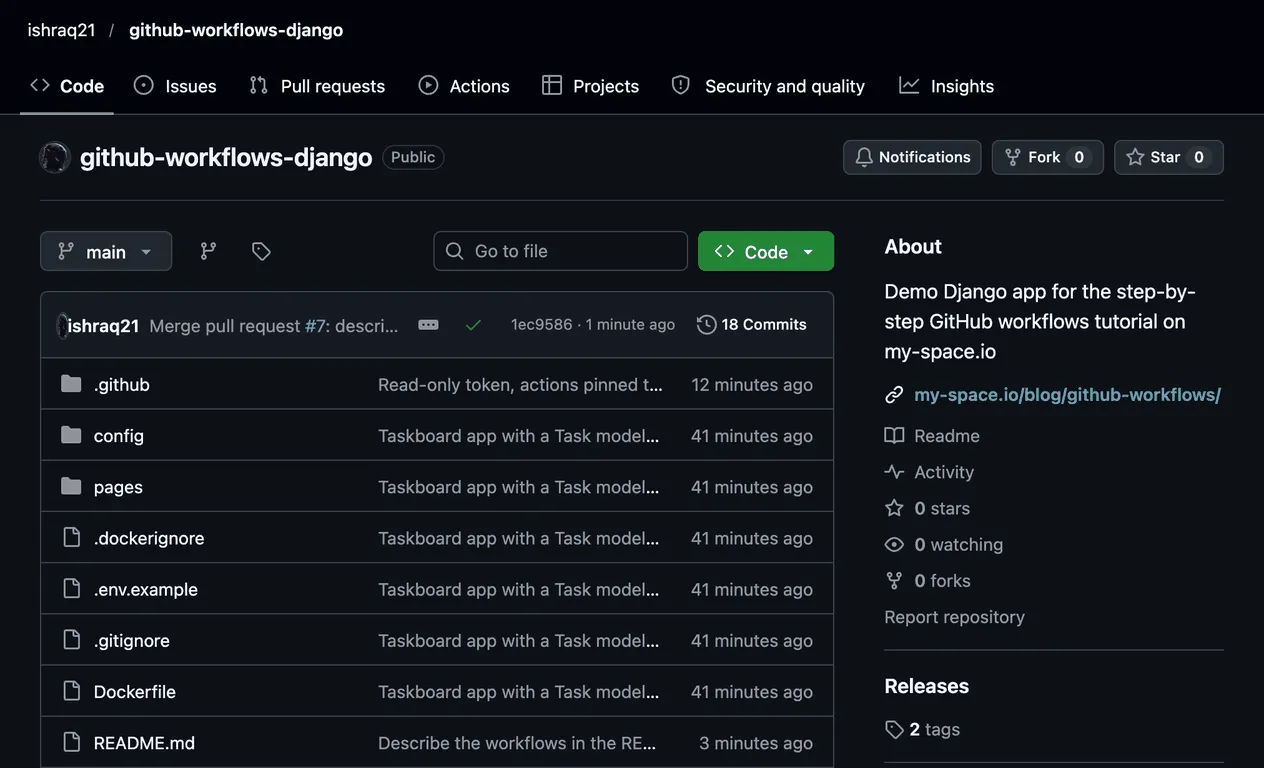
The demo repo. Each step of this guide is a commit or a pull request in its history.
What are GitHub workflows?
A GitHub workflow is one automated process, written as one YAML file. GitHub Actions is the feature that runs them, so a GitHub Actions workflow and a GitHub workflow are the same thing. Six words cover almost everything you’ll read in the docs.
- Workflow. One YAML file in
.github/workflows/. YAML is a plain-text settings format where indentation shows what belongs to what. A repo can have as many workflows as it needs, for example one for tests and one for releases. - Event. What starts a workflow. A push, a pull request, a new tag, a schedule or someone clicking Run workflow.
- Job. A group of steps that runs on one machine. Jobs run in parallel unless one job says it needs another.
- Step. One command (
run:) or one action (uses:). Steps in a job run in order and share that machine’s files. - Action. A packaged step someone else wrote, so you don’t have to.
actions/checkoutdownloads your code onto the machine. - Runner. The machine a job runs on. GitHub’s hosted runners are fresh virtual machines that get thrown away after each job.
Five events start every workflow in this guide.
| Event | When it runs | Step |
|---|---|---|
push |
Any push at first, then only pushes to main |
Step 2 |
pull_request |
Each pull request, and each new commit pushed to one | Step 3 |
workflow_dispatch |
Someone clicks Run workflow or runs gh workflow run |
Step 9 |
workflow_call |
Another workflow calls this one with uses: |
Step 10 |
push with tags |
Someone pushes a version tag such as v0.1.0 |
Step 10 |
One name trips people up in search. GitHub Flow isn’t a workflow file at all. GitHub’s docs call it “a lightweight, branch-based workflow”, meaning the habit of branching, opening a pull request and merging. Workflows are what check that pull request.
Why do I use GitHub workflows for CI?
CI, short for continuous integration, means your tests run automatically on every pull request and every push to main. I’m a data and backend developer who has been building with Django since 2018, and for CI it’s GitHub Actions all day. The CI stage of my eight-stage review pipeline runs on GitHub-hosted runners.
Three things have happened to me with CI. It has caught bugs on my pull requests before they merged. And I’ve merged on red once.
I’ve also pushed one “fix ci” commit after another just to debug a workflow file. Git remembers every one of those commits.
My open source project Skyborne shows what a grown-up version looks like. Its CI workflow tests three operating systems against three Python versions on every pull request, and its release workflow reruns that whole CI before it publishes anything. Steps 6, 8, 9, 10 and 11 borrow ideas from both files.
What do you need before you start?
- A GitHub account and git. Workflows run on GitHub’s machines, so your laptop only edits files and pushes them.
- The GitHub CLI,
gh, if you want logs in your terminal. It’s optional. Everything it does here, the Actions tab does too. - A Django project with tests. Step 1 gives you one. Any Python project with a test command works with small changes.
- Docker, only to run the app locally. CI builds the image on GitHub’s machines. My Django in Docker guide explains every file in the image, and my beginner Docker tutorial starts from zero.
On cost, GitHub’s billing docs say Actions is free for public repositories on standard GitHub-hosted runners. Private repos on GitHub Free get 2,000 minutes a month. The demo repo is public, so none of its runs cost anything.
The twelve steps at a glance
New to this? Steps 1 to 7 give you working CI, and you can stop there. Steps 8 to 12 are upgrades to add when you need them, like cancelling old runs, a Run workflow button, releases, tighter security and required checks.
- Get the demo project on GitHub.
- Write your first GitHub workflow.
- Run the tests on every pull request.
- Test against PostgreSQL with a service container.
- Cache pip downloads.
- Test several Python versions with a matrix.
- Build and smoke-test the Docker image.
- Cancel outdated runs.
- Add a Run workflow button.
- Reuse CI in a release workflow.
- Lock down permissions and pin actions.
- Make the checks required before merging.
Step 1. Get the demo project on GitHub
The demo is Taskboard, the Django 6.1 app from my Django in Docker guide, plus a small Task model and three tests. Its start branch has no workflows yet, which is where you begin.
Clone that branch, call it main, and drop the link to my repo.
git clone --branch start https://github.com/Ishraq21/github-workflows-django.git taskboard
cd taskboard
git switch -c main
git remote remove origin
Create an empty repository on GitHub with no README, then push to it. Replace OWNER with your username.
git remote add origin https://github.com/OWNER/taskboard.git
git push -u origin main
Here are the tests CI will run. The last one requests the status page, which reads the PostgreSQL version with a query only PostgreSQL understands. Remember that for Step 3.
from django.test import TestCase

from .models import Task


class TaskTests(TestCase):
    def test_new_task_is_open(self):
        task = Task.objects.create(title='Write the CI workflow')
        self.assertFalse(task.done)
        self.assertEqual(str(task), 'Write the CI workflow')


class PageTests(TestCase):
    def test_healthz_answers_ok(self):
        response = self.client.get('/healthz')
        self.assertEqual(response.status_code, 200)
        self.assertEqual(response.content, b'ok')

    def test_status_page_counts_open_tasks(self):
        Task.objects.create(title='Open one')
        Task.objects.create(title='Finished one', done=True)
        response = self.client.get('/')
        self.assertEqual(response.status_code, 200)
        self.assertEqual(response.context['open_tasks'], 1)
        self.assertContains(response, 'Open tasks')
Step 2. Write your first GitHub workflow
GitHub only looks for workflows in .github/workflows/ at the top of the repo, and only in files that end in .yml or .yaml. Create the folder and save this as .github/workflows/hello.yml.
name: Hello

on:
  push:

jobs:
  greet:
    runs-on: ubuntu-latest
    steps:
      - name: Say hello
        run: echo "Hello from GitHub Actions"

      - name: Show where this job runs
        run: |
          echo "Runner OS is $RUNNER_OS"
          echo "Commit is $GITHUB_SHA"
          python3 --version
Here’s what each key does.
nameis the label in the Actions tab.onlists the events that start the workflow.pushwith nothing under it means any push, to any branch or tag.jobsholds one job here, with the IDgreet. IDs are yours to pick.runs-on: ubuntu-latestasks for a GitHub-hosted Linux machine.stepsrun in order. Arun:step is a shell command, andrun: |lets one step hold several lines.
Indentation is the syntax in YAML. Use spaces, never tabs, two per level.
Commit and push it.
git add .github/workflows/hello.yml
git commit -m "Add a hello workflow"
git push
Open the Actions tab on GitHub and the run shows up within seconds. In the demo repo it passed in 3 seconds. You can also read it from your terminal. gh run list shows the run ID, and gh run view RUN_ID --log prints the whole log.
Hello from GitHub Actions
Runner OS is Linux
Commit is 8a7f6b4626380c912e586f6160396a88057dd274
Python 3.12.3
The runner had Python 3.12.3 before you installed anything. That’s the Ubuntu system Python, and Step 3 replaces it with the version you choose.
The run also came back with a notice. “The ubuntu-latest label will migrate to Ubuntu 26 beginning October 19, 2026.” GitHub’s announcement says the move rolls out over several weeks and should finish by November 19, 2026. Three seconds in, and GitHub already has notes.
That’s why the real CI in Step 3 names ubuntu-24.04 instead of ubuntu-latest. A label that moves under you is a fine default for a hello script and a bad one for a pipeline.
One more surprise. GitHub’s docs say “You must be logged in to a GitHub account to view workflow run information, including for public repositories.” A public repo doesn’t mean public logs. Anyone signed in can read them, and anyone else sees “Sign in to view logs.”
Step 3. Run the tests on every pull request
Real CI checks a change before it merges, so it belongs on pull requests. A pull request is how GitHub proposes the changes on a branch and lets you review them before they join main. Work on a branch and delete the hello workflow first.
git switch -c add-ci
git rm .github/workflows/hello.yml
mkdir -p .github/workflows
The mkdir isn’t a typo. When hello.yml is the only file in the folder, git rm deletes the empty folder too, and saving ci.yml into a folder that no longer exists fails.
Save this as .github/workflows/ci.yml.
name: CI

on:
  pull_request:
  push:
    branches: [main]

jobs:
  test:
    runs-on: ubuntu-24.04
    env:
      # A throwaway key. CI only ever talks to a throwaway database.
      SECRET_KEY: ci-only-not-a-real-secret
    steps:
      - uses: actions/checkout@v7

      - uses: actions/setup-python@v7
        with:
          python-version: "3.14"

      - name: Install dependencies
        run: pip install -r requirements.txt

      - name: Check for missing migrations
        run: python manage.py makemigrations --check --dry-run

      - name: Run Django's system checks
        run: python manage.py check

      - name: Collect static files
        run: python manage.py collectstatic --noinput

      - name: Run the tests
run: python manage.py testpull_requestruns the workflow for every pull request and for every new commit pushed to one.pushwithbranches: [main]runs it again after a merge. Listening topushon every branch would test each pull request twice.actions/checkoutdownloads your code. A runner starts with an empty folder, so without it there’s nomanage.pyto run.actions/setup-pythoninstalls Python. Quote the version. The errors section shows what happens when you don’t.makemigrations --check --dry-runfails when a model changed but nobody made the migration. It writes nothing to disk. My Django migrations tutorial covers why that file matters.collectstaticbuilds the static files manifest. Taskboard uses WhiteNoise’s manifest storage, so any test that renders a page needs that manifest.SECRET_KEYis a throwaway, because the settings refuse to start without a key. Never put a real secret in a workflow file.
Commit it, push the branch and open a pull request.
git add .github/workflows/ci.yml
git commit -m "Run the tests on every pull request"
git push -u origin add-ci
gh pr create --title "Run the tests on every pull request" --body "Adds CI."
It fails. That’s the plan.
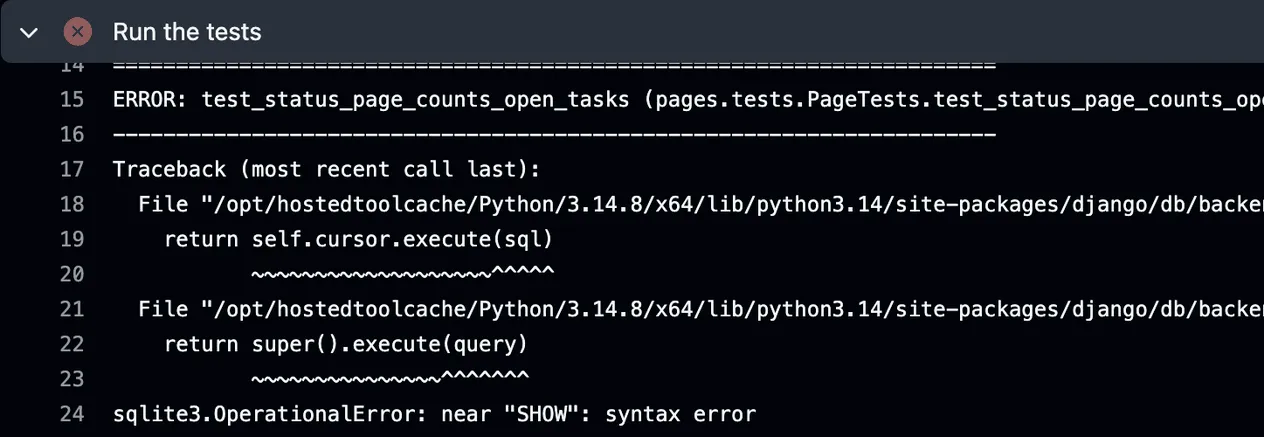
The failed step, expanded in the Actions tab.
django.db.utils.OperationalError: near "SHOW": syntax error

----------------------------------------------------------------------
Ran 3 tests in 0.087s

FAILED (errors=1)
No DATABASE_URL was set, so the settings fell back to SQLite. The status page asks for SHOW server_version, which only PostgreSQL understands. The pipeline works. The app doesn’t, at least not on a database it never runs on in production, and CI just said so before anything merged.
Step 4. Test against PostgreSQL with a service container
A service container is a Docker container GitHub starts next to your job. Use the same PostgreSQL image as production, which is postgres:18-alpine in Taskboard’s compose.yaml. Add services and a DATABASE_URL to the test job.
  test:
    runs-on: ubuntu-24.04
    services:
      postgres:
        image: postgres:18-alpine
        env:
          POSTGRES_PASSWORD: ci-password
          POSTGRES_DB: app
        ports:
          - 5432:5432
        options: >-
          --health-cmd "pg_isready -U postgres"
          --health-interval 5s
          --health-timeout 5s
          --health-retries 10
    env:
      # Throwaway values. CI only ever talks to a throwaway database.
      SECRET_KEY: ci-only-not-a-real-secret
      DATABASE_URL: postgresql://postgres:ci-password@localhost:5432/app
The job runs directly on the runner, so it reaches the database at localhost on the mapped port. The options give the container a health check, a command Docker runs to ask whether PostgreSQL is ready, and the runner waits for it before your first step runs. Here’s that wait in the log.
postgres service is starting, waiting 2 seconds before checking again.
postgres service is starting, waiting 3 seconds before checking again.
postgres service is healthy.
Without the health check, your tests could start while PostgreSQL is still booting. Service containers also need a Linux runner on GitHub-hosted machines, which ubuntu-24.04 is.
Push to the same branch. The pull request runs again and goes green in 27 seconds.
Creating test database for alias 'default'...
Ran 3 tests in 0.086s
OK
The password is a throwaway for a database that lives about a minute. GitHub still printed the URL as ***localhost:5432/app in the job’s environment. It masked everything before the host, password included, though nothing marked it as a secret.
Step 5. Cache pip downloads
Every run starts on a fresh machine, so pip downloads every package every time. setup-python can keep pip’s download cache between runs. Add one line.
      - uses: actions/setup-python@v7
        with:
          python-version: "3.14"
          cache: pip
The action keys the cache on your Python version and your requirements. Its docs say it looks for “requirements.txt or pyproject.toml for pip” and caches “the global cache directory”. That’s the downloaded files, not installed packages. Pip still installs everything, it just skips the download.
The first run finds nothing and saves a cache at the end.
pip cache is not found
Cache saved with the key: setup-python-Linux-x64-24.04-Ubuntu-python-3.14.8-pip-96cff2395093fc19a072867e79c1debebef53b75d31fc0158ce6d501444bb8fc
Rerunning the same commit hits it.
Cache hit for: setup-python-Linux-x64-24.04-Ubuntu-python-3.14.8-pip-96cff2395093fc19a072867e79c1debebef53b75d31fc0158ce6d501444bb8fc
Received 14317555 of 14317555 (100.0%), 16.4 MBs/sec
Cache Size: ~14 MB (14317555 B)
Cache restored successfully
Now the honest numbers. On the miss, the install step took 4.4 seconds. On the hit it took 2.8 seconds, but restoring the 14 MB cache took 1.1 seconds first.
The net saving was about half a second. Try not to spend it all in one place.
Taskboard has five pinned packages, so there isn’t much to save. Caching earns its line when a project’s downloads are big. Turn it on anyway, since it costs one line, but don’t expect it to fix a slow pipeline.
Step 6. Test several Python versions with a matrix
A matrix runs the same job once per value. Django 6.1 supports Python 3.12, 3.13 and 3.14, so test all three.
  test:
    name: Tests (Python ${{ matrix.python-version }})
    runs-on: ubuntu-24.04
    strategy:
      fail-fast: false
      matrix:
        python-version: ["3.12", "3.13", "3.14"]
Then pass the version to setup-python.
          python-version: ${{ matrix.python-version }}
          cache: pip
${{ }} is an expression, which GitHub fills in before the job starts. name puts the version in each job’s title, so a failure tells you which Python broke. fail-fast: false lets the other versions finish when one fails, so you see every failure at once. The run became three parallel jobs.
Successfully set up CPython (3.12.15)
Successfully set up CPython (3.13.16)
Successfully set up CPython (3.14.8)
Each version gets its own pip cache. Python 3.14 reused the cache from Step 5, and 3.12 and 3.13 started cold.
Skyborne’s CI adds a second dimension, os: [ubuntu-latest, macos-latest, windows-latest], so every pull request runs nine test jobs. When I asked Claude about a failed run on my Skyborne dashboard, the culprit was a TimeoutError on Windows with Python 3.12. A laptop running one OS and one Python was never going to catch that.
If you only deploy on one version, testing that one is fine. The matrix pays off when you support several.
Step 7. Build and smoke-test the Docker image
Passing tests don’t prove the Dockerfile builds or that the container starts. A smoke test checks exactly that, by starting the real app and asking it for one page. Add a second job that boots the stack with Docker Compose and requests a page from it.
  docker:
    name: Docker smoke test
    needs: test
    runs-on: ubuntu-24.04
    steps:
      - uses: actions/checkout@v7

      - name: Write a throwaway env file
        run: |
          cat > .env <<'ENV'
          SECRET_KEY=ci-only-not-a-real-secret
          POSTGRES_PASSWORD=ci-password
          ALLOWED_HOSTS=localhost
          ENV

      - name: Build and start the stack
        run: docker compose up --build --wait --wait-timeout 120

      - name: Request the status page
        run: curl --fail --silent --show-error http://localhost:8000/ | grep "Open tasks"

      - name: Show the logs if anything failed
        if: failure()
        run: docker compose logs

      - name: Tear down
        if: always()
        run: docker compose down --volumes
needs: testmakes this job wait for every test job and skip itself if any of them fail. Jobs don’t share files, so it checks out the code again on its own machine.cat > .env <<'ENV'writes the lines that follow into a file called.env, up to the line that saysENV. Compose reads its settings from that file.docker compose up --waitreturns only when the containers are running and healthy. Taskboard’scompose.yamlalready gives both services a health check, so there’s no sleep loop to write.curl --failexits with an error on a 4xx or 5xx response, andgrepfails if the page doesn’t contain “Open tasks”.if: failure()prints the container logs only when something broke.if: always()tears everything down even after a failure.
The job passed in 31 seconds.
 Container github-workflows-django-db-1  Healthy
 Container github-workflows-django-web-1  Healthy
      <div><dt>Open tasks</dt><dd>0</dd></div>
The Actions tab draws the needs link as a graph.
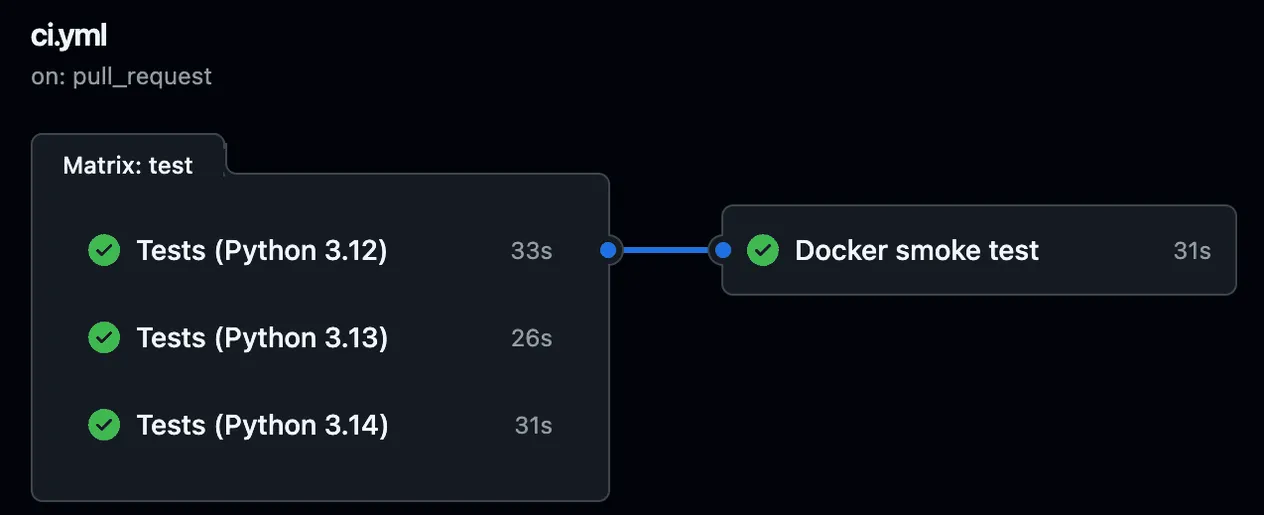
All three test jobs must pass before the Docker smoke test starts.
Step 8. Cancel outdated runs
Push a fix two minutes after a commit and the first run is now testing code nobody will merge. This step tells GitHub to cancel that older run, so you only wait for the newest one. Add this at the top level of ci.yml, under on.
# A new push to a pull request cancels that pull request's older run.
# Every other run gets a group of its own, so nothing cancels it.
concurrency:
  group: ci-${{ github.event_name == 'pull_request' && github.ref || github.run_id }}
  cancel-in-progress: ${{ github.event_name == 'pull_request' }}
In plain words, runs in the same group can’t overlap. Each pull request gets its own group, named after its ref, GitHub’s name for a branch or pull request such as refs/pull/1/merge. A new push to that pull request cancels its older run. Every other run, like a push to main, gets a group of its own, so it’s never cancelled.
Why not one group for everything? A group holds one running and one waiting run, and GitHub’s concurrency docs say a newer run cancels the waiting one. With three quick pushes to main, the middle commit would never get tested. Skyborne’s CI uses this same split.
In the same push, give each job a time limit. A hosted job can run for up to six hours by GitHub’s limits, and a hung test shouldn’t get to.
  test:
    name: Tests (Python ${{ matrix.python-version }})
    runs-on: ubuntu-24.04
    timeout-minutes: 10
The docker job gets the same line. Pushing these two changes 16 seconds apart cancelled the first run after 37 seconds, with this note on each job.
Canceling since a higher priority waiting request for ci-refs/pull/1/merge existsThat’s Step 8 done, and the end of the first pull request. All checks are green, so merge it.
Step 9. Add a Run workflow button
workflow_dispatch is the event behind the Run workflow button, and it can ask for inputs. Add it to on in ci.yml.
  workflow_dispatch:
    inputs:
      verbosity:
        description: "How much the test runner prints"
        type: choice
        options: ["1", "2", "3"]
        default: "1"
Then read the input in the test step.
      - name: Run the tests
        env:
          # Empty on push and pull_request runs, so fall back to 1.
          VERBOSITY: ${{ inputs.verbosity || '1' }}
        run: python manage.py test --verbosity "$VERBOSITY"
inputs is empty on push and pull request runs, so || '1' supplies a default. Passing the value through env is the safe habit. Pasting ${{ inputs.verbosity }} straight into the command would insert whatever someone typed into your script, which GitHub’s security guide warns against.
Inputs can be boolean, choice, number, environment or string, and the workflow syntax docs allow up to 25 of them.
The button has a catch. GitHub’s events docs say the event “will only trigger a workflow run if the workflow file exists on the default branch.” With this change still on a branch, the Actions page showed no button. ci.yml already existed on main, though, so the command line could run the branch’s version.
gh workflow run ci.yml --ref manual-runs -f verbosity=2That run passed, and verbosity 2 lists each test by name.
test_healthz_answers_ok (pages.tests.PageTests.test_healthz_answers_ok) ... ok
test_status_page_counts_open_tasks (pages.tests.PageTests.test_status_page_counts_open_tasks) ... ok
test_new_task_is_open (pages.tests.TaskTests.test_new_task_is_open) ... ok
After the merge, the button appears on the CI workflow’s page.
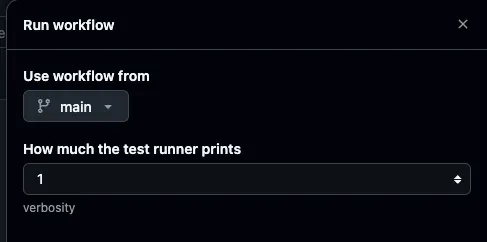
The input’s description becomes the dropdown’s label.
Skyborne’s release workflow uses its manual run for something better than log noise. A run started by hand from main is a dry run that publishes a dev build to TestPyPI, and a guard job refuses to start it from any other branch.
Step 10. Reuse CI in a release workflow
A reusable workflow is a workflow that other workflows can call, like a function. Here it means your release runs the exact same CI before it publishes anything. workflow_call is the event that allows it. Add it to on in ci.yml.
  # Lets other workflows run this one. The release workflow calls it before it publishes.
  workflow_call:
Now create .github/workflows/release.yml. When you push a version tag, it runs the whole CI first, then publishes the Docker image to GitHub Container Registry, GitHub’s storage for Docker images at ghcr.io.
name: Release

# Pushing a version tag such as v0.1.0 runs the full CI first,
# then publishes the Docker image to GitHub Container Registry.
on:
  push:
    tags: ["v*"]

jobs:
  ci:
    name: CI
    uses: ./.github/workflows/ci.yml

  publish:
    name: Publish the Docker image
    needs: ci
    runs-on: ubuntu-24.04
    timeout-minutes: 10
    permissions:
      contents: read
      packages: write
    steps:
      - uses: actions/checkout@v7

      - name: Log in to GitHub Container Registry
        env:
          GITHUB_TOKEN: ${{ secrets.GITHUB_TOKEN }}
        run: echo "$GITHUB_TOKEN" | docker login ghcr.io --username "$GITHUB_ACTOR" --password-stdin

      - name: Build and push the image
        run: |
          # Registry names must be lowercase, and usernames often aren't.
          image="ghcr.io/${GITHUB_REPOSITORY,,}"
          docker build --tag "$image:$GITHUB_REF_NAME" .
          docker push "$image:$GITHUB_REF_NAME"
uses: ./.github/workflows/ci.ymlat the job level calls the other file. Every test job and the Docker smoke test run inside this release.needs: cimeans nothing publishes unless the full CI passes.packages: writelets this one job’s token push to the registry. Step 11 covers permissions.${GITHUB_REPOSITORY,,}is bash for “lowercase this”. Registry names must be lowercase, and plenty of GitHub usernames aren’t.
Merge it, then tag a release.
git tag -a v0.1.0 -m "Taskboard 0.1.0"
git push origin v0.1.0
The release took 1 minute 49 seconds, and the publish job took 24 of them.
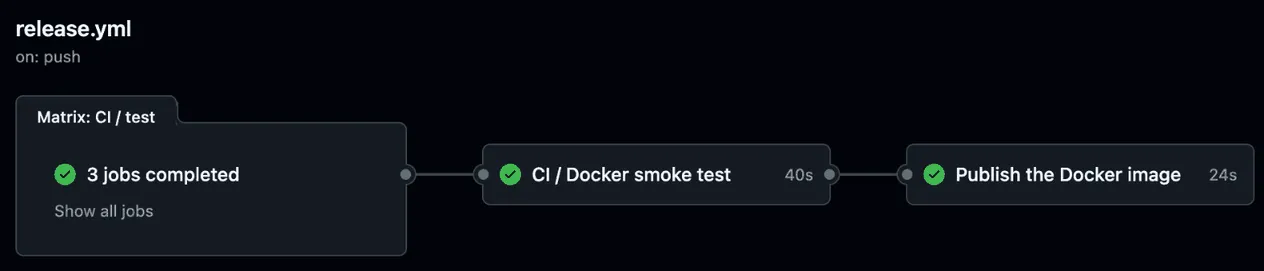
Jobs from the called workflow show up with a “CI /” prefix.
The push refers to repository [ghcr.io/ishraq21/github-workflows-django]
v0.1.0: digest: sha256:9b854e2b341bade84ae5e8f834a09439a0615cf6d03086f6b39a6ed4dcded32e size: 2200
GitHub’s registry docs say “When you first publish a package, the default visibility is private”, so change it in the package settings if others should pull it.
Two rules from the reusable workflows docs save debugging time. Variables in the caller’s top-level env don’t reach the called workflow. And the called workflow can’t get more token permissions than its caller has.
Skyborne’s release calls its CI the same way, so a release always runs the same tests as every push to main.
Step 11. Lock down permissions and pin actions
This step makes your workflows safer in three ways. Each job’s token gets only the access it needs, every action is pinned to one exact version, and Dependabot keeps those versions current.
Every job gets a short-lived token called GITHUB_TOKEN so it can talk to GitHub. The job’s log prints what that token can do. Before this step, every CI job in the demo got this.
Contents: read
Metadata: read
Packages: read
That’s already narrow, because new personal repositories default to read access for contents and packages. Organization repos can be set differently, so don’t count on it. Say it in the file. Add this at the top level of both workflows.
# The token every job gets can read the code and nothing else.
permissions:
  contents: read
After that, CI jobs got less, and only the publish job got more.
Contents: read
Metadata: read
Contents: read
Metadata: read
Packages: writeNext, pin each action to a full commit SHA, the 40-character ID of one exact commit. A tag like v7 can be moved to different code. A commit SHA can’t.
GitHub’s security guide says to “Pin references to actions to a commit SHA” and says it helps mitigate “the risk of a bad actor adding a backdoor”. Keep the version in a comment so people can read it.
      - uses: actions/checkout@3d3c42e5aac5ba805825da76410c181273ba90b1  # v7.0.1
        with:
          persist-credentials: false

      - uses: actions/setup-python@5fda3b95a4ea91299a34e894583c3862153e4b97  # v7.0.0
persist-credentials: false stops checkout from leaving the token in the repo’s git config, where any later step could read it. Both SHAs are the ones those version tags point to today, and Skyborne pins the same two. Find them on each action’s releases page, or with gh api repos/actions/checkout/git/ref/tags/v7.0.1.
Pinned versions go stale, so let Dependabot bump them. Save this as .github/dependabot.yml.
# Opens a pull request when an action used in .github/workflows has a new release.
version: 2
updates:
  - package-ecosystem: "github-actions"
    directory: "/"
    schedule:
      interval: "weekly"
Dependabot ran twice on the demo right after the merge and opened nothing, since both actions were already on their newest releases. When a new version ships, it opens a pull request, and your CI tests it like any other change.
Secrets come last because the demo doesn’t need one. GITHUB_TOKEN covered the registry.
When you do need one, such as a deploy key, store it with gh secret set NAME or in Settings, then Secrets and variables, then Actions. Read it in a step through env, the same way Step 9 reads its input. GitHub’s secrets docs also say “secrets are not passed to the runner when a workflow is triggered from a forked repository”, so a stranger’s pull request can’t read them.
Skyborne goes one better. It publishes to PyPI with trusted publishing, and its release file notes that no API tokens exist anywhere.
Here’s the finished ci.yml after Step 11.
name: CI

on:
  pull_request:
  push:
    branches: [main]
  workflow_dispatch:
    inputs:
      verbosity:
        description: "How much the test runner prints"
        type: choice
        options: ["1", "2", "3"]
        default: "1"
  # Lets other workflows run this one. The release workflow calls it before it publishes.
  workflow_call:

# The token every job gets can read the code and nothing else.
permissions:
  contents: read

# A new push to a pull request cancels that pull request's older run.
# Every other run gets a group of its own, so nothing cancels it.
concurrency:
  group: ci-${{ github.event_name == 'pull_request' && github.ref || github.run_id }}
  cancel-in-progress: ${{ github.event_name == 'pull_request' }}

jobs:
  test:
    name: Tests (Python ${{ matrix.python-version }})
    runs-on: ubuntu-24.04
    timeout-minutes: 10
    strategy:
      fail-fast: false
      matrix:
        python-version: ["3.12", "3.13", "3.14"]
    services:
      postgres:
        image: postgres:18-alpine
        env:
          POSTGRES_PASSWORD: ci-password
          POSTGRES_DB: app
        ports:
          - 5432:5432
        options: >-
          --health-cmd "pg_isready -U postgres"
          --health-interval 5s
          --health-timeout 5s
          --health-retries 10
    env:
      # Throwaway values. CI only ever talks to a throwaway database.
      SECRET_KEY: ci-only-not-a-real-secret
      DATABASE_URL: postgresql://postgres:ci-password@localhost:5432/app
    steps:
      - uses: actions/checkout@3d3c42e5aac5ba805825da76410c181273ba90b1  # v7.0.1
        with:
          persist-credentials: false

      - uses: actions/setup-python@5fda3b95a4ea91299a34e894583c3862153e4b97  # v7.0.0
        with:
          python-version: ${{ matrix.python-version }}
          cache: pip

      - name: Install dependencies
        run: pip install -r requirements.txt

      - name: Check for missing migrations
        run: python manage.py makemigrations --check --dry-run

      - name: Run Django's system checks
        run: python manage.py check

      - name: Collect static files
        run: python manage.py collectstatic --noinput

      - name: Run the tests
        env:
          # Empty on push and pull_request runs, so fall back to 1.
          VERBOSITY: ${{ inputs.verbosity || '1' }}
        run: python manage.py test --verbosity "$VERBOSITY"

  docker:
    name: Docker smoke test
    needs: test
    runs-on: ubuntu-24.04
    timeout-minutes: 10
    steps:
      - uses: actions/checkout@3d3c42e5aac5ba805825da76410c181273ba90b1  # v7.0.1
        with:
          persist-credentials: false

      - name: Write a throwaway env file
        run: |
          cat > .env <<'ENV'
          SECRET_KEY=ci-only-not-a-real-secret
          POSTGRES_PASSWORD=ci-password
          ALLOWED_HOSTS=localhost
          ENV

      - name: Build and start the stack
        run: docker compose up --build --wait --wait-timeout 120

      - name: Request the status page
        run: curl --fail --silent --show-error http://localhost:8000/ | grep "Open tasks"

      - name: Show the logs if anything failed
        if: failure()
        run: docker compose logs

      - name: Tear down
        if: always()
        run: docker compose down --volumes
Pushing a v0.1.1 tag ran the final release.yml and published the image again.
Step 12. Make the checks required before merging
A red check that anyone can merge past is a suggestion. Remember that merge on red? A ruleset takes that option off the table.
In your repo, open Settings and choose Rulesets in the sidebar. Create a new branch ruleset.
- Name it, for example “Protect main”, and set Enforcement status to Active.
- Under Target branches, add a target and include the default branch.
- Turn on Require a pull request before merging.
- Turn on Require status checks to pass, and add each job by its name, the part after
CI /in a pull request’s check list. For the demo that’sTests (Python 3.12),Tests (Python 3.13),Tests (Python 3.14)andDocker smoke test. - Turn on Restrict deletions and Block force pushes, and keep the bypass list empty.
Require every job by name, including each matrix job. If you require only the Docker job, a failing test makes GitHub skip it, and GitHub’s guide to required checks says a skipped job “may not block merging.” That would wave a broken pull request through.
Path filters, which run a workflow only when certain files change, cause the opposite problem. The same guide says a required check from a skipped workflow stays pending and blocks the merge, so keep path filters off the workflows you require.
To prove it works, the demo opened a pull request that expects two open tasks when the test creates one.
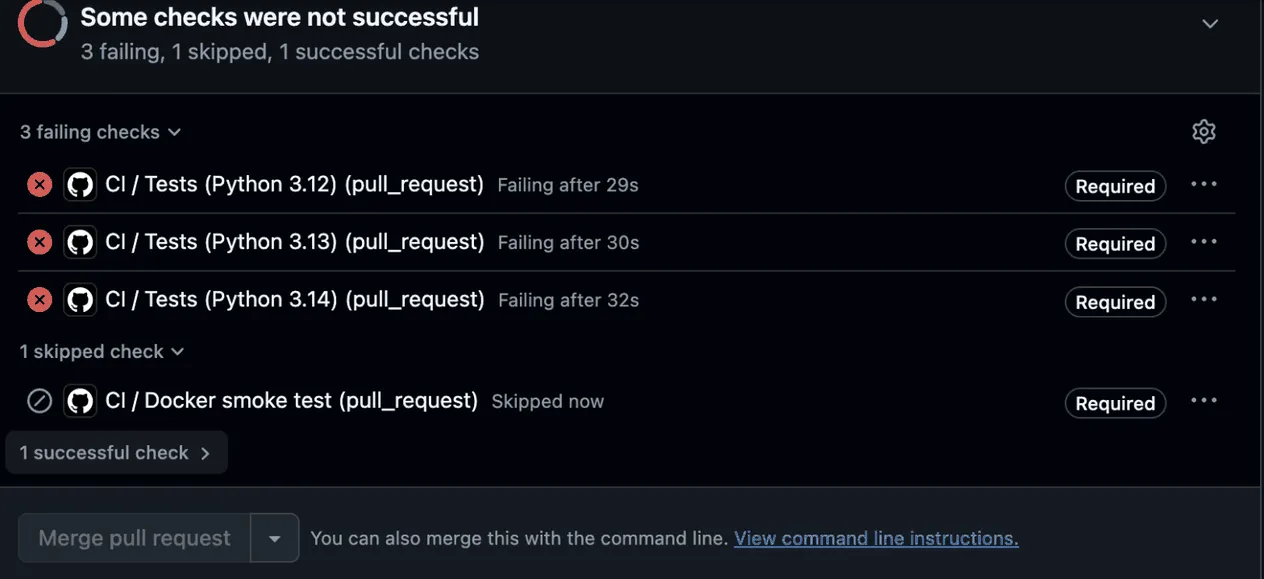
All four checks are marked Required, and the merge button is greyed out.
The command line refused too.
X Pull request ishraq21/github-workflows-django#5 is not mergeable: the base branch policy prohibits the merge.That pull request was closed, not merged. Since the ruleset went on, the demo’s main branch has only changed through pull requests that passed all four checks.
How do you fix common GitHub workflow errors?
Find your error message in the table, then jump to its fix. Each row was a deliberate mistake on a throwaway branch of the demo, run once by hand, and every message is copied from its log.
| Error you see | Cause | Fix |
|---|---|---|
version '3.1' ... was not found |
An unquoted 3.10 |
Quote the version |
No file in ... matched |
No actions/checkout step |
Check out the code first |
Migrations for 'pages' |
A model change with no migration | Commit the migration |
Missing staticfiles manifest entry |
No collectstatic before the tests |
Collect static files first |
Invalid workflow file on the wrong line |
Bad indentation | Read from that line down |
A green run with FAILED in the log |
A command that swallows failures | Let the failure fail |
| No Run workflow button | The trigger isn’t on main yet | Merge it first |
Why does setup-python look for Python 3.1?
The version '3.1' with architecture 'x64' was not found for Ubuntu 24.04.The matrix said [3.10, "3.14"]. YAML read the unquoted 3.10 as a number, dropped the trailing zero and passed 3.1, a Python that came out in 2009. The job’s own title read “Tests (Python 3.1)”.
Quote every version, as in "3.10". The quoted "3.14" job in the same run passed, thanks to fail-fast: false.
Why does setup-python say no file matched requirements.txt?
No file in /home/runner/work/github-workflows-django/github-workflows-django matched to [**/requirements.txt or **/pyproject.toml], make sure you have checked out the target repositoryThe job has no actions/checkout step, so the folder is empty. cache: pip looks for a requirements file before anything else runs, so this is the first thing that breaks. Make checkout the first step of every job that needs your code.
Why does the migrations check fail with “Migrations for ‘pages’”?
Migrations for 'pages':
  pages/migrations/0002_task_priority.py
    + Add field priority to task
Process completed with exit code 1.
The model gained a priority field and nobody ran makemigrations. This is CI doing its job. The fix is to run python manage.py makemigrations locally and commit the new file.
Why do the tests fail with “Missing staticfiles manifest entry”?
ValueError: Missing staticfiles manifest entry for 'pages/style.css'The collectstatic step was removed. WhiteNoise’s manifest storage needs the collected files before any test renders a template, so keep collectstatic before test.
Why does GitHub say “Invalid workflow file” on the wrong line?
One run: key was indented by seven spaces instead of eight. GitHub marked the run as failed and showed this annotation.
Invalid workflow file: .github/workflows/ci.yml#L53
You have an error in your yaml syntax on line 53
The broken line was 70. Line 53 is where the steps: list starts, so GitHub points at where it gave up, not where you went wrong. Look from the reported line down.
Starting a manual run from that branch gave a stranger message, “Workflow does not have ‘workflow_dispatch’ trigger”, for a file that has one. GitHub can’t read the file, so it can’t see the trigger.
Don’t count on a local check for this one. PyYAML 6.0.3 loaded the same broken file without a complaint, and so did actionlint 1.7.12, a linter built for workflow files. GitHub’s parser is stricter than both.
actionlint is still worth running for other mistakes. In a separate test it caught a misspelled runs_on key. Its Docker image runs it without installing anything else.
docker run --rm -v "$PWD:/repo" --workdir /repo rhysd/actionlint:1.7.12 .github/workflows/ci.ymlWhy is the run green when a test failed?
AssertionError: 1 != 2
FAILED (failures=1)
The test command ended in || true, which turns any failure into success. The test failed, the step passed, and so did the run. That’s not a CI pipeline. It’s a decoration.
continue-on-error: true on a step does the same thing.
Why is there no Run workflow button?
The default branch’s copy of the workflow has no workflow_dispatch. Merge the change first, as Step 9 shows. gh workflow run --ref can run a branch’s version only when a workflow with that file name already exists on the default branch.
What else should you know about GitHub workflows?
Can you run a workflow on a schedule?
Yes, with schedule and a cron line, a five-part code for minute, hour, day of the month, month and day of the week. 0 6 * * 1 means 6 AM every Monday. The events docs say cron times are UTC, runs use “the latest commit on the default branch”, they “can be delayed during periods of high loads”, and in a public repo they’re disabled after 60 days with no repository activity.
Can you test a workflow without pushing?
Partly. act runs workflows locally in Docker containers. Its machines aren’t GitHub’s runners, so treat its results as hints and let a real pull request have the final word.
How long can a job run?
Up to six hours on a GitHub-hosted runner, and a whole workflow run up to 35 days, per GitHub’s limits. Set timeout-minutes so you never find out the hard way.
What about self-hosted runners?
They’re your own machines registered with GitHub, and the billing docs still list them as free. GitHub announced a per-minute charge for them in December 2025, then postponed it. I fall back to a self-hosted runner inside Windows Subsystem for Linux when a private project’s free minutes run out, and it’s noticeably slower than the hosted ones. My self-hosted runner guide sets one up step by step, with Docker and a one-variable switch.
What does the finished pipeline do?
The two GitHub workflows in the demo repo do eight things.
- Runs on every pull request, every push to main and by hand, with a verbosity choice.
- Tests on Python 3.12, 3.13 and 3.14 against PostgreSQL 18, the same database as production.
- Fails when a migration is missing.
- Builds the Docker image, boots it with Compose and requests a real page, then tears it all down.
- Cancels outdated pull request runs and never cancels runs on main.
- Publishes the image on version tags, but only after the full CI passes inside the release.
- Gives every job a read-only token and pins every action to a commit.
- Blocks merges into main until all four checks pass.
All of it lives in two workflow files and one Dependabot file in the demo repo, ready to copy.
What’s the oldest “fix ci” commit in your history, and did it actually fix CI?